

When players cannot join a Palworld server, the most likely cause is that the server is still starting or the game versions differ. Wait until the Console shows Running Palworld dedicated server on, check that everyone's Palworld is updated, then restart the server so it installs any new version. Next, check the address, the password, crossplay, the whitelist and bans.
Work through the causes
- The server is not ready. The badge must say Online and the Console must show
Running Palworld dedicated server on. Joining earlier fails. - Different versions. After a Palworld patch, players' games update and the server needs a restart to follow. Click Restart, wait for the ready line, and ask players to restart Palworld too: How to update your Palworld server.
- Wrong address. Copy it again from the Play with friends card, IP and port together,
address:port, and paste it into the box at the bottom of Join Multiplayer Game: How to join your Palworld server. - Wrong password. It must match Server Password exactly, capitals included. The card's Password row shows it: How to set a password on your Palworld server.
- Platform not allowed. An Xbox, PS5 or Mac player can only join if Crossplay Platforms lists their platform: How to turn crossplay on or off on your Palworld server. Console players find the server under Community server, not by address: Which platforms can join your Palworld server.
- The whitelist is on. A player not on it is kicked within about 10 seconds with
This server is whitelisted.Add them: How to make your Palworld server private with a whitelist. - They are banned. Check Bans on the Active players card: How to unban a player on your Palworld server.
- The server is full. The Active players card shows players out of slots, for example
16 / 16: How to change player slots on your Palworld server. - Mods. With Allow client mods off in Gameplay Settings, players with mods enabled are kept out.
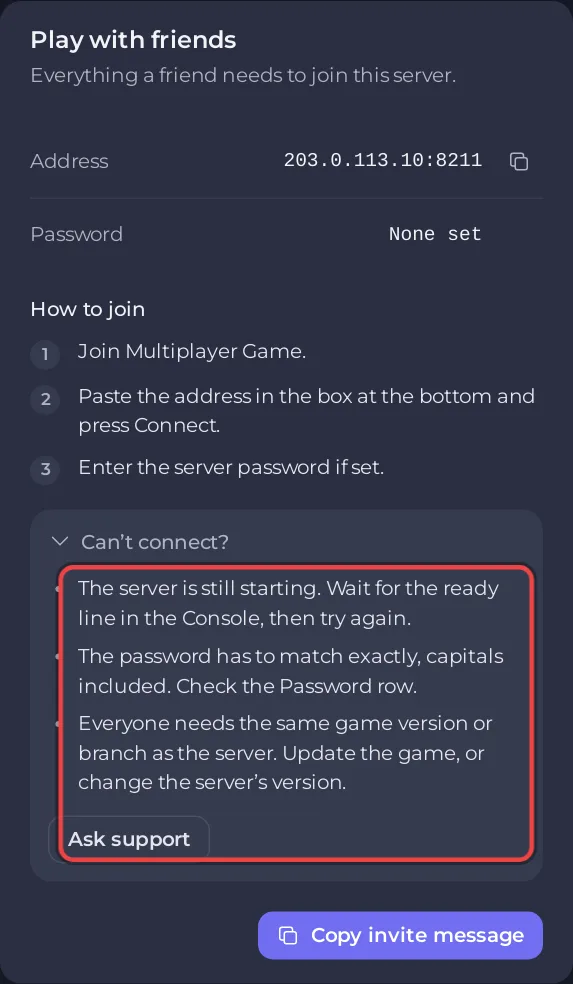
The Can’t connect? list on the Play with friends card names the three most common causes: still starting, a different game version, a password that does not match.
Only one player cannot join
- Ask them to restart Palworld so it finishes updating.
- Check whether they are on the whitelist or the ban list. Their ID is in the Activity log if they were banned from the card.
- If they always played co-op as the host, their old character is not found on a dedicated server: The co-op host has a new character on your Palworld server.
Still stuck
Click Ask support on the card, or open a ticket with the time of the attempt and what the game said. Other problems: Palworld server problems and fixes.


