

To unban a player on a Palworld server, click Bans on the Active players card of the Overview page. The window lists everyone banned on the server: click Unban beside the player, or type their user ID, for example steam_76561198000000000, and click Unban. It works whether the server is running or stopped.
Lift a ban
- Open your server in the panel. You land on Overview.
- On the Active players card, click Bans. The window Unban a player opens.
- Under Banned on this server, find the player's ID and click Unban beside it. Or type the ID in Player ID and click Unban.
- The panel confirms that the player can join again.
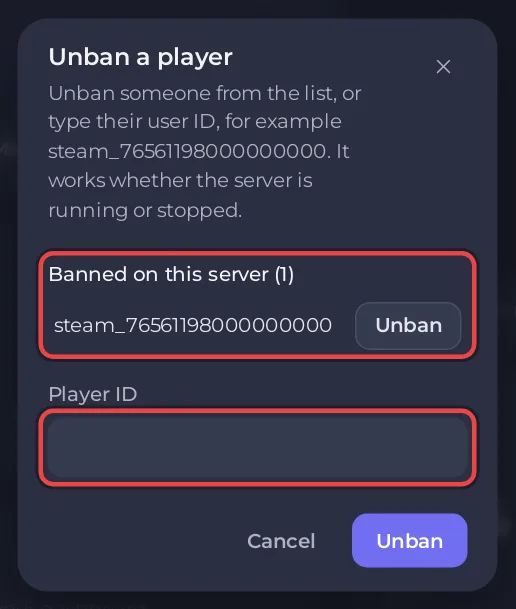
When nobody is banned, the list says Nobody is banned.
Where the IDs come from
The list is Palworld's own ban list, the file Pal/Saved/SaveGames/banlist.txt. It holds every ban: those made with Ban on the card and those made in the game with /BanPlayer. One list covers the whole server, every world on it.
A Steam player's ID is steam_ followed by their 17-digit Steam ID. A ban made from the card is also in your server's Activity log, with the player's name and ID, which helps when the list shows several IDs.
Running or stopped
- While the server runs, the panel asks Palworld to lift the ban.
- While it is stopped, the panel removes the line from the ban list file itself, so you do not have to start the server.
Messages you may see
That user ID is not on the server's ban list.: the ID is not banned, or it was typed differently. Copy it from the list instead.Type the player's user ID exactly as the game shows it, for example steam_76561198000000000: letters, numbers and _ only, no spaces.: the ID has a space or another character.
The Bans button needs the console and file permissions in your team role. More on kicks and bans: How to see, kick, ban and unban players on your Palworld server. To let only chosen players in, use the whitelist.


