

 MINECRAFT HOSTING
 GAME SERVERS
 Game Panel
Your players join your Palworld server with its Server Address, shown on the server's Overview page in the panel. Palworld is an open-world survival and crafting game where you catch and work with creatures called Pals; a hosted dedicated server keeps one shared world running around the clock so friends can join without anyone's PC being the host.
Join in a few steps
- Open your server in the panel. If the status badge says Offline, click Start and wait until it says Online. See How to start, stop, restart and force-stop your server.
- On the Overview page, click the copy icon next to Server Address. It looks like
address:port.
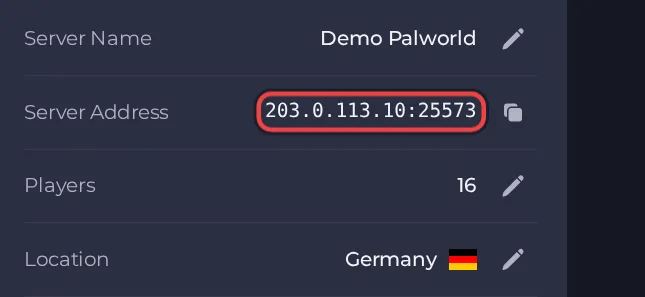
- Start Palworld on your platform and open the multiplayer join option on the main menu.
- Type the Server Address (address and port together) into the connection box below the server list and press Connect.
- If you set a Server Password in the panel, enter it when the game asks for it.
- The server also runs as a community server, so you can find it by switching the server list to Community server on the left side. Xbox and PS5 players can join it too, as long as their platform is listed in Crossplay Platforms.
Ports
Players use only the game port, which is the port shown in the Server Address on the Overview page. There is also an internal admin port that the panel uses on its own; players never use it and it is not something to share.





