

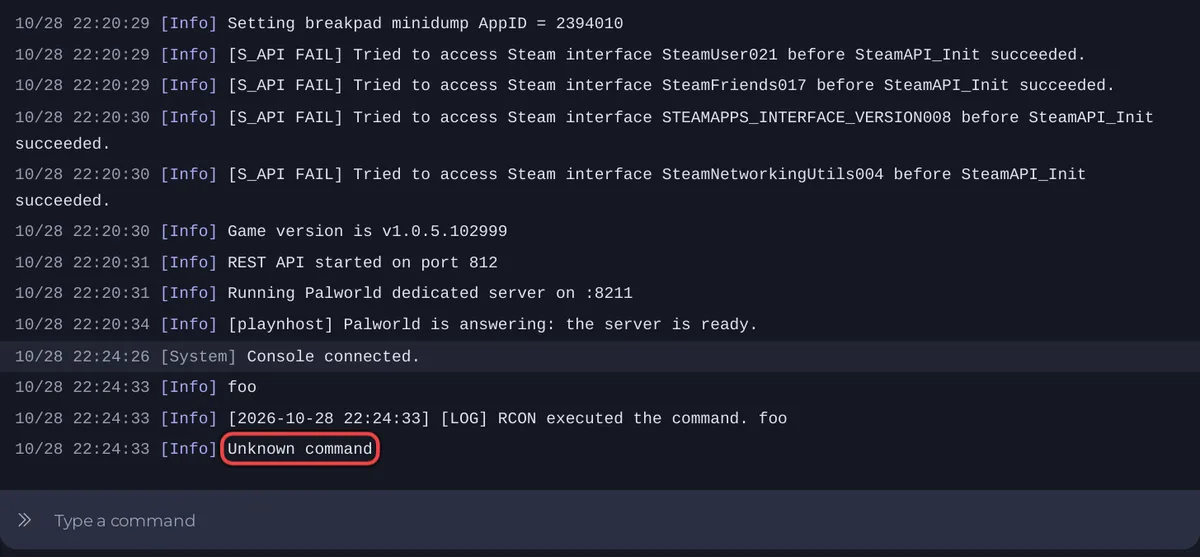
When a command typed in the Console of a Palworld server gets no answer, the most likely cause is that Palworld has not finished loading: it only takes commands once the Console shows Running Palworld dedicated server on. Wait for that line and try again. If the game answers Unknown command, Palworld does not have that command.
Work through the causes
- The server is still starting. Commands sent before the ready line get no answer. Wait for
Running Palworld dedicated server on, then for[playnhost] Palworld is answering: the server is ready. - The command does not exist. Palworld answers
Unknown command. Type it without a slash, for exampleinfo,saveorshowplayers. The full list is in Pocketpair's command list: How to use the Console on your Palworld server. - The server is stopped. The Console of a stopped server shows its last lines but sends nothing. Start it.
- An old server. Servers installed before 16 October 2026 do not have the panel's Palworld tools: a
broadcaststops at the first space and the Active players card stays on No answer from the server. The panel's own advice: "A server installed before 16 October 2026 needs a reinstall (your world and settings are kept)". Open a ticket if you are not sure.
How the Console talks to Palworld
Palworld has no console of its own. The panel sends each line you type to the game's remote console, signed with your Admin Password. The game and the panel both read the password when the server starts, so a new password takes effect for both at the next restart. The panel refuses an empty one: How to become admin on your Palworld server.
Stop stays on Stopping
The Stop button uses the same link. If the server stays on Stopping, wait 2 minutes: when Palworld does not answer, the panel stops it anyway and says [playnhost] Palworld did not answer for 2 minutes (it was still loading its world), so it is stopped without a save. If it is still stuck, use Kill: How to stop your Palworld server without losing progress.


