

Open Console and read the last lines before the bot stopped: almost every cause is written there. For the common ones the panel also shows a banner above the console that names the problem and links to the fix.
How the automatic restart works
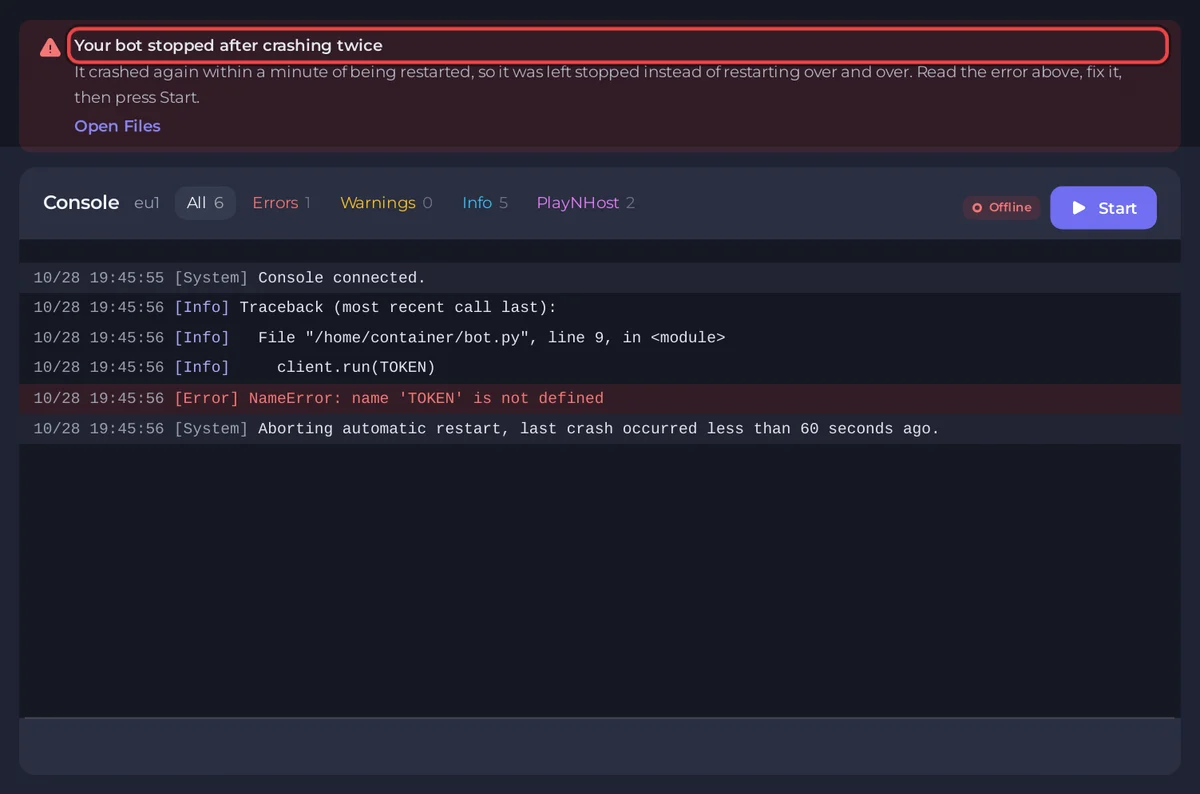
If your bot stops by itself, it is started again within about a minute. If it crashes again within a minute of that restart, it is left stopped on purpose, so a bot with a bug does not restart forever. Console then shows the banner Your bot stopped after crashing twice, unless the panel recognised the cause: then the banner for that cause stays, which is more useful. Fix the cause, then press Start.
A bot that runs for hours and then crashes is restarted every time: the one-minute rule only stops quick repeats. The start script's own refusals below (file not found, wrong language and so on) count as a stop too, so you will usually see each of them twice, then the bot stays stopped.
The bot never starts
The [PlayNHost] lines below come from the start script written when your server was installed. An older server may print fewer of them and show the runtime's own error instead. To get the newest one, click Reinstall at the bottom of the Bot page, pane Code: your files stay.
"Your bot is not set up yet"
[PlayNHost] Your bot is not set up yet: the main file index.js was not found.The banner says Your bot has no code yet, with Open Files. Why: nothing on the server matches Entry file. Names are case sensitive, and a file in a folder needs the folder, for example src/index.js. Fix: upload your files, or open the Bot page, pane Code, and set Entry file to the real path. A zip you unzipped often puts everything in one extra folder: move the files up, or put that folder in the path. Java says the jar file bot.jar was not found, .NET no project or published dll was found, Go and Rust the program bot was not found. No code at all on a Node.js or Python bot? The setup card on Overview can create a starter bot.

Your code is in another language
[PlayNHost] bot.py is a Python file, but this server runs Node.js.or [PlayNHost] index.js was not found, but this folder has Python files. This server runs Node.js. Python, Java and Bun servers print the same kind of line for their language. The banner says Your code is in another language than this server runs, and it stays even though [PlayNHost] Your bot is not set up yet follows: the language is the real reason. Fix: click Change what runs (in the banner, or on the Bot page, pane Code, next to Runtime) and pick your language. Leave Delete my existing files and start clean. unticked so your files stay. See How to switch your bot to another language.
The file starts with ```
[PlayNHost] bot.py starts with ```, a Markdown code fence copied together with the code.Why: code copied from a chat or a web page kept its ``` lines. The banner says Your file still has the ``` lines from a chat. Fix: click Open Files, open the file, delete the first and the last ``` line, save, and press Start.
Go or Rust: not a Linux program
[PlayNHost] bot is not a Linux program. Build it for Linux x86-64 (not Windows or macOS) and upload it again..NET: the build failed
[PlayNHost] The build failed. Read the errors above, fix them and press Start.The compiler errors (error CS...) are just above. See How to host a C# (.NET) Discord bot.
It starts, then stops within seconds
A package is missing
Error: Cannot find module 'x' (Node.js) or ModuleNotFoundError: No module named 'x' (Python). Banner: A package your code needs is missing. Fix: add the package to package.json or requirements.txt, or type its name in Packages on the Code pane, then restart. See How to install packages for your Discord bot.
A package could not be installed
[PlayNHost] Some packages in Bot page, Code, Packages could not be installed., or npm could not install everything in package.json, or pip could not install everything in requirements.txt. Banner: A package could not be installed. The bot still starts with what is installed, then usually fails on the missing package. Fix: check the spelling, and that names in Packages are separated by spaces, not commas.
The token is refused
TokenInvalid, LoginFailure: Improper token has been passed or close code 4004. Banner: Discord did not accept your bot token. Fix: press Reset Token in the Developer Portal and paste the new one with Replace token on the Discord pane. If the token is fine but your code still sends nothing, check it reads DISCORD_TOKEN, TOKEN, BOT_TOKEN or DISCORD_BOT_TOKEN: those are the names the token reaches your code under.
An intent is switched off
Used disallowed intents, PrivilegedIntentsRequired or close code 4014. Banner: Your bot needs an intent that is switched off. See Fix "Used disallowed intents".
A bug in your code
A SyntaxError, TypeError, NameError or similar, followed by a stack trace. Read it from the line that names your own file: How to read your Discord bot's console and logs.
It runs for a while, then stops
Out of memory
JavaScript heap out of memory, MemoryError or java.lang.OutOfMemoryError. Banner: Your bot ran out of memory, with See My plan. The bot used more memory than your plan gives. Fix: cache less (member and message caches grow with your servers), look for a list that only ever grows, or move to a plan with more memory. See How much RAM does a Discord bot need. A daily restart can hold a slow leak back meanwhile: How to restart your Discord bot on a schedule.
An error nobody catches
In Node.js, an error inside an event handler without try/catch can end the whole process. Wrap command handlers, and add process.on('unhandledRejection', console.error) so the error is logged instead of fatal.
It runs, but shows offline in Discord
- The chip on Overview says Running but never Online in Discord: either your bot has not logged in, or it prints nothing when it does. Add a
Logged in asline when it is ready. - The same token runs somewhere else (your computer, an old host). Stop the other copy and restart this one.
Still stuck? Send support the last 30 lines of Console. See How to fix a server that will not start.


