

You do not install packages by hand. List them in your package file (package.json or requirements.txt), or type their names in Packages on the Bot page, pane Code, and restart: the server installs them at the next start. After that it installs again only when the list, the package file or the runtime version changes, or once a day.
What each type installs on start
| Type | From your files | Packages field |
|---|---|---|
| Node.js Bot | npm install when a package.json exists | Yes, installed with npm |
| Python Bot | pip install -U -r requirements.txt (the file named in Requirements file) | Yes, installed with pip |
| Bun Bot | bun install when a package.json exists | Yes, added with bun add |
| Deno Bot | Your npm: and jsr: imports, downloaded when the bot first loads them | No |
| .NET Bot | The NuGet packages in your .csproj, restored when the project is built | No |
| Java Bot, Go Bot, Rust Bot | Nothing: libraries are built into your jar or program | No |
Do not upload node_modules, venv or .venv: the server builds them for the Linux system it runs on, which is not always the same as your computer.
Use your package file (recommended)
Node.js and Bun
On your computer, run npm install discord.js mysql2 (or bun add ...). That writes them into package.json. Upload the new package.json and restart.
Python
Put one package per line in requirements.txt. Pin a version with == if you need one:
discord.py
aiohttp
python-dotenv==1.0.1
Your file has another name or sits in a folder? Set it in Requirements file, in the Settings card of the Code pane. Packages go into a .local folder in your files; leave it there.
Use the Packages field
- Open your bot server in the panel, then the Bot page, pane Code.
- Under How it runs, type the names in Packages, separated by spaces, for example
yt-dlp aiohttp. Not commas, and not a wholepip installline. - Click Save, then restart the bot.
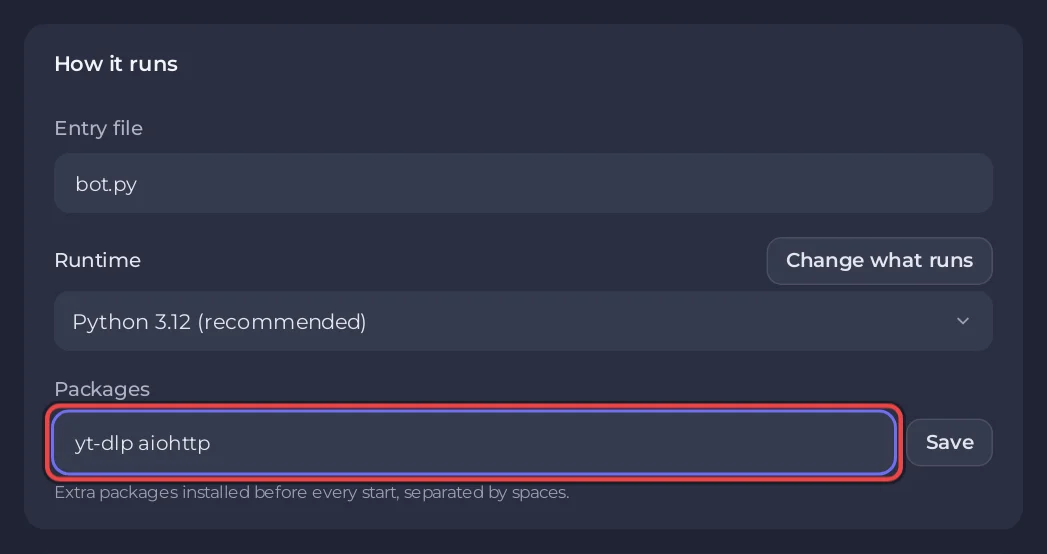
The field holds up to 200 characters. For more, use your package file. Packages install again at the first start after you change the field or the file, so that start takes longer. When nothing changed, the console says [PlayNHost] Packages are up to date. They install again when you change them, or after a day. An older server that still installs on every start gets this with Reinstall at the bottom of the Code pane: your files stay.
When something goes wrong
| You see | What it means |
|---|---|
Banner A package could not be installed, with [PlayNHost] Some packages in Bot page, Code, Packages could not be installed. | A name in Packages is misspelled or does not exist. The bot still starts with what is installed. Fix the name with Open Packages. |
[PlayNHost] npm could not install everything in package.json. or [PlayNHost] pip could not install everything in requirements.txt. (Bun: [PlayNHost] Bun could not install everything in package.json.) | A line in your package file is wrong. npm, pip or Bun names it just above (E404, No matching distribution found for ...). |
Banner A package your code needs is missing, with Cannot find module 'x' or ModuleNotFoundError: No module named 'x' | Your code imports a package nobody installed. Add it to your package file or to Packages. |
In Python, the name you install is not always the name you import:
| You import | You install |
|---|---|
import discord | discord.py |
from dotenv import load_dotenv | python-dotenv |
import yaml | PyYAML |
from PIL import Image | Pillow |
More: Why your Discord bot keeps stopping, Node.js, Python, Bun.


