

A small Discord bot with commands and moderation usually needs 128 to 256 MB of RAM, a bot with music or a database 256 to 512 MB, and a large bot that caches many members 512 MB to 2 GB. These are starting points: the language, the number of servers and members, and what the bot caches all change it, so check your Usage graph after a day of real use. PlayNHost's smallest bot plan, Starter, has 512 MB.
Starting points
| Bot | Usually needs |
|---|---|
| A small bot with commands and moderation | 128 to 256 MB |
| A bot with music or a database | 256 to 512 MB |
| A large bot that caches a lot of members | 512 MB to 2 GB |
The bot plans are Starter 0.5 GB, Standard 1 GB, Plus 2 GB, Pro 4 GB and Max 8 GB: Discord bot hosting. Starter's 512 MB covers most bots. A Lavalink music node is a separate plan with 1, 2 or 4 GB: Lavalink hosting.
How each language uses your plan
| Bot type | What the server sets |
|---|---|
| Node.js Bot, Deno Bot, Discord Tickets | The JavaScript memory limit is set to 80% of your plan, so the bot stops with a clear error before it reaches the server's limit. |
| Java Bot | Java's heap is capped at 80% of your plan; the bot as a whole uses a little more. |
| Bastion | Its JavaScript memory is capped at half of your plan, because its MongoDB database runs in the same server. |
| JMusicBot, Ree6, Lavalink | Java's heap is capped at 75% of your plan; the bot as a whole uses a little more. |
| Python Bot, Red, AI Chat Bot, Game Server Monitor and the others | No limit of their own: the plan's memory is the limit. |
What makes a bot use more
- Caching. Libraries keep servers, members and messages in memory. Turning off caches you do not use is the simplest fix.
- More servers and members. Every server the bot joins adds to the cache.
- Privileged intents. Server Members and Presence make Discord send many more updates, and libraries keep them.
- Add-ons. On Red, every cog you load adds to it.
- Leaks. Memory that climbs all day and only drops at a restart usually means a list or a cache in the code that only grows.
Check your usage
- Open your server in the panel.
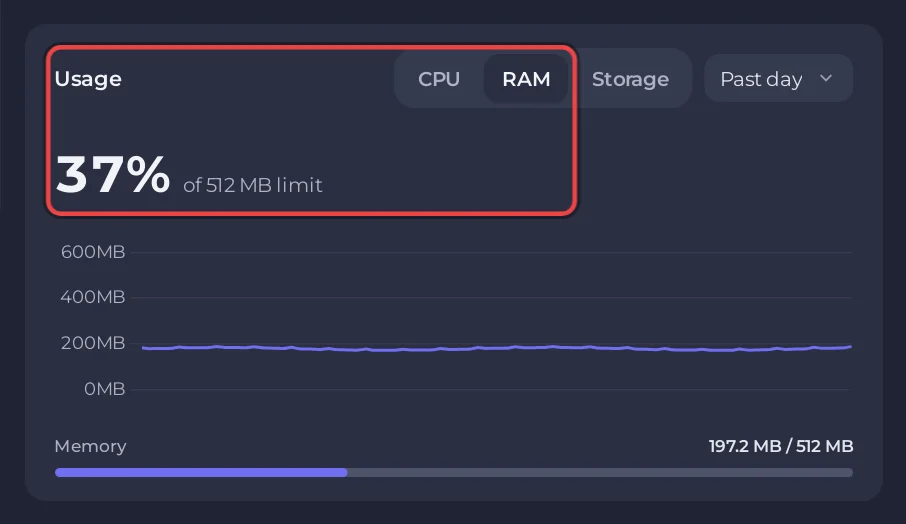
- On Overview, the Usage card has CPU, RAM and Storage, each with a live graph and the current figure against your plan's limit.
- Look after the bot has run for a day, not right after a start: How to read your server's usage graphs.
If it runs out
A bot that uses more memory than the plan gives is stopped, and the console shows the panel's banner Your bot ran out of memory. Before that, you may see one of these:
FATAL ERROR: Reached heap limit Allocation failed - JavaScript heap out of memoryjava.lang.OutOfMemoryError: Java heap spaceMake the bot keep less in memory, or move to a bigger plan: on the server's My plan page press Change plan. The server keeps its files. If it keeps stopping for other reasons, see Why your Discord bot keeps stopping.
Questions people ask
Is 512 MB enough for a Discord bot?
For most small bots, yes. Watch RAM on the Usage card after a day of real use.
What happens when my bot runs out of memory?
It is stopped and the console shows Your bot ran out of memory. A Node.js bot stops earlier, at 80% of the plan, with a heap error.
Can I add memory later without losing my files?
Yes. On My plan, press Change plan. The server keeps its files.


