

Moving a bot is copying its files, pasting the same token and settings, and starting it here once the old copy is stopped. The token stays the same, so the bot keeps its name, its servers and its commands.
- Check the bot's card on Overview shows your bot's language, and change it with Change what runs on the Bot page, pane Code, if needed.
- Copy your files in Files (zip, upload, Unzip), over SFTP, or from GitHub.
- Set the Entry file and Runtime on the Code pane.
- Paste the bot's token on the Discord pane and click Connect.
- Import your other settings with Paste a .env file on the Environment pane.
- Bring your database, if you had one, through the Databases page and Open in phpMyAdmin.
- Stop the old copy, press Start here, and watch Console until your bot logs in.
Each step is explained below.
Before you start
- Gather the bot's code and its data files (SQLite files, JSON files, saved settings) in one folder.
- Find every setting the old host gave your bot: its
.envfile or its environment variables. - Do not run both copies for long. Two bots logged in with one token answer commands twice, or fight each other.
Still choosing a host? See PlayNHost compared with Bot-Hosting.net, Space-Node, XGamingServer and Cybrancee, with each host's prices and features.
1. Check the type
Open your server in the panel. The bot's card on Overview says what runs, for example Discord bot - Node.js Bot. If your bot is in another language, change the type first: How to switch your bot to another language.
2. Copy the files
- Small bot: zip the folder, upload the zip in Files, tick it and click Unzip.
- Big folder: use SFTP. SFTP details in Files gives the address; you sign in with your panel password.
- Code on GitHub: connect the repository instead, and upload only your data files.
Leave out node_modules, venv or .venv, bin and obj: the server installs packages and builds by itself. Step by step: How to upload your Discord bot code.
3. Set the entry file
On the Bot page, pane Code, set Entry file to the file your old host started (the jar for Java, the program for Go or Rust) and pick the same Runtime version.
4. The token
- Paste the bot's token on the Discord pane and click Connect. If you no longer have it, press Reset Token in the Developer Portal: the old host loses it at the same moment.
- Your code gets the token as
DISCORD_TOKEN, and also asTOKEN,BOT_TOKENandDISCORD_BOT_TOKEN, the names tutorials use. If your code reads any other name, change that line to one of these. - Delete the token from any
config.jsonor.envfile you uploaded.
5. The other settings
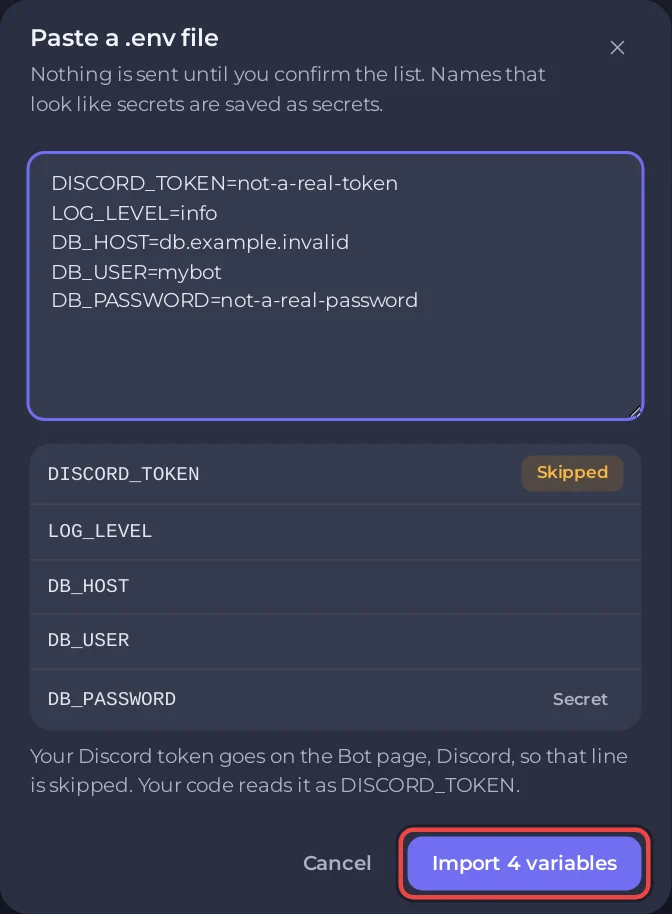
- Open the Environment pane and click Paste a .env file.
- Paste your old
.envas it is. The token line, any name the panel sets itself and any name that changes how a runtime starts (such asPYTHONPATH) are marked Skipped, with Your Discord token goes on the Bot page, Discord, so that line is skipped. Your code reads it as DISCORD_TOKEN. - Check the list (names that look like secrets get a Secret badge) and click the import button, for example Import 4 variables. Skipped lines are not counted.
6. The database
If your bot used a MySQL or MariaDB database, create one on the Databases page, import your old data with Open in phpMyAdmin, and put the new details in Environment: How to use a database with your Discord bot.
7. Switch over
- On the Discord pane, under Privileged intents, tick My code uses this for each intent your bot uses. They are already on in your portal, so they should show On.
- Stop the bot on the old host.
- Press Start here and watch Console until your bot logs in.
- Test a command in Discord. Then cancel the old host.
If something does not work
- A wrong file name, a wrong language or a missing package shows in the first seconds of the console, often as a banner. See Why your Discord bot keeps stopping.
- The bot starts but has lost its data: check the data files kept the same folder structure, and that your code opens them by a path relative to the main folder (
/home/containerhere), not one from your old host. - Commands answered twice: the old copy is still running somewhere.


