

Your bot token is its password: whoever has it can log in as your bot, post as it and read what it reads. Keep it on the Bot page, never in a file, and if it ever leaks, reset it in the Developer Portal and paste the new one with Replace token.
Where the token lives on PlayNHost
When you paste the token on the Bot page, pane Discord, the panel checks it with Discord and stores it encrypted. After that:
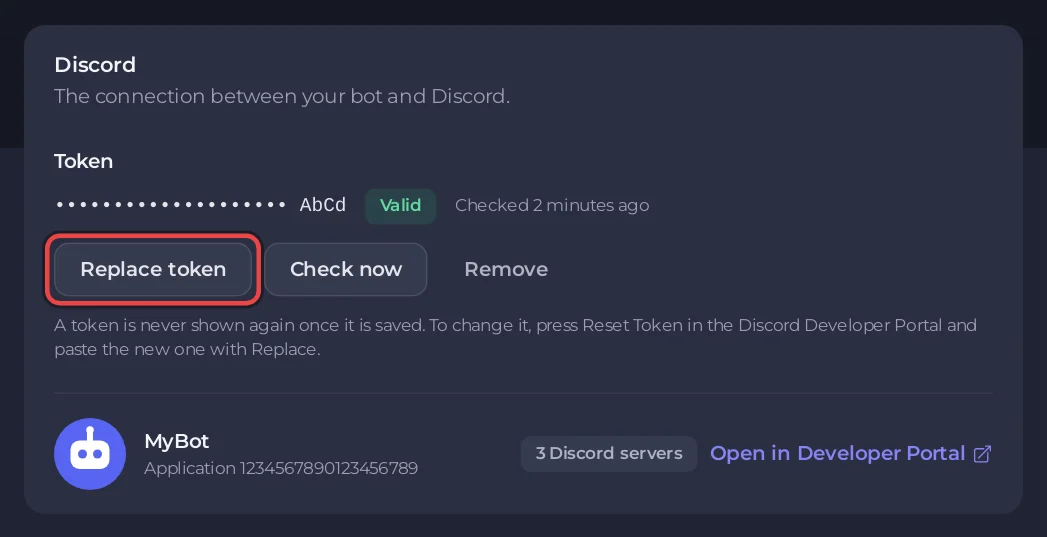
- It is never shown again, to you or anyone else. The panel shows twenty dots and its last four characters, so you can tell which token is saved.
- It is not a file. It does not appear in Files, over SFTP or in a backup.
- Your bot gets it at every start as the environment variable
DISCORD_TOKEN. A bot with your own code also gets it asTOKEN,BOT_TOKENandDISCORD_BOT_TOKEN, so code copied from a tutorial works as it is.
Read it in your code like this:
- Node.js and Bun:
process.env.DISCORD_TOKEN - Python:
os.environ["DISCORD_TOKEN"] - Java:
System.getenv("DISCORD_TOKEN") - C#:
Environment.GetEnvironmentVariable("DISCORD_TOKEN") - Deno:
Deno.env.get("DISCORD_TOKEN") - Go:
os.Getenv("DISCORD_TOKEN"); Rust:std::env::var("DISCORD_TOKEN")
Other keys your bot uses, such as an API key or a database password, belong under Environment on the same page, ticked Keep this value secret. See How to set environment variables and secrets for your Discord bot.
Keep it out of your files and your repository
- Delete any
config.jsonor.envline that holds the token once your code readsDISCORD_TOKEN. Files on the server are visible to everyone with file access and are copied into backups. - If you keep a
.envon your computer, add.envto.gitignoreso it never reaches GitHub. - Do not paste your code into a public chat with the token still in it.
People you give access to
Friends you invite to the server in the panel never see the token either. With the right permission they can replace or remove it; without it, the buttons are greyed out with You do not have permission to change the token. See How to invite friends and give them access.
If your token leaks
- In the Discord Developer Portal, open your application, then Bot, and click Reset Token. The old token stops working at once. Copy the new one.
- In the panel, open the Bot page, pane Discord, and click Replace token.
- Paste the new token and click Save token.
- If the bot is running, the panel says The bot is still using the old token until it restarts. Click Restart now.
- If the old token was ever in a public repository, delete it from the repository history too. Search engines and bots keep finding old commits.
Discord reset it for you
Discord scans public code for bot tokens and can reset a leaked one on its own. Your bot then cannot log in. The panel tells you in three places:
- The Console shows the banner Discord did not accept your bot token (close code 4004) with Replace the token.
- The chip on the bot's card on Overview says Token problem.
- On the Discord pane the token's badge says Discord did not accept it. The panel checks saved tokens with Discord once a day, and you can press Check now at any time.
Reset the token in the portal and follow the steps above.
Remove the token
To disconnect the bot from Discord without deleting the server, click Remove on the Discord pane, then Remove token. The token stays valid in the Developer Portal: reset it there too if you think someone else has it.


