

The bot shows online but ignores you. Nine times out of ten it is one of three things: prefix commands without the Message Content intent, slash commands that were never registered, or a channel that blocks the bot. Go down this list in order.
1. Is it really your bot that is online?
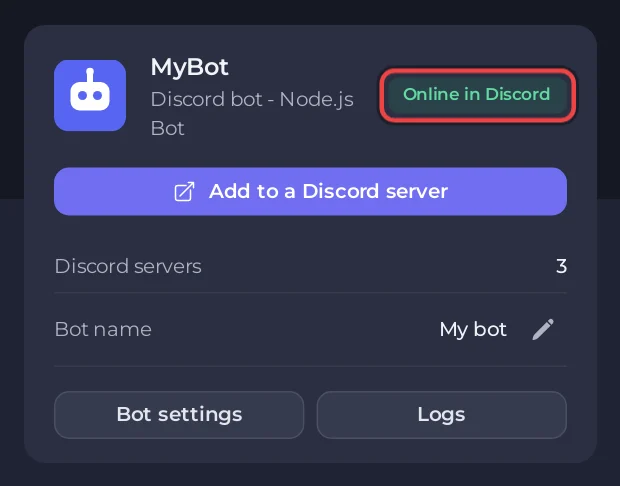
Look at the chip on the bot's card on Overview in the panel:
- Online in Discord: this server's bot logged in. Go on to step 2.
- Running: the process runs, but the console shows no login line. Read Console.
- Offline, Token problem or Missing intents: the bot here is not connected. If Discord still shows it online, another copy is running with the same token, on your computer or an old host. Stop that copy. See Why your Discord bot keeps stopping.
2. Prefix commands do nothing: Message Content
If your bot reads messages such as !help, it needs the Message Content intent, both in your code and in the Developer Portal. Without it Discord delivers messages with empty text, so no command ever matches, and there is no error. Open the Bot page, pane Discord, tick My code uses this next to Message Content, and follow How to switch it on if it shows a red OFF. See Fix "Used disallowed intents".
3. Slash commands do not appear
- Your code must register the commands with Discord. A command that only exists in your code never shows up. discord.py:
await tree.sync(); discord.js:rest.put(Routes.applicationCommands(...)). - Global commands can take a while to appear the first time. While testing, register them on one server (guild commands), which is instant.
- The invite link from the panel already has the
applications.commandsscope. If you invited the bot with a link you built yourself without it, invite it again with Add to a Discord server on the Discord pane. - Restart Discord (Ctrl+R) after registering.
Examples: discord.js, discord.py.
4. "The application did not respond"
Discord gives a bot 3 seconds to answer a slash command. A slow command (a database call, a web request) must defer first: await interaction.deferReply() in discord.js, await interaction.response.defer() in discord.py, then send the answer. The console shows Unknown interaction (10062) when the 3 seconds passed.
5. Permissions
The bot needs to see the channel and to send messages in it. A channel's own permission overrides can block a bot that its role allows. Check the channel overrides and that the bot's role sits above the roles it manages. Missing Access (50001) and Missing Permissions (50013) in the console mean exactly this: Common Discord bot errors and what they mean.
6. It answered once, then went quiet
Check the console for an error after the first answer, and memory use on Overview. A bot that hits its memory limit is stopped and restarted. See Why your Discord bot keeps stopping.
7. Find it in your code
Print a line at the very top of your command or message handler. Then try the command:
- Nothing printed: Discord never delivered the event. It is an intent, a permission or command registration (steps 2 to 5).
- Printed, but no reply: the problem is in your reply code. The error is just below in the console.


