

The most common Sven Co-op server problem on PlayNHost is players who cannot join, and the cause is most often a server that is not Online yet or an address typed without its port. Below is every frequent problem, most likely first, with its fix and a link to the full guide.
Players cannot join
Check that the badge on Overview says Online, then send players the address the Join button copies. They type connect and that address in the game console. Full checklist: Players cannot join your Sven Co-op server.
The server does not turn Online
The badge changes to Online when the Console prints Connection to Steam servers successful. Until then it says Starting.
- Open the Console tab and read the last lines.
- If the page says Running Installer, wait: the page updates by itself when the install is done.
- If the page says Installation failed, click Open a ticket.
- If the server stopped on its own, read the last lines the Console printed before it stopped, and send them with a ticket if they do not tell you the cause.
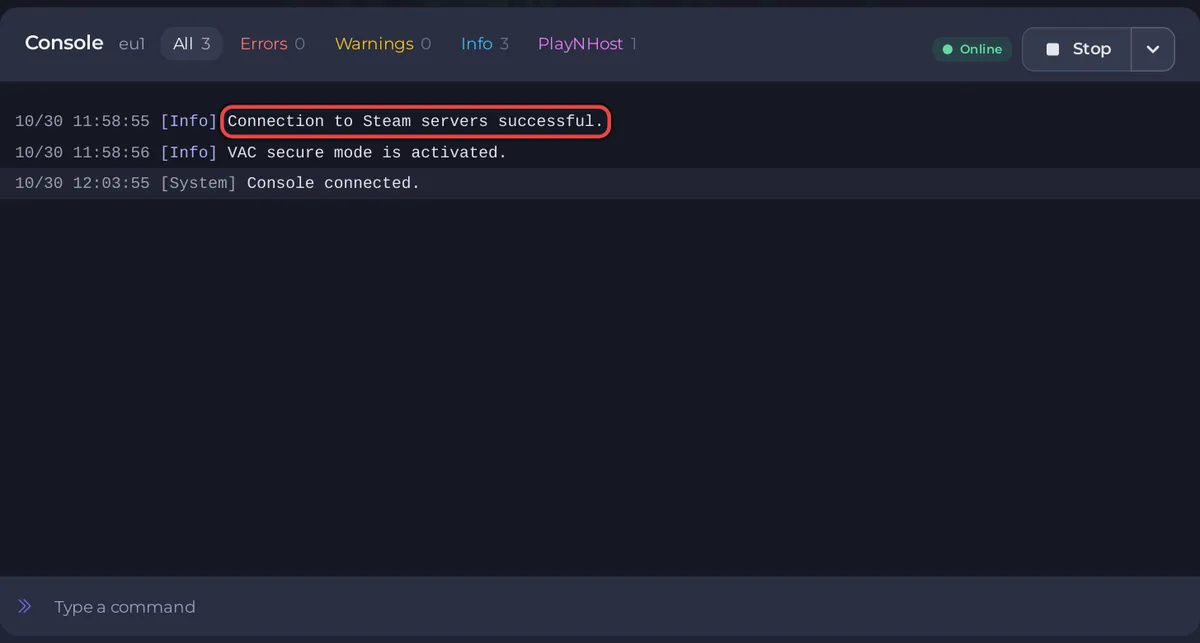
More: How to fix a server that will not start.
"Your .dll [cl_dlls/client.dll] differs from the server's"
The player's game and your server run different versions of Sven Co-op. Restart the server: it checks Steam for the newest build every time it starts. The player restarts Steam so the game finishes updating. See How to update your Sven Co-op server.
My hostname, password or region in server.cfg keeps resetting
The panel writes Server Name, Password and Region from Settings, Game Settings into the hostname, sv_password and sv_region lines of svencoop/server.cfg before every start. A hand edit of those three lines is replaced at the next start. Change them in Game Settings instead: How to change the name, password and region of your Sven Co-op server.
A change I made did nothing
- Game Settings: a field saves when you press Enter or click outside it, and the value applies the next time the server starts. The panel then shows
Saved. The server must restart before these take effect.with a Restart now button. svencoop/server.cfg: the official manual says you can edit it while the server runs and "any saved changes will take effect on the next map". Change the map or restart the server.
See How to edit server.cfg on your Sven Co-op server.
Change Map did not load my map
- The map name must match the map file name exactly, without
.bsp, for examplesc_tetris1. - The Change Map task keeps only letters, digits and underscores and at most 32 characters. A map whose name starts with a hyphen, such as the single player campaign portal
-sp_campaign_portal, cannot be loaded with it. - A custom map must be in
svencoop_addon/maps, not only on your computer.
See How to change the map on your Sven Co-op server and How to add custom maps to your Sven Co-op server.
The server changes map on its own
Most often that is the time limit, or a map in a series moving on to its next map. The official manual's sample server.cfg sets mp_timelimit to 60 minutes ("Map changes after this amount of time (minutes) if the map hasn't been completed already") and mp_timelimit_empty to 10 minutes for an empty server. Check both lines in svencoop/server.cfg and change them there: How to edit server.cfg on your Sven Co-op server.
How do I turn survival mode off?
The Sven Co-op FAQ answers it: add the line mp_survival_mode 0 to svencoop/server.cfg. See How to edit server.cfg on your Sven Co-op server.
Cheat commands do not work
The official sample server.cfg sets sv_cheats 0, which allows no cheats. With sv_cheats 2, only admins in admins.txt can use cheats, on any number of slots. With sv_cheats 1, the official manual says everyone may cheat only on an Internet server with 3 player slots or fewer. See How to become admin on your Sven Co-op server.
The server is missing from the server list
Region -1 hides it from the list on purpose. Any other region lists it. Players can always join with connect and the address. See How to change the name, password and region of your Sven Co-op server.
Players take long to download a custom map
A player who does not have a custom map downloads its files from your server when joining, which the official manual's sv_allowdownload (default 1) allows. The official manual describes sv_downloadurl, a web address where the files are kept "so players can download it very fast". It needs a separate web host with the same files. See How to add custom maps to your Sven Co-op server.
Still stuck?
Open a ticket from your account with the server name and the last lines of the Console: How to open a support ticket. Short answers to other questions: Sven Co-op server FAQ.


