

To become admin on a Sven Co-op server on PlayNHost, write your Steam ID on its own line in svencoop/admins.txt on the Files tab and restart the server. Put an asterisk * in front of your ID to mark yourself as the owner. Admins get an admin icon on the scoreboard and can use cheat commands when sv_cheats is 2.
Add an admin
- Find the player's Steam ID. While the player is on your server, type
statusin the Console tab and look for their Steam ID, in the formSTEAM_0:1:12345678.statusis in the official command list, but the Sven Co-op team does not document what it prints: if you see no Steam ID there, ask the player for theirs. - Click the Files tab and open the
svencoopfolder. - Click
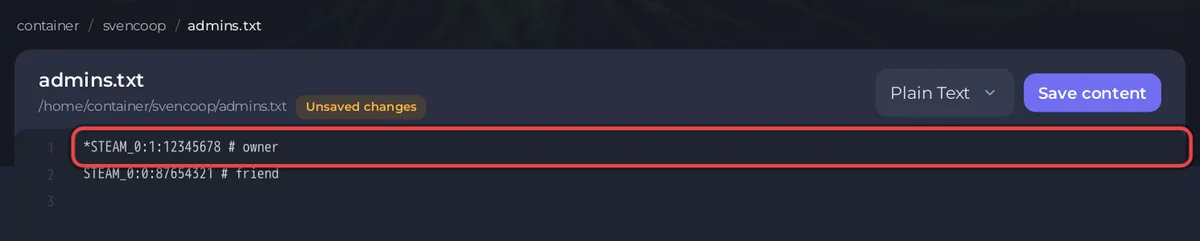
admins.txtto open it. If there is no such file, click New file instead: an empty editor opens. - Write the Steam ID on its own line. Add
*in front of it for the owner, and a note after#if you like, for example*STEAM_0:1:12345678 # me. - Click Save content. For a new file, click Create file, type
admins.txtas File name and click Create file. - Click Restart. The server reads the admin list again as it starts.
The official manual's example file begins like this:
// Owners/operators
*STEAM_9:1:488201	# Paul (owner)
*STEAM_9:0:38195	# Jane
// Administrators
STEAM_9:0:95482		# Dave
STEAM_9:1:5828645	# Emily
The admins file is admins.txt because adminsfile points there by default (server configuration manual). The official command list also names reloadadminlist; a restart is the sure way to load your changes.
What can an admin do in Sven Co-op?
Less than in many games. The official manual says "The only administrative functionality built-in currently provided is the ability to use cheat commands", and about owners: "No additional functionality is currently available to owners, it's mainly for show." Admins show on the scoreboard with an admin icon, and owners with a tinted one.
Kicking, banning and changing the map are done from the panel Console, which works for you without being an admin in the game: How to kick and ban players on your Sven Co-op server and How to change the map on your Sven Co-op server.
How do I let only admins use cheats?
- Open
svencoop/server.cfgon the Files tab. - Set the line
sv_cheats 2, or add it if it is missing. - Click Save content and change the map or restart.
With sv_cheats 2, the manual says only server administrators can use cheats, whatever the number of player slots. With sv_cheats 1, everyone can, but on an Internet server only when it has 3 player slots or fewer. Cheat commands from the manual include godmode 1, cl_noclip 1, give <item name>, reviveme, healme and chargeme.
Is admin in the game the same as access to the panel?
No. admins.txt only matters inside the game. To let a friend use the panel, for example the Console or Files, invite them on Team & Roles: How to invite friends to your Sven Co-op server.
What about AMX Mod X or plugins?
The Sven Co-op FAQ says AMX Mod X can run through a third-party Metamod-P build, "supplied and maintained through a third party, so use at your own discretion". Sven Co-op also has its own AngelScript plugins. Both are installed by uploading files on the Files tab, following the official wiki.


