

To add a custom map to a Sven Co-op server on PlayNHost, upload the map's archive to the svencoop_addon folder on the Files tab, tick it and click Unzip, then load the map with changelevel in the Console. The official wiki says custom content belongs in svencoop_addon, never in the svencoop folder.
Add the map
- Download the map's archive to your computer. Most Sven Co-op maps are on scmapdb.com, a community map database the official manual links to. It is not run by the Sven Co-op team.
- Open your server in the panel and click the Files tab.
- Open the
svencoop_addonfolder. If it is not there, click Create Directory and name itsvencoop_addon. - Click Upload and pick the archive, or drag it onto the page. Wait for the upload to finish.
- Tick the archive and click Unzip in the bar that appears. The files land in
svencoop_addon. - Open the folders that came out and check that the map file is at
svencoop_addon/maps/<name>.bsp. Then delete the archive to keep the folder tidy. - Click the Console tab and type
changeleveland the map name, for examplechangelevel mymapforsvencoop_addon/maps/mymap.bsp. Wait forStarted map "mymap".
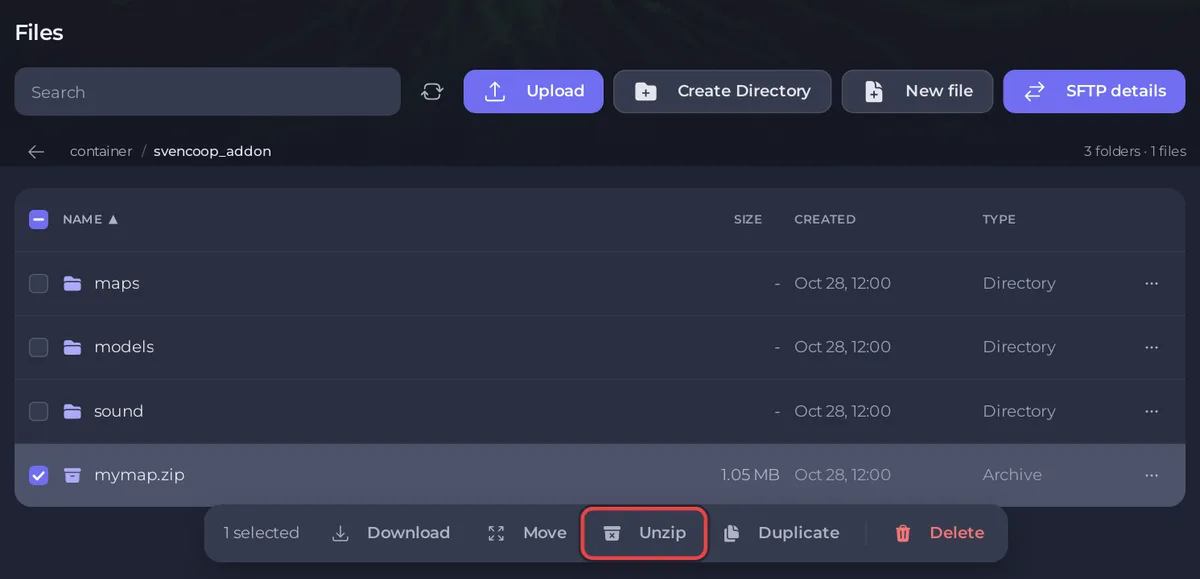
The file manager unzips .zip, .rar and .7z archives. It does not upload whole folders: upload an archive and unzip it, or use SFTP: How to connect to your server files with SFTP.
What should the folders look like?
The Sven Co-op wiki describes a well packed map:
- The archive holds folders such as
maps,models,sound,sprites,gfxandscripts, often with.wadfiles. They all go straight intosvencoop_addon, so the map file ends up atsvencoop_addon/maps/<name>.bsp. - An archive with only a
.bspfile, and maybe a few.txtor.cfgfiles, goes intosvencoop_addon/maps. - An archive that holds a single
svencoopfolder: move what is inside that folder intosvencoop_addoninstead. - A
scriptsfolder should hold only amapsfolder. The wiki calls anything else in it suspicious: do not keep it.
Do players need to download the map?
Players who do not have the map download it from your server when they join. The official manual lists sv_allowdownload with a default of 1, "Allow players to download custom content from your server". The manual's faster option is sv_downloadurl, a web address where the same files are kept "so players can download it very fast", which it calls "essential to get players onto your server while it's running non-standard maps". It needs a separate web host with the same files.
How do I add the map to the map vote?
Players can vote only for maps listed in svencoop/mapvote.cfg. Open it on the Files tab, add your map, and click Save content. Keep the list under 200 maps: the official manual warns that "Exceeding 200 maps may prevent players joining due to "reliable channel overflowed"!"
How do I make it the starting map?
Type its name in Default Map in Settings, Game Settings, and restart. See How to change the map on your Sven Co-op server.
How do I remove a custom map?
Delete its files from svencoop_addon on the Files tab: at least maps/<name>.bsp, plus its own models, sounds and sprites if no other map uses them. Take a backup first so you can put them back: How to back up and restore your Sven Co-op server.
More on the file manager: How to upload, edit and manage your server files.


