

To edit server.cfg on a Sven Co-op server on PlayNHost, open the Files tab, open svencoop/server.cfg, change the lines you want and click Save content. The official manual says saved changes take effect on the next map. Leave hostname, sv_password and sv_region alone: the panel rewrites them from Game Settings at every start.
Edit the file
- Open your server in the panel and click the Files tab.
- Open the
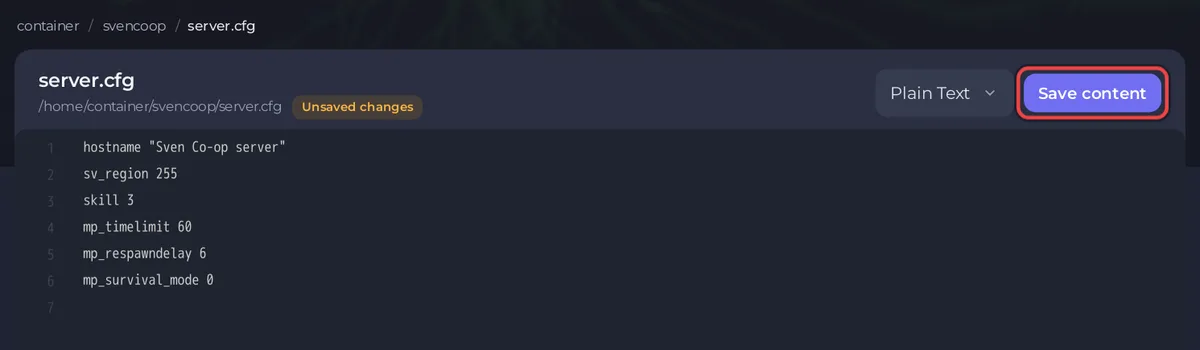
svencoopfolder and clickserver.cfg. The file opens in the editor. - Change a value, or add a line such as
mp_respawndelay 3. Each setting is one line: its name, a space, the value. - Click Save content.
- Change the map or restart the server. The official manual says: "You can modify this file while your server is running, then any saved changes will take effect on the next map."
The Config files list under the Settings tab also shows svencoop/server.cfg, with the note svencoop/server.cfg is not editable here yet and You can edit svencoop/server.cfg in the file manager in the meantime. The Files tab is the place to edit it.
Which lines does the panel write?
Before every start, the panel replaces three lines in svencoop/server.cfg with your Game Settings:
| Line | Comes from |
|---|---|
hostname | Server Name |
sv_password | Password |
sv_region | Region |
A value typed into those lines by hand is gone after the next start. Change them in Game Settings: How to change the name, password and region of your Sven Co-op server. The player limit and the first map are not in this file either: they are Max Players and Default Map in Game Settings.
Which settings are worth changing?
These come from the official server configuration manual. The second column is the value the manual gives for its sample file. The game's own variable list gives other values for some of these (mp_timelimit 90, for example), so read the line in your file before you rely on a number.
| Setting | Value in the manual | What it does |
|---|---|---|
skill | 3 | The default skill level. "Maps can override this in their configuration." |
mp_timelimit | 60 | Minutes before the map changes, if the map has not been completed. 0 means no limit |
mp_timelimit_empty | 10 | Minutes before the map changes while the server is empty. 0 turns it off |
mp_respawndelay | 6 | Seconds a player waits before respawning |
mp_npckill | 1 | 0 allied NPCs cannot be killed, 1 they can, 2 they can by anything except players, allied NPCs and the human passive class |
mp_voteallow | 1 | Lets players use the built-in voting |
mp_votekickrequired | 66 | Percent of yes votes a kick vote needs. -1 turns kick votes off |
mp_votebanrequired | -1 | Percent of yes votes a ban vote needs. -1 is off, which the manual recommends |
mp_votemaprequired | 66 | Percent of yes votes a map vote needs. -1 turns map votes off |
sv_cheats | 0 | Cheat commands. 2 lets only admins use them |
How do I turn survival mode off?
Add this line to svencoop/server.cfg, as the Sven Co-op FAQ says:
mp_survival_mode 0Then save and change the map.
Is it safe to set rcon_password?
You do not need it. The panel's Console tab already sends commands to your server. The manual says that with rcon_password empty, "remote console access will not be available", and that anyone with the password has "unlimited access to your game server". Leave it empty unless you know you need remote console.
How do I undo a change?
Restore the file from a backup, or delete the line you added and save. Take a backup before big edits: How to back up and restore your Sven Co-op server. Admins are in a separate file: How to become admin on your Sven Co-op server.


