

To invite friends to your Palworld server on PlayNHost, open the server's Overview page and click Copy invite message on the Play with friends card. Paste the message into Discord, Steam chat or wherever your friends are. It holds the address, the password line and the three steps to join.
Send the invite message
- Open your server in the panel. The Play with friends card is on the Overview page.
- Check the rows: Address is what players paste in the game, and Password shows your join password or None set.
- Click Copy invite message at the bottom of the card. The button says Copied for a moment.
- Paste the message to your friends.
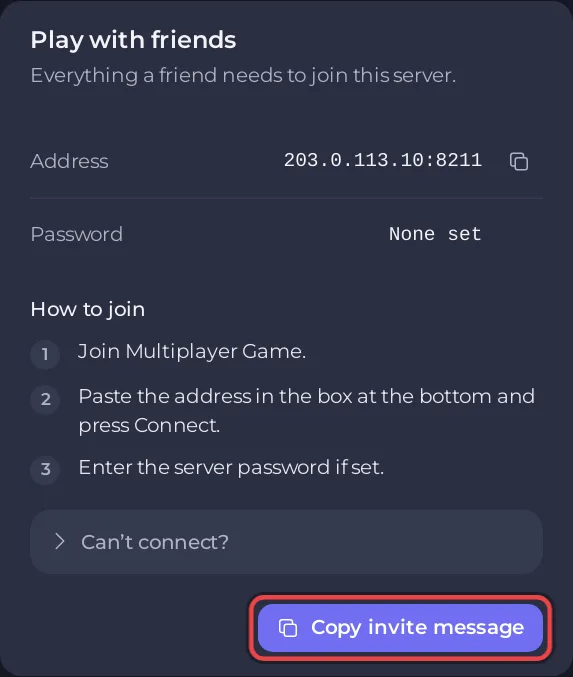
The message reads like this, with your own address:
Join my Palworld server: address:port
Password: yourpassword

How to join:
1. Join Multiplayer Game.
2. Paste the address in the box at the bottom and press Connect.
3. Enter the server password if set.
If your account may not see the password, the line says It has a password: ask me for it. instead. With no password set, the line is left out.
Before you invite
- Start the server and wait for Online: How to start your Palworld server for the first time.
- Give it a name your friends recognise in the list: How to change your Palworld server name and description.
- Set a password, or a whitelist so only the people you choose can play: How to set a password on your Palworld server and How to make your Palworld server private with a whitelist.
- Check you have enough slots: How to change player slots on your Palworld server.
- Console friends find the server by name under Community server: Which platforms can join your Palworld server.
If a friend cannot connect
Click Can’t connect? on the card. It lists the three usual causes: the server is still starting, the game version is different, or the password does not match exactly, capitals included. Ask support opens a ticket. More checks: Players cannot join your Palworld server.
Let a friend help run the server
The invite lets a friend play. To let a friend start and stop the server, change settings or manage players, invite them to the panel instead of sharing your password: click Invite people in the bar at the top of the server page (on a wide screen), or open Team & Roles in the left menu, and give them a role. See How to invite friends and give them access.
A friend who should use admin commands inside the game needs the Admin Password: How to become admin on your Palworld server. Kick and ban on the Active players card need the console permission in their role, and the Whitelist and Bans buttons also need the file permissions.


