

To host a Node.js Discord bot 24/7, run it on a server that stays on: upload your files with package.json (without node_modules), set the entry file, paste the token and start it. On a PlayNHost bot plan (from US$1.99 a month) you pick Node.js 20, 22, 24, 25 or 26 (22 by default), npm install runs whenever your packages change, and a bot that crashes is started again. The five steps:
- Check the bot's card on Overview says Node.js Bot; if not, on the Bot page, pane Code, click Change what runs next to Runtime and pick it.
- Upload your files with
package.jsonin Files, withoutnode_modules. - Set the Entry file on the Bot page, pane Code, and click Save.
- Paste your token on the Discord pane and click Connect.
- Press Start and watch Console. Packages from
package.jsoninstall by themselves on the first start, and again whenever you change it.
1. Check the type
On a computer, the type label at the top of the server page shows what runs, for example Node.js Bot. The bot's card on Overview says it too: Discord bot - Node.js Bot. If it is another language, on the Bot page, pane Code, click Change what runs next to Runtime (on a computer, the type label at the top of the page opens the same dialog) and pick Node.js Bot. Bot files are kept unless you tick Delete my existing files and start clean. See How to switch your bot to another language.
2. Add your code
- Open your server in the panel, then Files.
- Upload your bot with its
package.json. Leave outnode_modules: the server installs it. Folders cannot be uploaded as they are, so zip the project, upload the zip, tick it and click Unzip. See How to upload your Discord bot code. - No code yet? On Overview, the Set up your bot card offers Create a starter bot: a working discord.js bot that answers
/ping. See How to create a starter Discord bot in one click.
Your code on GitHub? Use Git repository as the source instead: How to deploy and update your Discord bot from GitHub.
3. Set how it runs
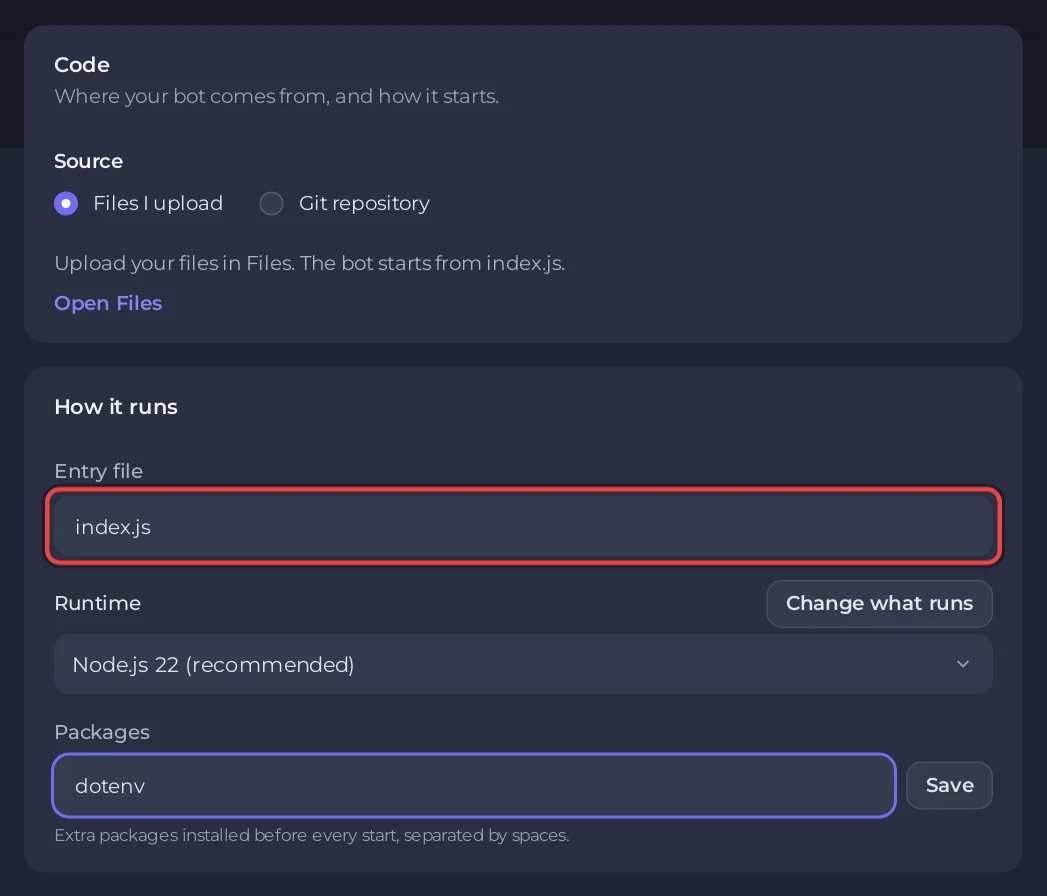
Open the Bot page, pane Code. The card How it runs has three settings:
- Entry file: the file that starts your bot,
index.jsby default. Use the path from the main folder, for examplesrc/bot.js. Names are case sensitive. A.tsfile works too: see How to run a TypeScript Discord bot. - Runtime: Node.js 22 (recommended), or Node.js 20, 24, 25 or 26. The change applies at the next start.
- Packages: extra npm packages, installed at the next start after you change them, separated by spaces, for example
dotenv mysql2. Use it for packages that are not inpackage.json.
Change a field, then click the Save button that appears next to it.
4. Paste the token
On the Discord pane, paste the token under Token and click Connect. Your code reads it as process.env.DISCORD_TOKEN. See How to create a Discord bot and get its token.
5. Start it
Press Start and open Console. When the bot starts, the server does this, in order:
- Installs anything in Packages, then runs
npm installwhen apackage.jsonexists. The first start takes longer while packages download. Later starts install again only when Packages,package.json, the lock file or the Node version changed, whennode_modulesis missing, or once a day; otherwise the console says[PlayNHost] Packages are up to date. - Limits Node's memory to 80 percent of your plan's memory, so the rest of the process has room.
- Prints
[PlayNHost] Starting your botand runs your entry file withnode(ortsxfor a.tsfile).
Print a line such as Logged in as MyBot when your bot is ready. The panel reads it and the chip on Overview turns to Online in Discord. Without such a line it can only say Running.
A minimal discord.js bot
package.json
{
  "name": "my-bot",
  "private": true,
  "main": "index.js",
  "dependencies": {
    "discord.js": "^14"
  }
}
index.js
const { Client, Events, GatewayIntentBits } = require('discord.js');

const client = new Client({ intents: [GatewayIntentBits.Guilds] });

client.once(Events.ClientReady, (c) => {
  console.log(`Logged in as ${c.user.tag}`);
});

client.login(process.env.DISCORD_TOKEN);
For slash commands, see How to make a Discord bot with discord.js.
How much memory a discord.js bot uses
We measured it on one of our own servers on 6 November 2026, in a throwaway container set up like a 1 GB bot plan, with a fake token that Discord refused. A minimal discord.js 14.28.1 bot on Node.js 22, with the library loaded and its login sent, used about 75 MB of memory, and Discord answered 0.6 s after the start. Node.js on its own used 43 MB. A bot that has connected, joined servers and cached members uses more, so check RAM on the Usage card after a day of real use; the library and Node.js together take about a seventh of the 0.5 GB STARTER plan. Memory is the resident memory 15 seconds after Discord's answer, the median of three runs after a warm-up run.
Console lines you may see
| Line | What to do |
|---|---|
[PlayNHost] Your bot is not set up yet: the main file index.js was not found. | Upload your files, or fix Entry file so it matches the real name and folder. |
[PlayNHost] bot.py is a Python file, but this server runs Node.js. | Your code is Python. Change the type to Python Bot and keep your files. |
[PlayNHost] index.js starts with ```, a Markdown code fence copied together with the code. | Open the file in Files, delete the first and last ``` lines, save, start again. |
[PlayNHost] npm could not install everything in package.json. Starting with the packages already installed. | A name or version in package.json is wrong. The npm error just above names it. |
Error: Cannot find module 'x' | Add the package to package.json or to Packages, then restart. |
The panel turns these into a banner above the console with a button to the right place. More: Why your Discord bot keeps stopping.
Good to know
- The Settings card on the Code pane has Node arguments (optional). They go to Node itself, before your entry file, for example
--trace-warningsor--enable-source-maps. On a server set up before this worked, click Reinstall at the bottom of the Code pane once: your files stay and the server gets the newest start script. - Keep API keys and passwords under Environment, not in a file: How to set environment variables and secrets.
- Prefer TypeScript with no build step? Bun runs
.tsas is: How to host a Bun Discord bot.
See also How to use a MySQL database with a discord.js bot (mysql2).
Questions people ask
Which Node.js version should I pick?
Node.js 22, the default, marked (recommended). Change it under Runtime on the Code pane; it applies at the next start.
Does the bot stay online when I turn off my PC?
Yes. It runs on the server. If it crashes it is started again within about a minute; if it crashes again within a minute of that, it stays stopped and Console says why.
Can I run TypeScript without a build step?
Yes. Set Entry file to your .ts file and the server runs it with tsx.


