

Bun runs JavaScript and TypeScript bots with no build step, and discord.js works on it. To run one:
- Switch the type: on the Bot page, pane Code, click Change what runs next to Runtime and pick Bun Bot.
- Upload your files with
package.jsonin Files, withoutnode_modules. - Check the Entry file (
index.tsby default) on the Bot page, pane Code. - Paste your token on the Discord pane and click Connect.
- Press Start and watch Console.
1. Switch the type to Bun Bot
On the Bot page, pane Code, click Change what runs next to Runtime and pick Bun Bot. On a computer, the type label at the top of the page (for example Node.js Bot) opens the same dialog. Leave Delete my existing files and start clean. unticked to keep your files. Same plan, same price. See How to switch your bot to another language.
2. Add your code
Upload your .ts or .js files and package.json in Files (zip a folder, upload, tick it, Unzip). Leave out node_modules. Or choose Git repository as the source on the Code pane: How to deploy and update your Discord bot from GitHub.
3. Set how it runs
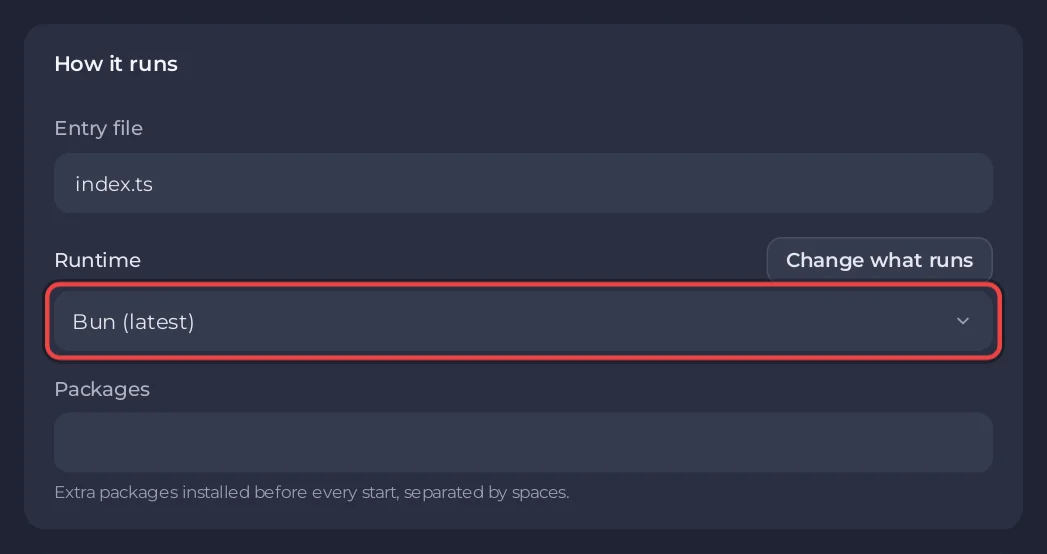
On the Bot page, pane Code, card How it runs:
- Entry file:
index.tsby default. Any.tsor.jsfile works, for examplesrc/bot.ts. - Runtime: Bun (latest), or Bun canary (unstable) if you need a feature that is not released yet.
- Packages: extra packages added with
bun addat the next start after you change them, separated by spaces.
4. Paste the token and start
On the Discord pane, paste the token and click Connect. Press Start and open Console. The server runs bun install when a package.json exists, prints [PlayNHost] Starting your bot, and runs bun run on your entry file. Later starts install again only when Packages, package.json, the lockfile or the Bun version changed, when node_modules is missing, or once a day; otherwise the console says [PlayNHost] Packages are up to date.
A minimal Bun bot with discord.js
package.json
{
  "name": "my-bun-bot",
  "private": true,
  "dependencies": {
    "discord.js": "^14"
  }
}
index.ts
import { Client, Events, GatewayIntentBits } from 'discord.js';

const client = new Client({ intents: [GatewayIntentBits.Guilds] });

client.once(Events.ClientReady, (c) => {
  console.log(`Logged in as ${c.user.tag}`);
});

client.login(process.env.DISCORD_TOKEN);
Bun reads the token with process.env.DISCORD_TOKEN or Bun.env.DISCORD_TOKEN. Printing Logged in as turns the chip on Overview to Online in Discord.
Console lines you may see
| Line | What to do |
|---|---|
[PlayNHost] Your bot is not set up yet: the main file index.ts was not found. | Upload your files, or set Entry file to the real name and folder. |
[PlayNHost] bot.py is a Python file, but this server runs Bun (JavaScript). | Your code is Python. Click Change what runs and pick Python Bot, keeping your files. |
[PlayNHost] index.ts starts with ```, a Markdown code fence copied together with the code. | Open the file in Files, delete the first and last ``` lines, save, start again. |
[PlayNHost] Bun could not install everything in package.json. Starting with the packages already installed. | A name or version in package.json is wrong. Bun's error just above names it. |
[PlayNHost] Some packages in Bot page, Code, Packages could not be installed. | Check the spelling in Packages and that names are separated by spaces. |
| Banner A package your code needs is missing | Your code imports a package that is not installed. Add it to package.json or Packages, then restart. |
The wrong-language, fence and package lines come from the start script of servers installed or reinstalled since 28 October 2026. On an older server, click Reinstall at the bottom of the Code pane once: your files stay.
Good to know
- Bun does not check TypeScript types when it runs. Run
bunx tsc --noEmiton your computer to see type errors. - Bun is not Node.js. Most npm packages work, but if one does not, the Node.js Bot type runs
.tsfiles too (withtsx): How to run a TypeScript Discord bot. - Keys and passwords go under Environment: How to set environment variables and secrets.


