

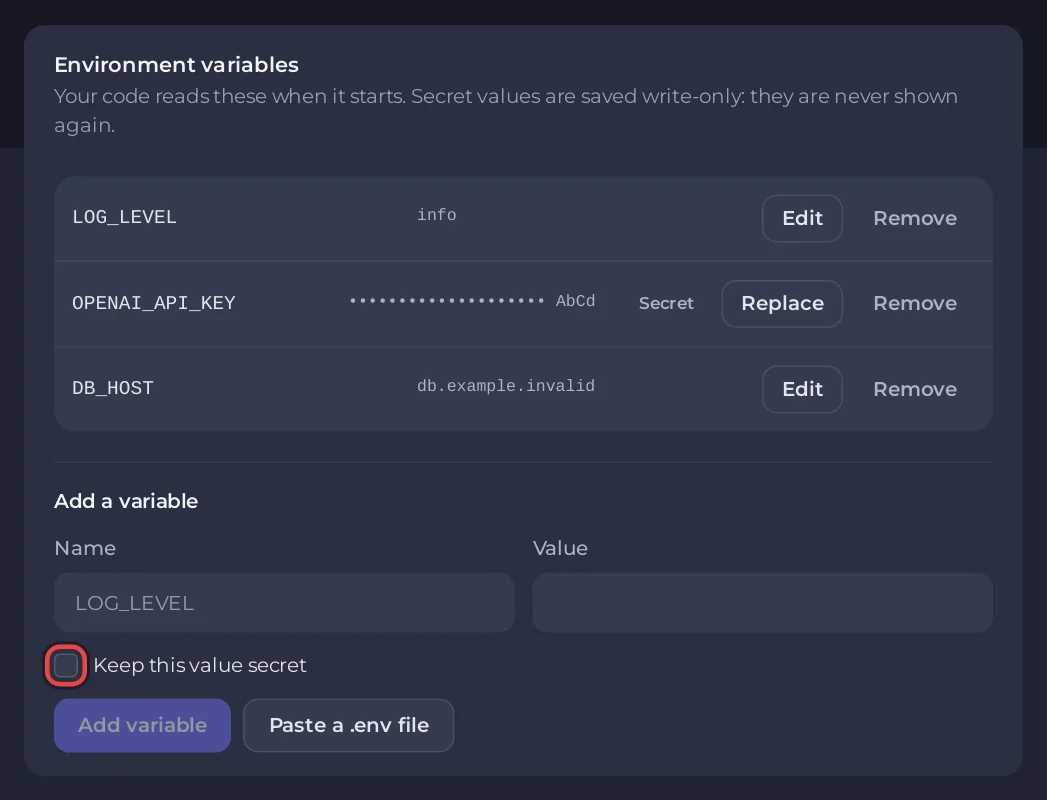
Put your bot's keys and settings on the Bot page, pane Environment: add them one by one or paste your whole .env file, tick Keep this value secret for passwords and keys, then restart the bot. Your code reads them like any environment variable.
Why here and not in a file
- Values saved here are stored encrypted by the panel, not in your server's files. They do not show in Files, over SFTP or in backups.
- A secret value is never shown again, to you or anyone you give access to: the list shows dots and its last four characters.
- You can share your code, or put it on GitHub, without leaking a key.
Add one variable
- Open your bot server in the panel, then the Bot page, pane Environment.
- Under Add a variable, type the Name, for example
OPENAI_API_KEY, and the Value. - Keep this value secret ticks itself for names that look like secrets (ending in
KEY,TOKEN,SECRET,PASSWORDand the like, or a database URL). Tick or untick it as you need. - Click Add variable.
- The pane says Changes apply the next time the bot starts. If the bot is running, click Restart now.
Paste a whole .env file
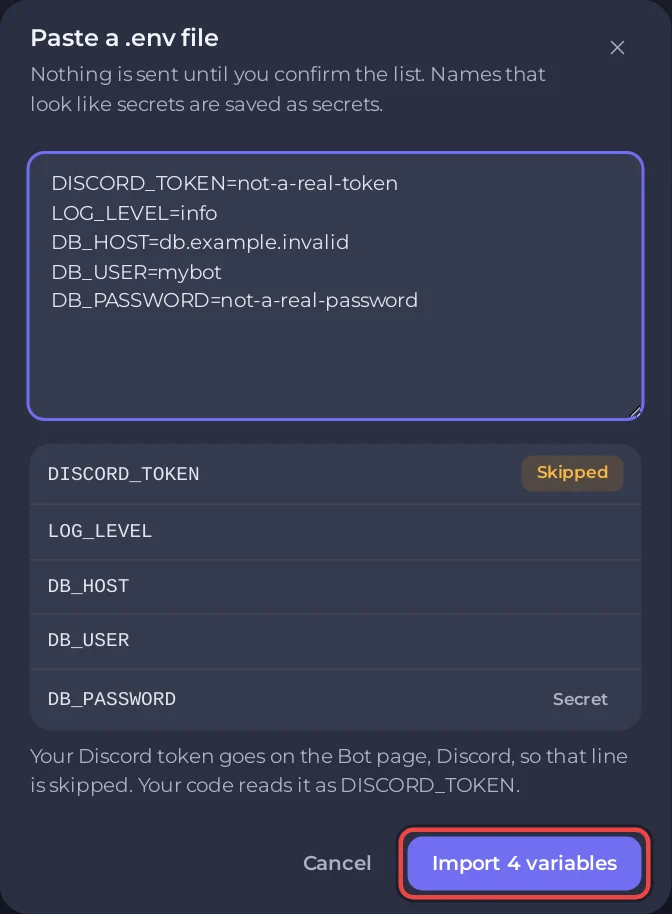
- Click Paste a .env file.
- Paste the contents of your
.env. Nothing is sent yet: the dialog lists the names it found, with a Secret badge on those it will save as secrets. - Names the panel will not take are marked Skipped: the bot token under any of its names (
DISCORD_TOKEN,TOKEN,BOT_TOKEN,DISCORD_BOT_TOKEN),GIT_TOKEN, your bot type's own settings (they live on the Code pane), system names such asPATH, and names that change how a runtime starts, such asPYTHONPATH,NODE_PATHor anything starting withLD_. A note says where they belong. Lines it cannot read at all are listed with their line numbers. - Click the import button, for example Import 6 variables. Skipped lines are left out of the count.
The usual .env forms work: KEY=value, export KEY=value, comments, and values in 'single' or "double" quotes (double quotes may span several lines). If a name appears twice, the last one wins.
Read them in your code
| Language | Code |
|---|---|
| Node.js, Bun | process.env.OPENAI_API_KEY |
| Python | os.environ["OPENAI_API_KEY"] |
| Java | System.getenv("OPENAI_API_KEY") |
| C# | Environment.GetEnvironmentVariable("OPENAI_API_KEY") |
| Deno | Deno.env.get("OPENAI_API_KEY") |
| Go | os.Getenv("OPENAI_API_KEY") |
| Rust | std::env::var("OPENAI_API_KEY") |
Your code already uses dotenv or python-dotenv? It keeps working: those libraries do not overwrite a variable that is already set, so the panel's values win over a leftover .env file.
Change or remove one
- A plain value has Edit; a secret has Replace. A secret starts empty because its value is never sent back: type the new value and click Save.
- Remove asks Remove OPENAI_API_KEY?; confirm with Remove variable. The bot no longer has it at its next start.
Rules and limits
- A name is letters, digits and underscores, up to 64 characters, and does not start with a digit.
- A value is up to 4 KB. A bot can have up to 50 variables.
- Names the panel sets itself are refused with
... is set by PlayNHost and cannot be changed here.: the token names (DISCORD_TOKEN,TOKEN,BOT_TOKEN,DISCORD_BOT_TOKEN),GIT_TOKEN,PATH,HOME,NODE_OPTIONS, names starting withSERVER_orPNH_, and your bot type's own settings such asMAIN_FILE. - Names that change how a runtime or the shell starts are refused under Add a variable with
... controls how the bot starts and cannot be set here.(a pasted.envmarks them Skipped), for examplePYTHONPATH,NODE_PATH,JAVA_TOOL_OPTIONSor anything starting withLD_,NPM_CONFIG_,PIP_orGIT_.
Your Discord token reaches your code without any variable from you, as DISCORD_TOKEN and also as TOKEN, BOT_TOKEN and DISCORD_BOT_TOKEN. That is why those names cannot be set here.
A ready-made bot has no list of its own variables: its keys are fixed fields on the Credentials card of this pane. A key the bot cannot start without shows Required, and until it is set the Set up your bot card on Overview keeps Start bot off and links here with Open Environment: How to change a ready-made bot's settings.
Related: How to keep your Discord bot token safe, How to use a database with your Discord bot.


