

To run a JDA (or any Java) bot on your bot server:
- Check the bot's card on Overview says Java Bot; if not, on the Bot page, pane Code, click Change what runs next to Runtime and pick it.
- Build your bot as one runnable jar with its libraries inside.
- Upload the jar in Files.
- Set its name as the Entry file on the Bot page, pane Code, and click Save.
- Paste your token on the Discord pane, click Connect, then press Start.
1. Check the type
The bot's card on Overview says what runs, for example Discord bot - Java Bot. If it says another language, on the Bot page, pane Code, click Change what runs next to Runtime (on a computer, the type label at the top of the page opens the same dialog) and pick Java Bot. Your files stay unless you tick Delete my existing files and start clean. See How to switch your bot to another language.
2. Build a jar that runs on its own
The server starts your bot with java -jar, so the jar must hold your code and every library it uses (a "fat" or "shaded" jar) and name its main class in the manifest. Gradle users add the Shadow plugin and run shadowJar; Maven users add the Shade plugin. Test it on your computer first:
java -jar build/libs/bot-all.jarIf that prints no main manifest attribute or NoClassDefFoundError, the jar is not complete yet, and it will fail the same way on the server.
3. Upload it and set the Entry file
- Open your server in the panel, then Files, and upload the jar. See How to upload your Discord bot code.
- Open the Bot page, pane Code. Under How it runs, set Entry file to the jar's exact name, for example
bot.jar(the default), and click Save. - Runtime: Java 21 (recommended), or Java 17 or 25. Pick the version your jar was built for or newer.
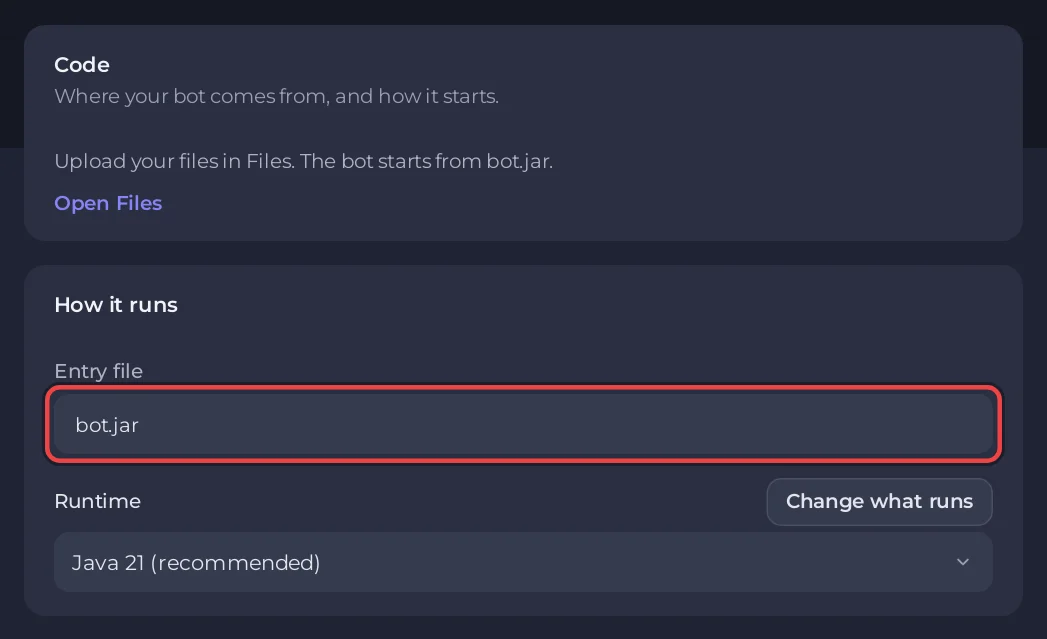
Java bots have no Git source and no Packages field: everything your bot needs is inside the jar. Upload a new jar to update the bot.
4. Paste the token and start
- On the Discord pane, paste the token and click Connect. Your code reads it with
System.getenv("DISCORD_TOKEN"). - Press Start and open Console. You see
[PlayNHost] Starting your bot, then your bot's own output.
The server gives the Java heap up to 80 percent of your plan's memory, which leaves room for the rest of the process, and uses the G1 garbage collector.
A minimal JDA 5 bot
import net.dv8tion.jda.api.JDABuilder;
import net.dv8tion.jda.api.events.session.ReadyEvent;
import net.dv8tion.jda.api.hooks.ListenerAdapter;

public class Bot extends ListenerAdapter {
    public static void main(String[] args) {
        JDABuilder.createLight(System.getenv("DISCORD_TOKEN"))
                .addEventListeners(new Bot())
                .build();
    }

    @Override
    public void onReady(ReadyEvent event) {
        System.out.println("Logged in as " + event.getJDA().getSelfUser().getName());
    }
}
Printing Logged in as lets the panel show Online in Discord on the bot's card on Overview.
How much memory a JDA bot uses
We measured it on one of our own servers on 6 November 2026, in a throwaway container set up like a 1 GB bot plan, with a fake token that Discord refused. A minimal JDA 6.7.0 bot on Java 21, started with the same Java flags as the server, used about 91 MB of memory, and Discord answered 1.5 s after the start. Java on its own used 38 MB, and a Discord4J 3.3.3 bot 126 MB (2.6 s). The heap limit of 80 percent of your plan is a ceiling, not what the bot uses. A bot that has connected, joined servers and cached members uses more, so check RAM on the Usage card after a day of real use. Memory is the resident memory 15 seconds after Discord's answer, the median of three runs after a warm-up run.
The bot above also runs unchanged on JDA 6.7.0, the current release: we built it into one jar with Maven and ran it until Discord refused our fake token, which JDA reports as net.dv8tion.jda.api.exceptions.InvalidTokenException: The provided token is invalid!
Console lines you may see
| Line | What to do |
|---|---|
[PlayNHost] Your bot is not set up yet: the jar file bot.jar was not found. | Upload the jar, or set Entry file to its exact name. |
[PlayNHost] bot.py is a Python file, but this server runs Java. (or a JavaScript file) | Your code is not a Java bot. Click Change what runs in the banner or on the Code pane and pick the right type, keeping your files. |
[PlayNHost] bot.txt is not a .jar file. Build your bot into a jar, upload it in the Files tab and set it as the Entry file on the Bot page, Code, then press Start. | Entry file must name a .jar. |
no main manifest attribute, in bot.jar | The jar has no main class. Build it with Shadow or Shade, or set Main-Class in the manifest. |
UnsupportedClassVersionError | The jar was built for a newer Java than the server runs. Pick a newer Runtime. |
java.lang.OutOfMemoryError | The bot used all its memory. The panel shows Your bot ran out of memory. See How much RAM does a Discord bot need. |
The two lines about the file type come from the start script of servers installed or reinstalled since 28 October 2026. An older server shows Java's own error instead; Reinstall at the bottom of the Code pane brings the newest start script and keeps your files.
More: Why your Discord bot keeps stopping. Keys and passwords your bot uses go under Environment: How to set environment variables and secrets.


