

To invite friends to your V Rising server on PlayNHost, send them three things: the Server Address from your server's Overview page, the server's name, and the Server Password if you set one. They join with Direct Connect in the game's server list. To let a friend restart the server or change settings too, invite them in Team & Roles.
Send the invite
- Open your server in the panel. You land on Overview.
- Click the copy button next to Server Address.
- Paste it in Discord, Steam chat or wherever your friends are, with the server name and the password.
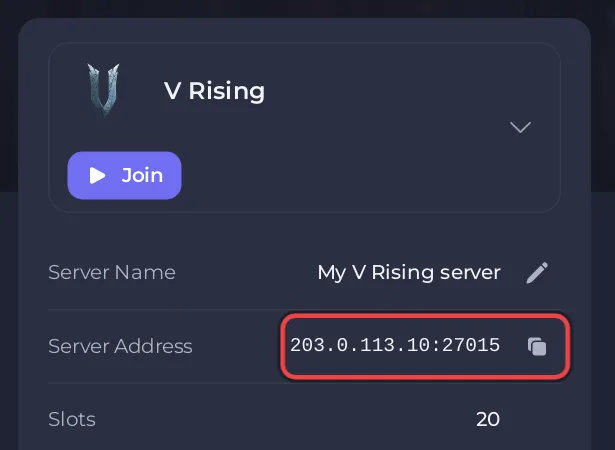
A message your friends can follow:
Join my V Rising server: in V Rising, choose Online Play, Find Servers,
Display all Servers & Settings, Direct Connect, and enter 203.0.113.10:27015
Password: (ask me)
Put your own address in place of the example. Your friends need V Rising on Steam on a PC: Can PlayStation 5 players join your V Rising server?
Before you invite
- The badge next to the server name must say Online: What happens the first time you start your V Rising server.
- Give the server a name your friends will recognise in the server list, and a password if you want it private: How to change the server name, password and description of your V Rising server.
- Pick PvE or PvP before the world fills up: How to choose PvP or PvE on your V Rising server.
- Check how many players your server takes: How many players can join a V Rising server?
Let a friend help run the server
The address lets a friend play. To let a friend restart the server, take backups or edit settings in the panel, invite them with Invite people at the top of the server page, or from Team & Roles in the left menu, and give them a role. See How to invite friends and give them access.
To make a friend an admin inside the game (kick, ban, admin commands), add their SteamID to the admin list instead: How to become admin on your V Rising server.
Joining step by step: How to join your V Rising server. Plans and features: V Rising server hosting.


