

To start a Rising World server on PlayNHost, click Start on the server's Overview page and wait for the badge to say Online. The Console shows Dedicated server is ready! when Rising World is ready for players. The first start also generates a new world called myworld.
How do I start it?
- Open your server in the panel. The badge near the name says Offline.
- Click Start. The badge changes to Starting.
- Click the Console tab to watch the server start.
- Wait for the line
Dedicated server is ready!. The badge then says Online and players can join.
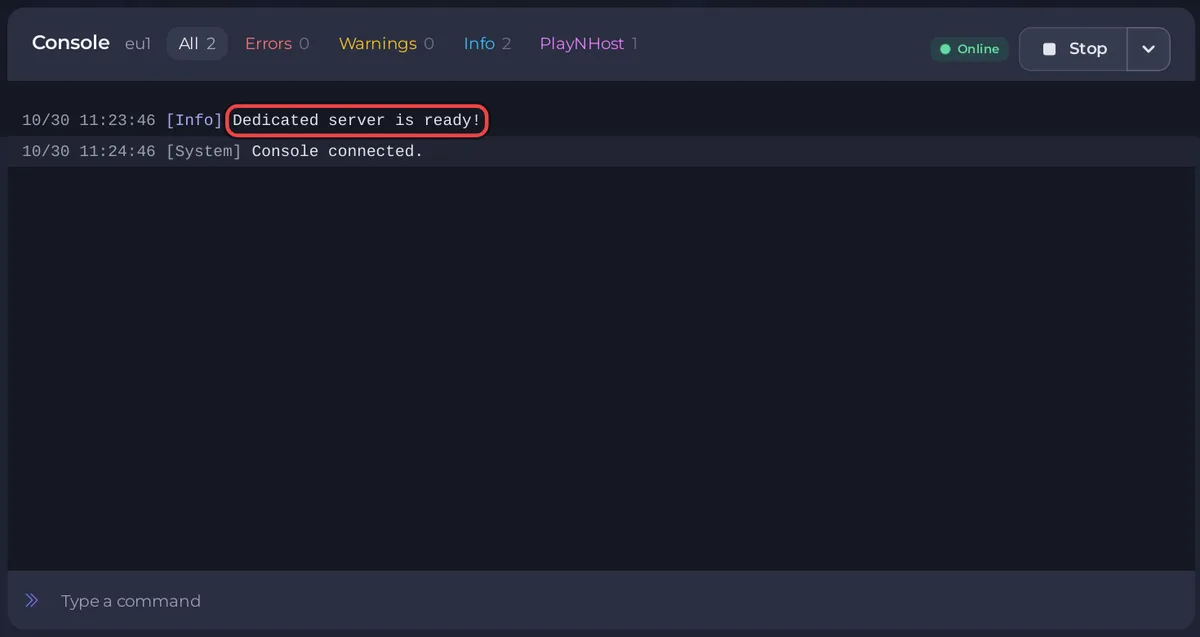
What does the Console show on a Rising World start?
With Auto Update on (it is on by default), every start first asks Steam whether a newer Rising World server build is out and downloads it. Then the game loads the world named in World Name, or generates it if it does not exist yet. Dedicated server is ready! is the last line you wait for. After it, the Console box takes Rising World's own server commands: How to use the Console and commands on your Rising World server.
How long does the first start take?
In PlayNHost's own test, a new Rising World server was installed and ready for players in under 3 and a half minutes. The first start is the slowest one, because the world is generated, and memory use peaks while that happens. Later starts load the existing world. As long as new lines keep appearing in the Console, the server is still working: do not click Kill.
The first start after a big Rising World update can also be slower. Update 0.9.3 (31 August 2026) converts each world "when loading a world for the first time after the update", according to the developer's patch notes.
What does a new Rising World server already have?
- Server Name:
A PlayNHost Rising World Server. Change it before you invite people: How to change your Rising World server name and password. - Server Password: empty, so anyone with the address can join.
- World Name:
myworld, created on the first start in theWorldsfolder under Files. - Game Mode:
Survival. It only applies when a new world is created: How to start a new world on your Rising World server. - Auto Update: on, so the server keeps up with Rising World updates.
- A Save World task under Quick Tasks, and an Automatic backup schedule when your plan has backup slots.
- Nobody is admin in the game yet: How to become admin on your Rising World server.
This server runs the current Rising World from Steam's normal branch: the Unity version that replaced the Java version on 31 January 2025.
What should I do next?
If the badge never reaches Online, see Rising World server problems and fixes and How to fix a server that will not start.


