

To run a command on a Rising World server on PlayNHost, open the Console tab, type the command in the Type a command box without a slash, for example saveall, and press Enter. The server console needs no login or admin rights. Rising World can take up to a minute to pick up a typed command.
How do I send a command?
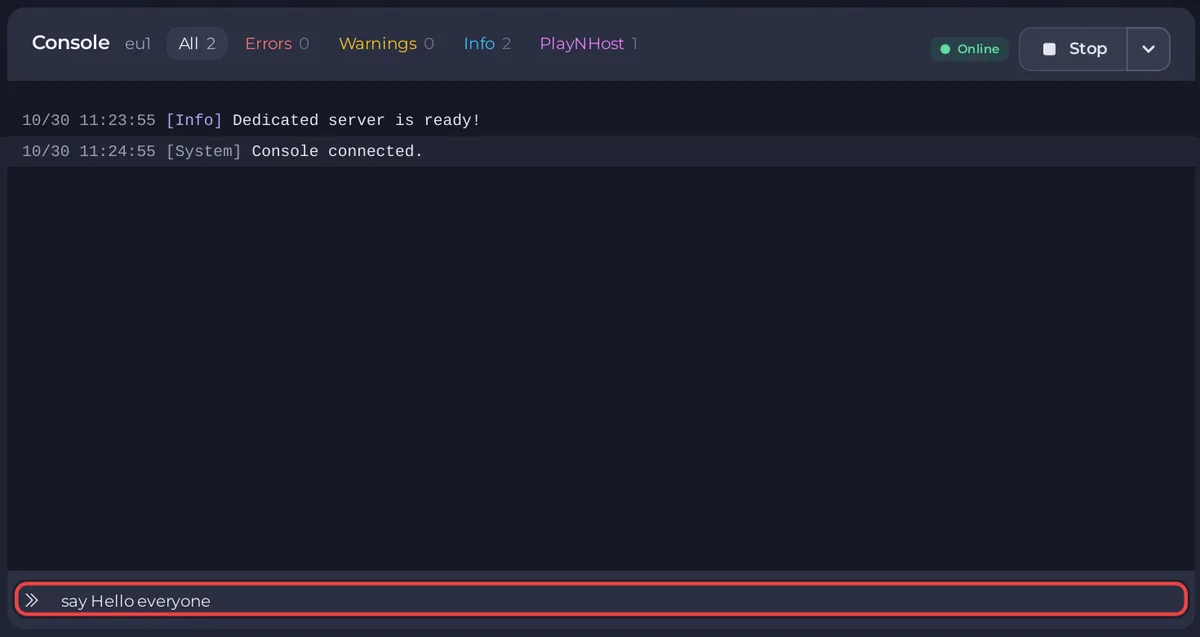
- Open your server in the panel and click the Console tab.
- Check that the server is Online and the Console has shown
Dedicated server is ready!. - Click the Type a command box at the bottom.
- Type the command, for example
say Hello everyone, and press Enter. - Wait for the answer in the Console. It can take up to a minute.
If the Console prints Command not found: and your text, the game did not recognise the command. Check its spelling against the list below.
Which commands work in the server console?
These come from the developer's list of server console commands, which says they "don't require you to be logged into the server and they don't require specific permissions".
| Command | What it does |
|---|---|
say <message> | Sends a chat message to all players. |
yell <message> | Sends a big announcement message to all players. |
kick <player> <reason> | Kicks one player. |
kickall <reason> | Kicks every player. |
saveall | Saves all world changes now. The Console prints Save all.... |
makeadmin <playername> | Gives a player admin. A player UID works too. |
revokeadmin <playername> | Takes admin away again. |
tod <hours> <minutes> | Sets the time of day, 24-hour format, for example tod 8 30. |
weather <name> | Changes the weather. Add 1 at the end to change it at once. |
memory | Prints how much memory the server uses. |
version | Prints the server version. |
The developer adds that a say or yell message reaches one player only when you put @ and their name in it.
Which commands should I not use?
restart: the developer calls it experimental. Use the panel's Restart button instead, which the panel can follow.shutdown: it ends the server outside the panel. Use Stop.
Is there a button for saving the world?
Yes. Quick Tasks in the left menu has Save World, which sends saveall for you. You can run it, pin it to your Overview or put it on a schedule: How to restart your Rising World server every day. The developer notes that saving "usually happens automatically every few seconds", so saveall is for the moment before a stop, a backup or a risky change.
Where do I type in-game commands?
Rising World also has a console in the game, which the Rising World community wiki says opens with the ^ key (on a German keyboard, the key left of 1). Some commands, such as ban, are typed there: How to kick and ban players on your Rising World server.
More about the panel's Console: How to use the console and run commands.


