

To join a Rising World server on PlayNHost, copy the Server Address from the server's Overview page, open Multiplayer in Rising World, click the red button for connecting to an IP address, and paste the address with its port. If the server has a password, the game asks for it.
How do I join from Rising World?
- Open your server in the panel. If the badge says Offline, click Start and wait until it says Online.
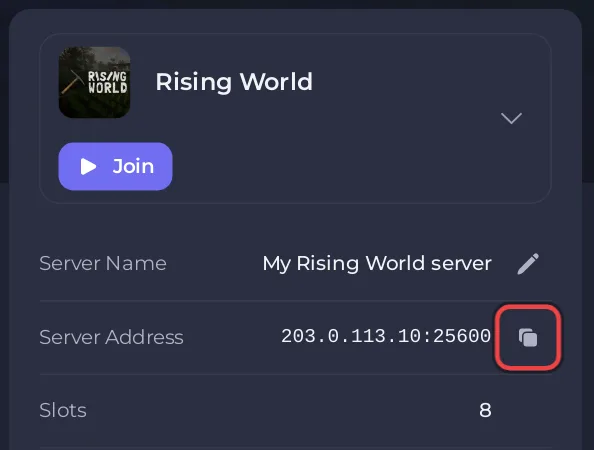
- On the Overview page, click the copy icon next to Server Address. It looks like
203.0.113.10:25600, with your own numbers. - Start Rising World.
- Open the Multiplayer menu.
- Click the red button for connecting to an IP address. In German menus it reads "Zu IP verbinden".
- Paste the whole address, the part after the colon included, and connect.
- If the server has a password, type the Server Password from the panel.
The developer names it the red "Zu IP verbinden" (connect to IP) button in the Multiplayer menu, in a German forum answer from April 2025.
Why connect by IP and not search the server list?
Rising World's server list reads a server's details from a second port, one below the game port. Your PlayNHost server's address has one port, the game port, so the server may not appear in the list, or appear without its details. Connecting by IP only needs the game port, which accepts both TCP and UDP.
Which version must players run?
The current Rising World, the Unity version. Players who switched their game to the "java - Legacy Version" beta branch in Steam must switch back to the normal version. After a Rising World update, players on the new version usually need the server on it too. The developer says in his update posts when an update is optional for servers, as he did for the hotfix of 22 December 2025. With Auto Update on, the server takes the update at its next restart. See How to update your Rising World server.
Who can join?
Players of Rising World on Windows, macOS and Linux, the platforms the developer lists. Each player needs their own copy of the game. The developer lists no console version.
What if I cannot join?
- The badge must say Online and the Console must show
Dedicated server is ready!. - Copy the address again: a missing port is the most common mistake.
- Check the password: it must match Server Password under Settings, Game Settings exactly.
More causes, most likely first: Rising World server problems and fixes. To bring friends along: How to invite friends to your Rising World server.


