

Rising World's developer suggests at least 1 to 2 GB of RAM for a small server with few players, and 4 to 8 GB for more players. On PlayNHost, a new Rising World server used about 686 MiB while it generated its first world and about 308 MiB once it was running with nobody online. Your own usage on Overview, with players on, tells you most.
What did PlayNHost measure?
On a new PlayNHost server with the default world and no players:
| Moment | Memory used |
|---|---|
| Generating the first world | about 686 MiB at the peak |
| Running, nobody online | about 308 MiB |
An empty server tells you little about a busy one: the developer's own figures rise with the number of players.
What does the developer say?
Rising World's dedicated server guide recommends "at least 1-2 GB of RAM" for small servers with few players and 4 to 8 GB for more players. It adds that the server "will continue to allocate more memory if necessary", and that, unlike the old Java version, the server's RAM can no longer be set in a config file.
How do I check my own server's memory?
- Open your server in the panel. On Overview, find the Usage card.
- Click the RAM tab and choose Live (30 minutes), Past 6 hours or Past day.
- Look at it while players are online, on a busy evening.
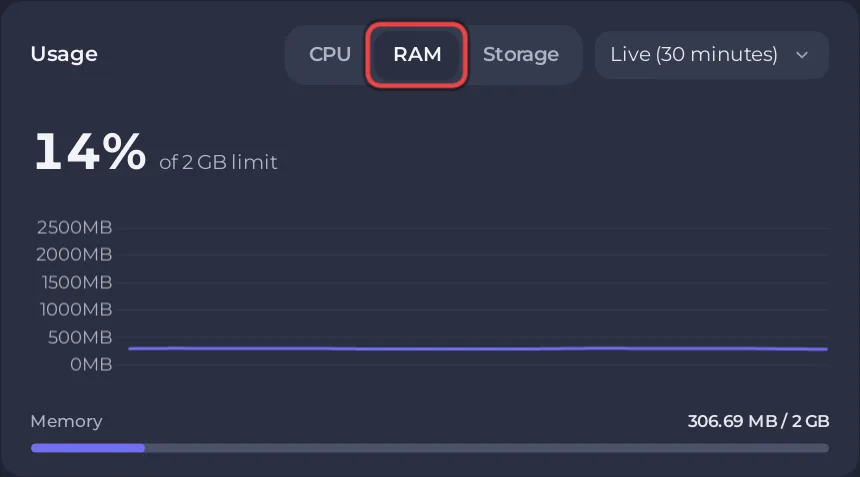
You can also type memory in the Console tab. Rising World prints the memory the server is using, which the developer says does not cover all the memory the process has already taken, so the RAM graph can read higher. More about the graphs: How to read your server's usage graphs.
What happens if it runs out?
If the system stops your server because it needed more memory than its plan gives, the Overview page shows a card, This server ran out of memory, with when it last happened and how many times it happened recently. It has the buttons Add more memory and See the usage. If the card never appears, your server has enough.
How do I keep memory use down?
- Restart once a day. The developer recommends a restart at least every 24 hours: How to restart your Rising World server every day.
- Keep the player limit to your group. The
Settings_MaxPlayersline sets it: How many players can a Rising World server have?. - Expect a peak on a new world. In PlayNHost's measurement, generating the first world used more than twice the memory of the running server.


