

To become admin on a Rising World server on PlayNHost, join the server, then type makeadmin followed by your player name in the panel's Console tab, for example makeadmin Alex. The server console needs no login, so the command works straight from the panel. revokeadmin takes admin away again.
How do I make myself admin?
- Start the server and wait until the Console shows
Dedicated server is ready!. - Join the server from Rising World with your player name: How to join your Rising World server.
- In the panel, click the Console tab.
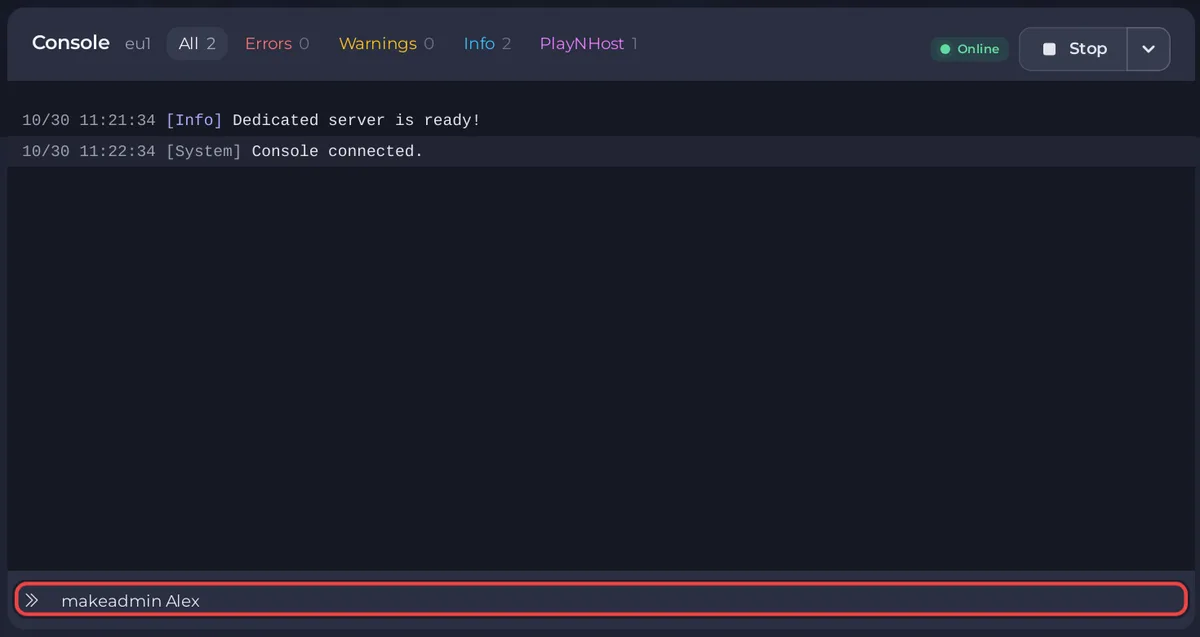
- Type
makeadminand your player name, exactly as it shows in the game, for examplemakeadmin Alex. Press Enter. - Wait. Rising World's server console can take up to a minute to pick up a typed command. Do not type it again straight away.
The developer's list of server console commands gives the command as makeadmin <playername> or makeadmin <playeruid>, and says these commands "don't require you to be logged into the server and they don't require specific permissions".
How do I make a friend admin?
The same way: your friend joins, and you type makeadmin with their player name in the Console. Admin in the game is separate from the panel. To let a friend use the panel too, invite them in Team & Roles: How to invite friends to your Rising World server.
How do I remove an admin?
Type revokeadmin and the player name in the Console, for example revokeadmin Alex. A player UID works too.
Can I add admins in server.properties?
Yes. The official 2021 sample server.properties has a line Server_Admins, described as "UIDs of server admins (separated by semicolon)". It takes player UIDs, not names, so makeadmin in the Console is the easier way. If you use the line, stop the server first, edit server.properties under Files, click Save content and start the server. More: Rising World server settings reference.
How do I change what admins and players may do?
Since update 0.9.3 (31 August 2026), Rising World has a permission editor in the game. According to the developer's patch notes, you need the savepermissions permission, then press ESC and click the small red edit button next to Permissions. The developer calls the editor an experimental feature.
What next?
Kicking and banning players: How to kick and ban players on your Rising World server. Commands for the panel's Console: How to use the Console and commands on your Rising World server.


