

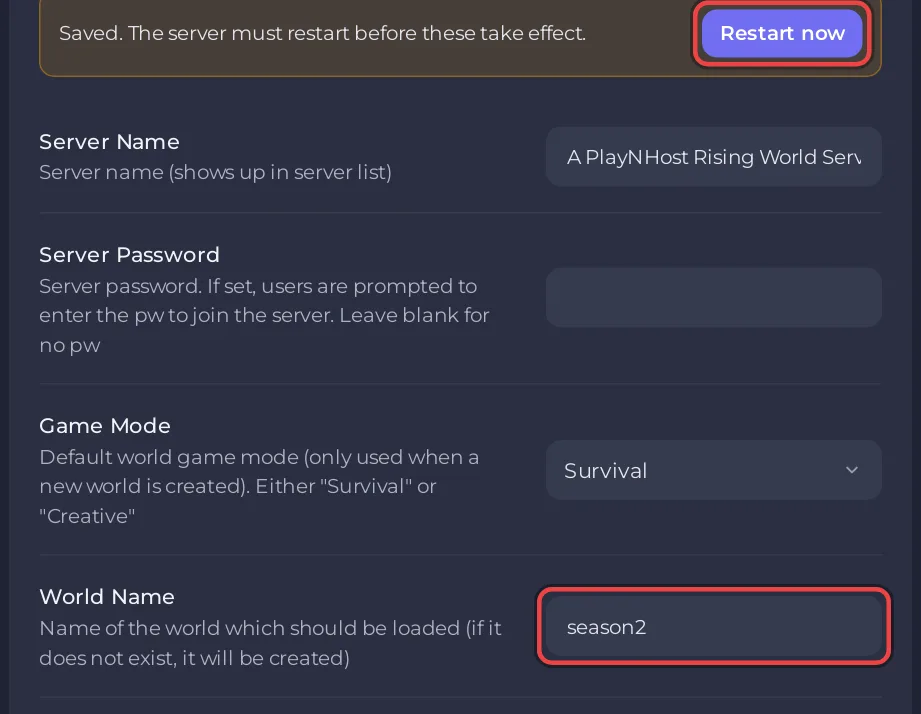
To start a new world on a Rising World server on PlayNHost, type a new name in World Name under Settings, Game Settings, and click Restart now. Rising World creates a world with that name and keeps the old one in the Worlds folder. Type the old name back to return to it.
How do I start a new world?
- Open your server in the panel, click Quick Tasks in the left menu and run Save World, so the current world is saved.
- Click the Settings tab, then Game Settings.
- Pick Survival or Creative in Game Mode. It only applies when a world is created.
- Type a new name in World Name, up to 20 characters, for example
season2, and press Enter. - Click Restart now.
- Open the Console tab and wait for
Dedicated server is ready!. A new world takes longer to start than an existing one, because it is generated.
The developer explains, in a forum answer from April 2026, that "The active world is determined by the server.properties file (it's the "World_Name" entry)" and that a world which "still exists in the "Worlds" folder" is loaded. The panel writes World Name into that line at every start.
How do I go back to my old world?
Type the old world's name in World Name and click Restart now. A new server's first world is called myworld. To see every world on the server, open Files, then Worlds: each folder is one world. Type the name exactly as the folder is written, capitals included, or Rising World creates another new world.
Can I choose the seed of the new world?
Yes, with the World_Seed line in server.properties under Files, before the world is created. The developer says "The seed is stored per world", and that an empty World_Seed gives a random seed. Set the seed before you type the new World Name:
- Click Stop and wait for Offline.
- Open Files and click
server.properties. - Type your seed after
World_Seed=and click Save content. - Set the new World Name under Settings, Game Settings, and click Start.
Can I reset the world and keep the same name?
Yes, by deleting the world's folder. Take a backup first, because a deleted world cannot come back without one: How to back up and restore your Rising World server.
- Click Stop and wait for Offline.
- Open Files, then
Worlds. - Open the ... menu of your world's folder and choose Delete folder. Confirm.
- Click Start. Rising World generates a new world with the same name, from
World_Seedor a random seed.
If the server started a new world when you did not want one, see Rising World server problems and fixes.


