

To invite friends to a Rising World server on PlayNHost, copy the Server Address from the server's Overview page and send it to them with the Server Password, if you set one. Each friend opens Multiplayer in Rising World and connects to that IP address. To let a friend help run the server, invite them in Team & Roles.
How do I send my friends the address?
- Open your server in the panel. You land on Overview.
- Click the copy icon next to Server Address.
- Paste the address to your friends in Discord, Steam chat or a message. Keep the part after the colon: it is the port, and Rising World needs it.
- If the server has a password, send the Server Password too. You find it under Settings, Game Settings.
- Tell them to open Multiplayer in Rising World and use the red button for connecting to an IP address.
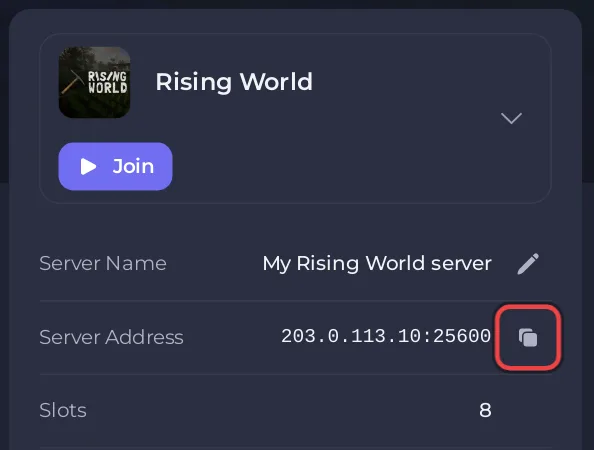
A message like this works:
Join my Rising World server: 203.0.113.10:25600
Password: (your password)
In Rising World: Multiplayer, then the red connect-to-IP button.
Use your own address from the panel. Full join steps for your friends: How to join your Rising World server.
What should I check before I invite people?
- The server is Online. The Console shows
Dedicated server is ready!when players can join. - A name and a password you chose. A new server is called
A PlayNHost Rising World Serverand has no password: How to change your Rising World server name and password. - Everyone runs the current Rising World. Friends on the "java - Legacy Version" beta branch in Steam cannot join this server.
- Each friend owns Rising World. It runs on Windows, macOS and Linux. The developer lists no console version.
Why does my server not show in my friends' server list?
Rising World's server list reads a server's details from a second port, one below the game port, according to the developer's dedicated server guide. Your PlayNHost server's address has one port, so friends should connect by IP and not search the list.
How do I let a friend help run the server?
The address lets a friend play. To let a friend start and restart the server, use the Console or edit files, invite them to the panel:
- Click Team & Roles in the left menu.
- Click Invite someone, or Invite people at the top of the server page.
- Type their Email address and pick a Role. The role is a starting point: you can tick or untick its permissions below it.
- Click Send invitation. They get an email with a link to accept.
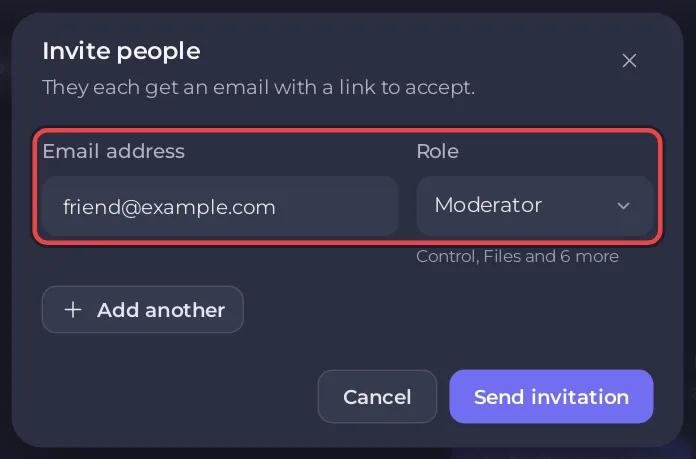
More about roles: How to invite friends and give them access.
Panel access does not make anyone an admin inside the game. For that, use makeadmin in the Console: How to become admin on your Rising World server.


