%7B.s%7Banimation%3Ab%201.5s%20ease-out%20both%7D.d%7Banimation-delay%3A.16s%7D%7D%40keyframes%20b%7B0%25%7Bfill%3A%23F4F6FA%7D18%25%7Bfill%3A%23FFE08A%7D34%25%2C70%25%7Bfill%3A%23FF8A1F%7D80%25%7Bfill%3A%23FFE08A%7D100%25%7Bfill%3A%23FF8A1F%7D%7D%3C%2Fstyle%3E%3Cg%20transform%3D%22translate(143%20428.93)%20scale(3.885906)%22%3E%3Cg%20transform%3D%22translate(0%202)%22%20fill%3D%22%23706EF0%22%3E%3Cpath%20d%3D%22M0%200%20H48%20A40%2040%200%200%201%2048%2080%20V100%20H0%20Z%22%2F%3E%3Cpath%20transform%3D%22translate(91.75%200)%22%20d%3D%22M0%200%20L48%200%20L48%2050%20L76%2050%20L76%20100%20L0%20100%20Z%22%2F%3E%3Cpath%20transform%3D%22translate(173%200)%22%20d%3D%22M0%20100%20L58%20-4%20L116%20100%20Z%22%2F%3E%3Cpath%20transform%3D%22translate(264.25%200)%22%20d%3D%22M0%200%20L104%200%20L76%2050%20L76%20100%20L28%20100%20L28%2050%20Z%22%2F%3E%3Cg%20transform%3D%22translate(375%200)%22%3E%3Cpath%20d%3D%22M0%200%20L50%2038%20L50%200%20L100%200%20L100%20100%20L0%20100%20Z%22%20fill%3D%22%23F4F6FA%22%2F%3E%3Crect%20class%3D%22s%22%20x%3D%2247%22%20y%3D%2263%22%20width%3D%2219%22%20height%3D%2230%22%2F%3E%3Crect%20class%3D%22s%20d%22%20x%3D%2274%22%20y%3D%2263%22%20width%3D%2219%22%20height%3D%2230%22%2F%3E%3C%2Fg%3E%3Cpath%20transform%3D%22translate(484.75%200)%22%20d%3D%22M0%200%20L48%200%20L48%2037%20L52%2037%20L52%200%20L100%200%20L100%20100%20L52%20100%20L52%2063%20L48%2063%20L48%20100%20L0%20100%20Z%22%2F%3E%3Cpath%20transform%3D%22translate(588.5%200)%22%20d%3D%22M0%2050%20A53%2053%200%201%200%20106%2050%20A53%2053%200%201%200%200%2050%20Z%22%2F%3E%3Cpath%20transform%3D%22translate(698.25%200)%22%20d%3D%22M25%200%20H102%20V50%20H77%20A25%2025%200%200%201%2077%20100%20H0%20V50%20H25%20A25%2025%200%200%201%2025%200%20Z%22%2F%3E%3Cpath%20transform%3D%22translate(804%200)%22%20d%3D%22M0%200%20L90%200%20L90%2050%20L69%2050%20L69%20100%20L21%20100%20L21%2050%20L0%2050%20Z%22%2F%3E%3C%2Fg%3E%3C%2Fg%3E%3C%2Fsvg%3E)


Project Zomboid keeps most server rules in one settings file. The panel shows that file as a form called Server Settings, under Settings, then Config files. You change the join password, close the server to new players and set safehouse, PvP and chat rules there, without editing a file by hand. Sandbox rules (zombies, loot, vehicles, the world) have their own form: How to change Project Zomboid sandbox settings in the panel.
Open the editor
- Open your server in the panel and click the Settings tab.
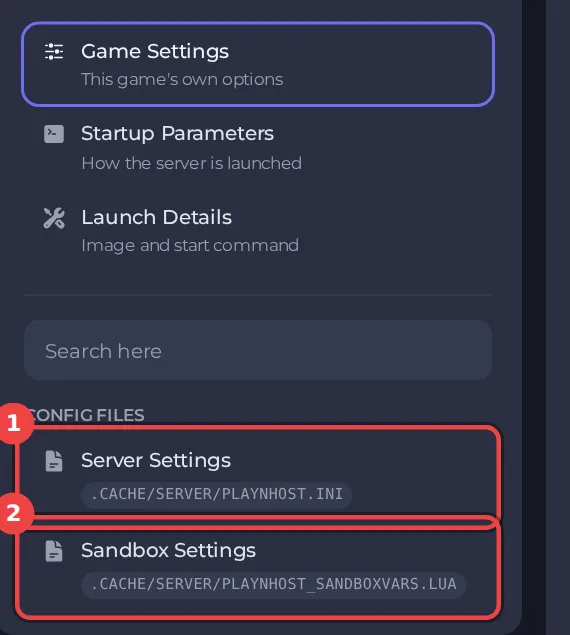
- In the card on the left, look under Config files and click Server Settings. The path of the file is shown at the top, and it is named after your Server Name.
- If the list says No config files yet, start the server once. The game writes its settings file the first time it runs.
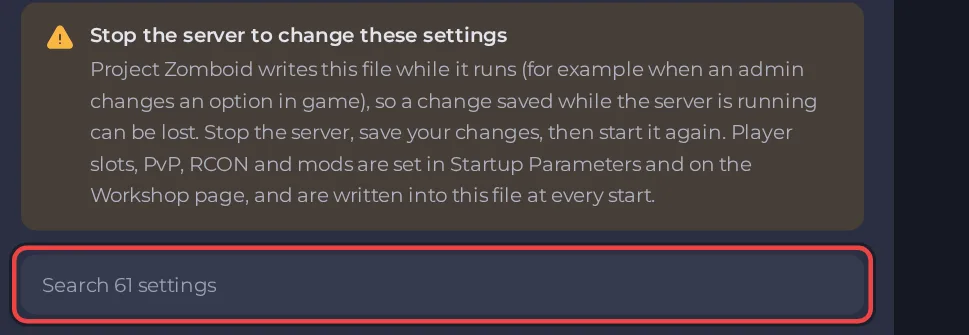
Stop the server before you save
The game writes this file while it runs, so a change saved while the server is running can be lost. The editor shows Stop the server to change these settings and keeps its save buttons switched off until the server is stopped.
- Click Stop and wait for Offline.
- Change your settings. The box at the top searches all settings by name, and each heading can be folded.
- Click Save only, or Save & start to save and start in one step. Revert discards your edits.

A value outside the allowed range shows "This value is outside the range the file allows." under that setting, and the save buttons stay off until you fix it. The editor shows a setting only when the file has it, so a rule that the game does not read on your build is not offered.
The eight groups
| Group | What it holds | Guide |
|---|---|---|
| Listing and joining | Join password, new accounts, server list name, ping limit | Listing and joining |
| Players | Pause when empty, spawn point, names, sleep, chat, voice | Players |
| PvP safety | PvP toggle, skull, timers, damage | PvP safety |
| Safehouses | Who can claim, enter, loot and burn | Safehouses |
| Factions | Create factions, tags | Factions |
| World | Save interval, fire, sledgehammers, containers | World |
| Game backups | The game's own backup copies | Game backups |
| Discord | Chat bridge to a Discord channel | Discord |
Settings that are not here
Some settings are written into the file at every start from other pages, so the editor does not offer them, and an edit made in the file by hand is overwritten:
- Player slots: your plan sets the limit. Use Edit slots on the Active players card: How to change player slots on your Project Zomboid server.
- PVP and the RCON Password: Settings, then Game Settings.
- The Workshop items, the mods and the map folders: the Workshop tab.
A few other settings are not in the editor at all: the anti-cheat levels, the chat and log filters and the world seed. Edit those under Files with the server stopped. The panel does not overwrite them. Leave the world seed alone: changing it would make a different world.
Good to know
- The panel's own text on this page and on the Sandbox Settings page says "Startup Parameters" for slots, PvP and RCON. Those rows are under Game Settings.
- Back up before big changes: How to back up and restore your Project Zomboid world.
- A save that is refused or reverts: Your Project Zomboid settings will not save and Your Project Zomboid settings keep changing back.





