%7B.s%7Banimation%3Ab%201.5s%20ease-out%20both%7D.d%7Banimation-delay%3A.16s%7D%7D%40keyframes%20b%7B0%25%7Bfill%3A%23F4F6FA%7D18%25%7Bfill%3A%23FFE08A%7D34%25%2C70%25%7Bfill%3A%23FF8A1F%7D80%25%7Bfill%3A%23FFE08A%7D100%25%7Bfill%3A%23FF8A1F%7D%7D%3C%2Fstyle%3E%3Cg%20transform%3D%22translate(143%20428.93)%20scale(3.885906)%22%3E%3Cg%20transform%3D%22translate(0%202)%22%20fill%3D%22%23706EF0%22%3E%3Cpath%20d%3D%22M0%200%20H48%20A40%2040%200%200%201%2048%2080%20V100%20H0%20Z%22%2F%3E%3Cpath%20transform%3D%22translate(91.75%200)%22%20d%3D%22M0%200%20L48%200%20L48%2050%20L76%2050%20L76%20100%20L0%20100%20Z%22%2F%3E%3Cpath%20transform%3D%22translate(173%200)%22%20d%3D%22M0%20100%20L58%20-4%20L116%20100%20Z%22%2F%3E%3Cpath%20transform%3D%22translate(264.25%200)%22%20d%3D%22M0%200%20L104%200%20L76%2050%20L76%20100%20L28%20100%20L28%2050%20Z%22%2F%3E%3Cg%20transform%3D%22translate(375%200)%22%3E%3Cpath%20d%3D%22M0%200%20L50%2038%20L50%200%20L100%200%20L100%20100%20L0%20100%20Z%22%20fill%3D%22%23F4F6FA%22%2F%3E%3Crect%20class%3D%22s%22%20x%3D%2247%22%20y%3D%2263%22%20width%3D%2219%22%20height%3D%2230%22%2F%3E%3Crect%20class%3D%22s%20d%22%20x%3D%2274%22%20y%3D%2263%22%20width%3D%2219%22%20height%3D%2230%22%2F%3E%3C%2Fg%3E%3Cpath%20transform%3D%22translate(484.75%200)%22%20d%3D%22M0%200%20L48%200%20L48%2037%20L52%2037%20L52%200%20L100%200%20L100%20100%20L52%20100%20L52%2063%20L48%2063%20L48%20100%20L0%20100%20Z%22%2F%3E%3Cpath%20transform%3D%22translate(588.5%200)%22%20d%3D%22M0%2050%20A53%2053%200%201%200%20106%2050%20A53%2053%200%201%200%200%2050%20Z%22%2F%3E%3Cpath%20transform%3D%22translate(698.25%200)%22%20d%3D%22M25%200%20H102%20V50%20H77%20A25%2025%200%200%201%2077%20100%20H0%20V50%20H25%20A25%2025%200%200%201%2025%200%20Z%22%2F%3E%3Cpath%20transform%3D%22translate(804%200)%22%20d%3D%22M0%200%20L90%200%20L90%2050%20L69%2050%20L69%20100%20L21%20100%20L21%2050%20L0%2050%20Z%22%2F%3E%3C%2Fg%3E%3C%2Fg%3E%3C%2Fsvg%3E)


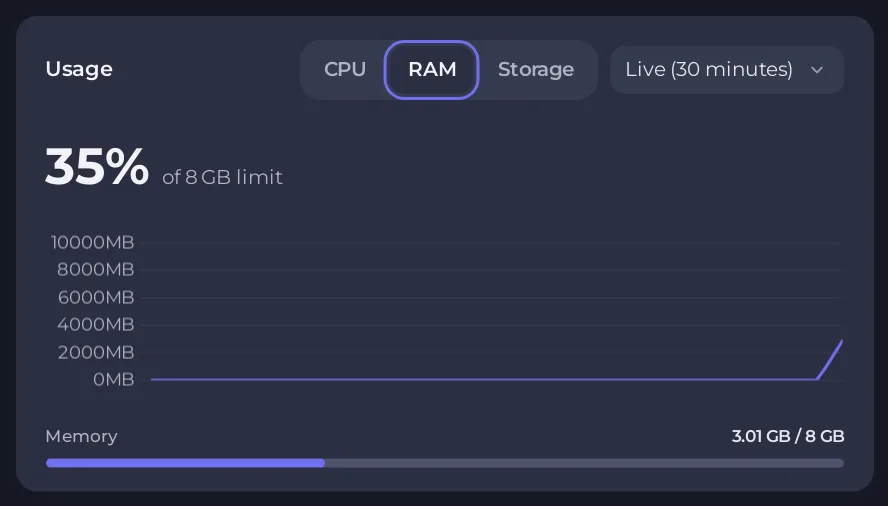
A Project Zomboid server uses more memory with more players, more mods and a bigger loaded part of the map. The Usage card on the Overview page shows how much of your plan's memory the server is using now. If the RAM line sits at the top of your plan, or the server restarts by itself, you need fewer mods or a bigger plan.
Read the Usage card
- Open your server in the panel and stay on Overview.
- Find the Usage card. It has the tabs CPU, RAM and Storage.
- Click RAM. The graph shows memory over time. Watch it at a busy hour, with your usual players and mods.
More about the graphs: How to read your server's usage graphs.
How the server sizes its memory
When the server starts, the panel gives the game your plan's memory minus about 1 GB, and keeps the rest for the system. It also makes sure the game uses the normal Java memory manager, because the other one counts its memory several times against your plan and the server can be shut down while it looks healthy. You do not need to set anything for this.
What raises memory use
- Players. More players load more of the map at once.
- Mods. Each mod adds items, scripts and sometimes maps. A big list of mods raises memory use.
- Vehicles and zombies. Many vehicles and a high zombie population cost memory: How to change the vehicle settings of your Project Zomboid server.
- Time. Compare the graph just after a start with the graph after several hours. If it keeps climbing, a scheduled restart gives the server a clean start: How to schedule restarts and backups for your Project Zomboid server.
We do not state a fixed number of GB per player, because it depends on your mods and map. Measure on your own server.
When to move to a bigger plan
- The RAM graph stays at the top of your plan while players are online.
- The server stops without you pressing Stop: Your Project Zomboid server will not start.
- Players lag more as more of them join: Why is my Project Zomboid server lagging.
Open My plan in the left menu (owner only) to see the options for your server. First try removing mods or lowering Zombie Population: How to change zombie population, respawn and loot respawn on your Project Zomboid server.





