%7B.s%7Banimation%3Ab%201.5s%20ease-out%20both%7D.d%7Banimation-delay%3A.16s%7D%7D%40keyframes%20b%7B0%25%7Bfill%3A%23F4F6FA%7D18%25%7Bfill%3A%23FFE08A%7D34%25%2C70%25%7Bfill%3A%23FF8A1F%7D80%25%7Bfill%3A%23FFE08A%7D100%25%7Bfill%3A%23FF8A1F%7D%7D%3C%2Fstyle%3E%3Cg%20transform%3D%22translate(143%20428.93)%20scale(3.885906)%22%3E%3Cg%20transform%3D%22translate(0%202)%22%20fill%3D%22%23706EF0%22%3E%3Cpath%20d%3D%22M0%200%20H48%20A40%2040%200%200%201%2048%2080%20V100%20H0%20Z%22%2F%3E%3Cpath%20transform%3D%22translate(91.75%200)%22%20d%3D%22M0%200%20L48%200%20L48%2050%20L76%2050%20L76%20100%20L0%20100%20Z%22%2F%3E%3Cpath%20transform%3D%22translate(173%200)%22%20d%3D%22M0%20100%20L58%20-4%20L116%20100%20Z%22%2F%3E%3Cpath%20transform%3D%22translate(264.25%200)%22%20d%3D%22M0%200%20L104%200%20L76%2050%20L76%20100%20L28%20100%20L28%2050%20Z%22%2F%3E%3Cg%20transform%3D%22translate(375%200)%22%3E%3Cpath%20d%3D%22M0%200%20L50%2038%20L50%200%20L100%200%20L100%20100%20L0%20100%20Z%22%20fill%3D%22%23F4F6FA%22%2F%3E%3Crect%20class%3D%22s%22%20x%3D%2247%22%20y%3D%2263%22%20width%3D%2219%22%20height%3D%2230%22%2F%3E%3Crect%20class%3D%22s%20d%22%20x%3D%2274%22%20y%3D%2263%22%20width%3D%2219%22%20height%3D%2230%22%2F%3E%3C%2Fg%3E%3Cpath%20transform%3D%22translate(484.75%200)%22%20d%3D%22M0%200%20L48%200%20L48%2037%20L52%2037%20L52%200%20L100%200%20L100%20100%20L52%20100%20L52%2063%20L48%2063%20L48%20100%20L0%20100%20Z%22%2F%3E%3Cpath%20transform%3D%22translate(588.5%200)%22%20d%3D%22M0%2050%20A53%2053%200%201%200%20106%2050%20A53%2053%200%201%200%200%2050%20Z%22%2F%3E%3Cpath%20transform%3D%22translate(698.25%200)%22%20d%3D%22M25%200%20H102%20V50%20H77%20A25%2025%200%200%201%2077%20100%20H0%20V50%20H25%20A25%2025%200%200%201%2025%200%20Z%22%2F%3E%3Cpath%20transform%3D%22translate(804%200)%22%20d%3D%22M0%200%20L90%200%20L90%2050%20L69%2050%20L69%20100%20L21%20100%20L21%2050%20L0%2050%20Z%22%2F%3E%3C%2Fg%3E%3C%2Fg%3E%3C%2Fsvg%3E)


Project Zomboid can make its own copies of your save. They are separate from the backups on the Backups page of the panel. The Game backups group sets when the game makes them and how many it keeps. Each game copy is a full copy of the save and uses disk space on your server.
Open the editor
- Open your server in the panel and click the Settings tab.
- In the list on the left, under Config files, click Server Settings. The file name is shown at the top.
- If the list says No config files yet, start the server once. The game writes its settings file the first time it runs.
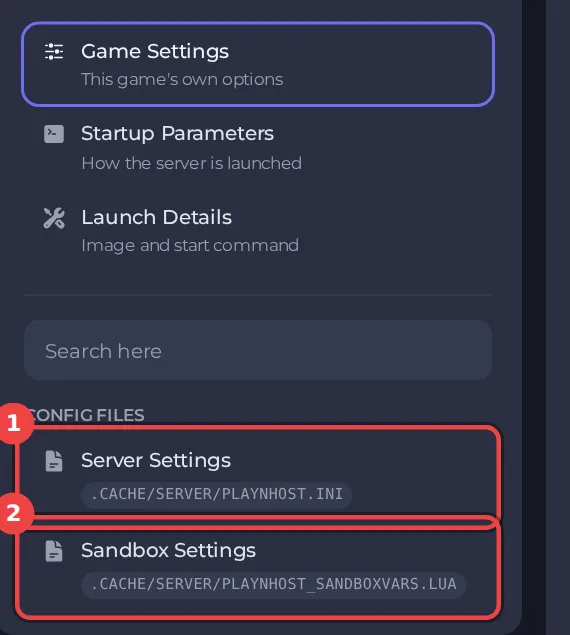
The editor only saves while the server is stopped, because the game writes this file while it runs. Stop the server, change the settings below, then click Save only or Save & start. The full steps are in How to change Project Zomboid server settings in the panel. Headings such as Game backups appear in capitals in the editor, and the search box at the top finds any setting by its name.
Every setting in Game backups
| Setting | What it does | Values |
|---|---|---|
| Back up on every start | The game copies the save into .cache/backups each time the server starts. These copies are separate from the panel's own backups. | On or off |
| Back up when the game updates | The game copies the save before it loads it on a new game version. | On or off |
| Backups to keep | How many of the game's own backups are kept before the oldest is deleted. Each one is a full copy of the save and uses disk space. | A whole number from 1 to 300 |
| Back up every (minutes) | Also back up the save every this many minutes while the server runs. 0 turns it off. | A whole number from 0 to 1500 |
Game backups and panel backups
- The game's copies are kept on your server, in the
.cache/backupsfolder under Files. If the server is deleted, they go with it. - Panel backups leave that folder out on purpose, so a panel backup does not carry the same world several times. Use the Backups page for copies you can download and restore: How to back up and restore your Project Zomboid world.
- Each game copy is a full copy of the save, as the Backups to keep setting says. To look inside one, download it with Files. Before you put one back over your world, take a panel backup of the current state, and open a ticket if you are not sure what is inside.
Good to know
- Settings you change here apply at the next start. A sandbox rule or server rule that is not in this editor can still be edited under Files, with the server stopped.
- These settings belong to the save named by Server Name under Settings, then Game Settings. A new Server Name starts a world with its own settings files: How to switch between Project Zomboid worlds on your server.
- Back up first if a change could affect players' progress: How to back up and restore your Project Zomboid world.





