%7B.s%7Banimation%3Ab%201.5s%20ease-out%20both%7D.d%7Banimation-delay%3A.16s%7D%7D%40keyframes%20b%7B0%25%7Bfill%3A%23F4F6FA%7D18%25%7Bfill%3A%23FFE08A%7D34%25%2C70%25%7Bfill%3A%23FF8A1F%7D80%25%7Bfill%3A%23FFE08A%7D100%25%7Bfill%3A%23FF8A1F%7D%7D%3C%2Fstyle%3E%3Cg%20transform%3D%22translate(143%20428.93)%20scale(3.885906)%22%3E%3Cg%20transform%3D%22translate(0%202)%22%20fill%3D%22%23706EF0%22%3E%3Cpath%20d%3D%22M0%200%20H48%20A40%2040%200%200%201%2048%2080%20V100%20H0%20Z%22%2F%3E%3Cpath%20transform%3D%22translate(91.75%200)%22%20d%3D%22M0%200%20L48%200%20L48%2050%20L76%2050%20L76%20100%20L0%20100%20Z%22%2F%3E%3Cpath%20transform%3D%22translate(173%200)%22%20d%3D%22M0%20100%20L58%20-4%20L116%20100%20Z%22%2F%3E%3Cpath%20transform%3D%22translate(264.25%200)%22%20d%3D%22M0%200%20L104%200%20L76%2050%20L76%20100%20L28%20100%20L28%2050%20Z%22%2F%3E%3Cg%20transform%3D%22translate(375%200)%22%3E%3Cpath%20d%3D%22M0%200%20L50%2038%20L50%200%20L100%200%20L100%20100%20L0%20100%20Z%22%20fill%3D%22%23F4F6FA%22%2F%3E%3Crect%20class%3D%22s%22%20x%3D%2247%22%20y%3D%2263%22%20width%3D%2219%22%20height%3D%2230%22%2F%3E%3Crect%20class%3D%22s%20d%22%20x%3D%2274%22%20y%3D%2263%22%20width%3D%2219%22%20height%3D%2230%22%2F%3E%3C%2Fg%3E%3Cpath%20transform%3D%22translate(484.75%200)%22%20d%3D%22M0%200%20L48%200%20L48%2037%20L52%2037%20L52%200%20L100%200%20L100%20100%20L52%20100%20L52%2063%20L48%2063%20L48%20100%20L0%20100%20Z%22%2F%3E%3Cpath%20transform%3D%22translate(588.5%200)%22%20d%3D%22M0%2050%20A53%2053%200%201%200%20106%2050%20A53%2053%200%201%200%200%2050%20Z%22%2F%3E%3Cpath%20transform%3D%22translate(698.25%200)%22%20d%3D%22M25%200%20H102%20V50%20H77%20A25%2025%200%200%201%2077%20100%20H0%20V50%20H25%20A25%2025%200%200%201%2025%200%20Z%22%2F%3E%3Cpath%20transform%3D%22translate(804%200)%22%20d%3D%22M0%200%20L90%200%20L90%2050%20L69%2050%20L69%20100%20L21%20100%20L21%2050%20L0%2050%20Z%22%2F%3E%3C%2Fg%3E%3C%2Fg%3E%3C%2Fsvg%3E)


The PvP safety group lets players protect themselves from other players. Whether players can hurt each other at all is the PVP switch under Settings, then Game Settings: How to turn PvP on or off on your Project Zomboid server. The settings here only matter while that switch is on.
Open the editor
- Open your server in the panel and click the Settings tab.
- In the list on the left, under Config files, click Server Settings. The file name is shown at the top.
- If the list says No config files yet, start the server once. The game writes its settings file the first time it runs.
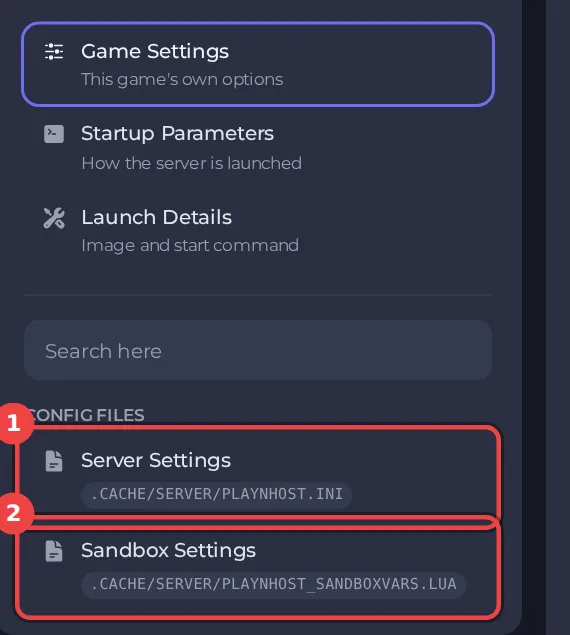
The editor only saves while the server is stopped, because the game writes this file while it runs. Stop the server, change the settings below, then click Save only or Save & start. The full steps are in How to change Project Zomboid server settings in the panel. Headings such as PvP safety appear in capitals in the editor, and the search box at the top finds any setting by its name.
Every setting in PvP safety
| Setting | What it does | Values |
|---|---|---|
| PvP toggle | Each player switches their own PvP mode on and off, and players can only hurt each other when one of them has it on. Off: with PvP on, anyone can hurt anyone at any time. | On or off |
| Show PvP skull | Shows a skull over players who have PvP mode on. | On or off |
| PvP toggle time (seconds) | How long it takes to switch PvP mode on or off. | A whole number from 0 to 1000 |
| PvP toggle cooldown (seconds) | How long a player waits before switching PvP mode again. | A whole number from 0 to 1000 |
| PvP melee damage | Damage multiplier for melee attacks on other players. The game's default is 30. | A number from 0 to 500 |
| PvP firearm damage | Damage multiplier for gunshots on other players. The game's default is 50. | A number from 0 to 500 |
How the pieces fit
- PVP (Game Settings) on: players can hurt each other.
- PvP toggle on: each player switches their own PvP mode on and off, and players can only hurt each other when one of them has it on.
- Show PvP skull shows who has PvP mode on.
- PvP toggle time (seconds) and PvP toggle cooldown (seconds) stop players from switching in the middle of a fight.
- PvP melee damage and PvP firearm damage scale the damage between players.
Good to know
- Settings you change here apply at the next start. A sandbox rule or server rule that is not in this editor can still be edited under Files, with the server stopped.
- These settings belong to the save named by Server Name under Settings, then Game Settings. A new Server Name starts a world with its own settings files: How to switch between Project Zomboid worlds on your server.
- Back up first if a change could affect players' progress: How to back up and restore your Project Zomboid world.





