%7B.s%7Banimation%3Ab%201.5s%20ease-out%20both%7D.d%7Banimation-delay%3A.16s%7D%7D%40keyframes%20b%7B0%25%7Bfill%3A%23F4F6FA%7D18%25%7Bfill%3A%23FFE08A%7D34%25%2C70%25%7Bfill%3A%23FF8A1F%7D80%25%7Bfill%3A%23FFE08A%7D100%25%7Bfill%3A%23FF8A1F%7D%7D%3C%2Fstyle%3E%3Cg%20transform%3D%22translate(143%20428.93)%20scale(3.885906)%22%3E%3Cg%20transform%3D%22translate(0%202)%22%20fill%3D%22%23706EF0%22%3E%3Cpath%20d%3D%22M0%200%20H48%20A40%2040%200%200%201%2048%2080%20V100%20H0%20Z%22%2F%3E%3Cpath%20transform%3D%22translate(91.75%200)%22%20d%3D%22M0%200%20L48%200%20L48%2050%20L76%2050%20L76%20100%20L0%20100%20Z%22%2F%3E%3Cpath%20transform%3D%22translate(173%200)%22%20d%3D%22M0%20100%20L58%20-4%20L116%20100%20Z%22%2F%3E%3Cpath%20transform%3D%22translate(264.25%200)%22%20d%3D%22M0%200%20L104%200%20L76%2050%20L76%20100%20L28%20100%20L28%2050%20Z%22%2F%3E%3Cg%20transform%3D%22translate(375%200)%22%3E%3Cpath%20d%3D%22M0%200%20L50%2038%20L50%200%20L100%200%20L100%20100%20L0%20100%20Z%22%20fill%3D%22%23F4F6FA%22%2F%3E%3Crect%20class%3D%22s%22%20x%3D%2247%22%20y%3D%2263%22%20width%3D%2219%22%20height%3D%2230%22%2F%3E%3Crect%20class%3D%22s%20d%22%20x%3D%2274%22%20y%3D%2263%22%20width%3D%2219%22%20height%3D%2230%22%2F%3E%3C%2Fg%3E%3Cpath%20transform%3D%22translate(484.75%200)%22%20d%3D%22M0%200%20L48%200%20L48%2037%20L52%2037%20L52%200%20L100%200%20L100%20100%20L52%20100%20L52%2063%20L48%2063%20L48%20100%20L0%20100%20Z%22%2F%3E%3Cpath%20transform%3D%22translate(588.5%200)%22%20d%3D%22M0%2050%20A53%2053%200%201%200%20106%2050%20A53%2053%200%201%200%200%2050%20Z%22%2F%3E%3Cpath%20transform%3D%22translate(698.25%200)%22%20d%3D%22M25%200%20H102%20V50%20H77%20A25%2025%200%200%201%2077%20100%20H0%20V50%20H25%20A25%2025%200%200%201%2025%200%20Z%22%2F%3E%3Cpath%20transform%3D%22translate(804%200)%22%20d%3D%22M0%200%20L90%200%20L90%2050%20L69%2050%20L69%20100%20L21%20100%20L21%2050%20L0%2050%20Z%22%2F%3E%3C%2Fg%3E%3C%2Fg%3E%3C%2Fsvg%3E)


The World group has the server's save interval and a few rules about fire, destruction and containers. These are server rules. Rules about weather, loot and zombies are in the sandbox editor: How to change Project Zomboid sandbox settings in the panel.
Open the editor
- Open your server in the panel and click the Settings tab.
- In the list on the left, under Config files, click Server Settings. The file name is shown at the top.
- If the list says No config files yet, start the server once. The game writes its settings file the first time it runs.
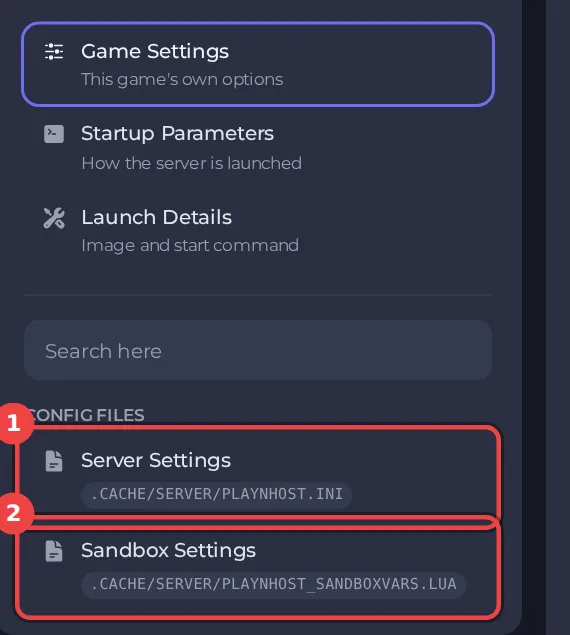
The editor only saves while the server is stopped, because the game writes this file while it runs. Stop the server, change the settings below, then click Save only or Save & start. The full steps are in How to change Project Zomboid server settings in the panel. Headings such as World appear in capitals in the editor, and the search box at the top finds any setting by its name.
Every setting in World
| Setting | What it does | Values |
|---|---|---|
| Save the world every (minutes) | Saves the loaded parts of the map every this many real-world minutes. 0 saves only when players leave an area, which is the game's default. | A whole number from 0 to 2147483647 |
| No fire | Turns off every kind of fire except campfires. | On or off |
| Sledgehammers break walls | Players can destroy world objects with a sledgehammer. | On or off |
| Sledgehammers only in safehouses | Sledgehammers only work inside the player's own safehouse. | On or off |
| Items per container | The most items a container can hold, counting each nail or bullet. 0 means no limit. | A whole number from 0 to 9000 |
| Blood stays for (days) | Days before old blood is cleaned from the map. 0 means it never disappears. | A whole number from 0 to 365 |
| Time speed while sleeping | How much faster time passes while everyone online is asleep. The game's default is 40. | A number from 1 to 100 |
About the save interval
Save the world every (minutes) at 0 saves only when players leave an area, which is the game's default. A shorter interval costs less progress after a crash. The Save World task and a normal Stop also save: How to stop and save your Project Zomboid server safely.
Good to know
- Settings you change here apply at the next start. A sandbox rule or server rule that is not in this editor can still be edited under Files, with the server stopped.
- These settings belong to the save named by Server Name under Settings, then Game Settings. A new Server Name starts a world with its own settings files: How to switch between Project Zomboid worlds on your server.
- Back up first if a change could affect players' progress: How to back up and restore your Project Zomboid world.





