%7B.s%7Banimation%3Ab%201.5s%20ease-out%20both%7D.d%7Banimation-delay%3A.16s%7D%7D%40keyframes%20b%7B0%25%7Bfill%3A%23F4F6FA%7D18%25%7Bfill%3A%23FFE08A%7D34%25%2C70%25%7Bfill%3A%23FF8A1F%7D80%25%7Bfill%3A%23FFE08A%7D100%25%7Bfill%3A%23FF8A1F%7D%7D%3C%2Fstyle%3E%3Cg%20transform%3D%22translate(143%20428.93)%20scale(3.885906)%22%3E%3Cg%20transform%3D%22translate(0%202)%22%20fill%3D%22%23706EF0%22%3E%3Cpath%20d%3D%22M0%200%20H48%20A40%2040%200%200%201%2048%2080%20V100%20H0%20Z%22%2F%3E%3Cpath%20transform%3D%22translate(91.75%200)%22%20d%3D%22M0%200%20L48%200%20L48%2050%20L76%2050%20L76%20100%20L0%20100%20Z%22%2F%3E%3Cpath%20transform%3D%22translate(173%200)%22%20d%3D%22M0%20100%20L58%20-4%20L116%20100%20Z%22%2F%3E%3Cpath%20transform%3D%22translate(264.25%200)%22%20d%3D%22M0%200%20L104%200%20L76%2050%20L76%20100%20L28%20100%20L28%2050%20Z%22%2F%3E%3Cg%20transform%3D%22translate(375%200)%22%3E%3Cpath%20d%3D%22M0%200%20L50%2038%20L50%200%20L100%200%20L100%20100%20L0%20100%20Z%22%20fill%3D%22%23F4F6FA%22%2F%3E%3Crect%20class%3D%22s%22%20x%3D%2247%22%20y%3D%2263%22%20width%3D%2219%22%20height%3D%2230%22%2F%3E%3Crect%20class%3D%22s%20d%22%20x%3D%2274%22%20y%3D%2263%22%20width%3D%2219%22%20height%3D%2230%22%2F%3E%3C%2Fg%3E%3Cpath%20transform%3D%22translate(484.75%200)%22%20d%3D%22M0%200%20L48%200%20L48%2037%20L52%2037%20L52%200%20L100%200%20L100%20100%20L52%20100%20L52%2063%20L48%2063%20L48%20100%20L0%20100%20Z%22%2F%3E%3Cpath%20transform%3D%22translate(588.5%200)%22%20d%3D%22M0%2050%20A53%2053%200%201%200%20106%2050%20A53%2053%200%201%200%200%2050%20Z%22%2F%3E%3Cpath%20transform%3D%22translate(698.25%200)%22%20d%3D%22M25%200%20H102%20V50%20H77%20A25%2025%200%200%201%2077%20100%20H0%20V50%20H25%20A25%2025%200%200%201%2025%200%20Z%22%2F%3E%3Cpath%20transform%3D%22translate(804%200)%22%20d%3D%22M0%200%20L90%200%20L90%2050%20L69%2050%20L69%20100%20L21%20100%20L21%2050%20L0%2050%20Z%22%2F%3E%3C%2Fg%3E%3C%2Fg%3E%3C%2Fsvg%3E)


The Players group controls what players see and can do: whether time stops when the server is empty, where new characters appear, whether names and coordinates show, sleep rules, chat and voice. All of them apply at the next start.
Open the editor
- Open your server in the panel and click the Settings tab.
- In the list on the left, under Config files, click Server Settings. The file name is shown at the top.
- If the list says No config files yet, start the server once. The game writes its settings file the first time it runs.
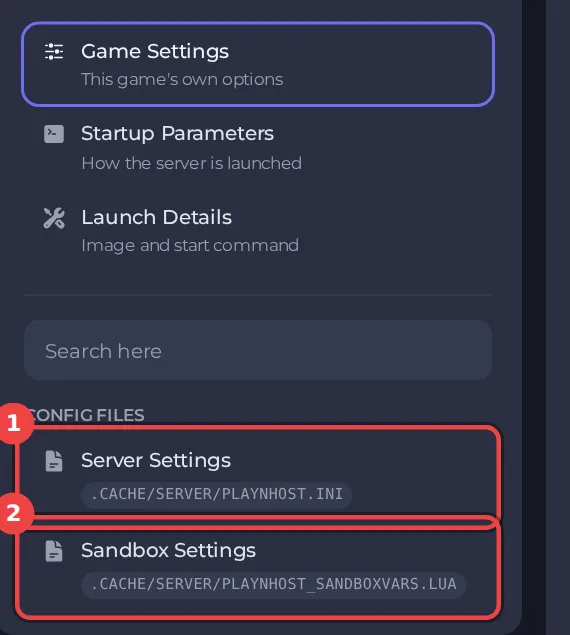
The editor only saves while the server is stopped, because the game writes this file while it runs. Stop the server, change the settings below, then click Save only or Save & start. The full steps are in How to change Project Zomboid server settings in the panel. Headings such as Players appear in capitals in the editor, and the search box at the top finds any setting by its name.
Every setting in Players
| Setting | What it does | Values |
|---|---|---|
| Pause when empty | Game time stops while nobody is online. | On or off |
| Show usernames | Shows usernames above players' heads. | On or off |
| Show character names | Shows each character's first and last name above their head. | On or off |
| Names on mouse-over only | Players must point at someone to see their name. | On or off |
| Forced spawn point | Every new player spawns at these x,y,z map coordinates. 0,0,0 lets players pick a spawn as normal. map.projectzomboid.com shows coordinates. | Three whole numbers, x,y,z, for example 10745,9412,0 (0,0,0 is off) |
| Split-screen players | Allows co-op and split-screen players to join with someone. | On or off |
| Sleeping allowed | Players can sleep when tired. | On or off |
| Sleep needed | Players get tired and must sleep. Needs Sleeping allowed on. | On or off |
| Announce deaths | Posts a message in chat every time a player dies. | On or off |
| Respawn where you died | Players can respawn at the place their last character died. | On or off |
| Respawn at a split-screen partner | Players can respawn at a split-screen or Remote Play partner's location. | On or off |
| Other players on the map | Which other players are shown on the in-game map. | Hidden, Friends, Friends and nearby players, Everyone |
| Show coordinates | Shows each player's map coordinates in the lower right corner. | On or off |
| Global chat | Players can talk to everyone online with /all. | On or off |
| Voice chat | Players can talk to each other with in-game voice chat. | On or off |
| Directional voice | Voices come from the direction of the player speaking. | On or off |
The settings most owners change
- Pause when empty: game time stops while nobody is online.
- Forced spawn point: How to set a spawn point on your Project Zomboid server.
- Other players on the map, Show usernames and Show coordinates decide how easy it is to find friends and enemies.
- Global chat and Voice chat turn the all-players chat and in-game voice on or off.
Good to know
- Settings you change here apply at the next start. A sandbox rule or server rule that is not in this editor can still be edited under Files, with the server stopped.
- These settings belong to the save named by Server Name under Settings, then Game Settings. A new Server Name starts a world with its own settings files: How to switch between Project Zomboid worlds on your server.
- Back up first if a change could affect players' progress: How to back up and restore your Project Zomboid world.





