

If players cannot find your V Rising server in the in-game server list, the quickest fix is to skip the list: copy the Server Address from the Overview page in the PlayNHost panel and join with Direct Connect. Then check that the server is Online, that List On Epic is on, and that players search for the exact Server Name.
Join without the list
- Open your server in the panel and copy the Server Address on the Overview page.
- In V Rising, choose Online Play, then Find Servers (bottom right), then Display all Servers & Settings.
- Click Direct Connect and paste the address.
This works whenever the server is Online, whatever the list shows. Stunlock's help center gives these steps for exactly this problem, because the list fetches thousands of servers at a time and can fail to load some of them: I Can't See My Private Server on the Server List. Full steps: How to join your V Rising server.
Why the server is not in the list
Check these in order:
- The server is not online yet. The badge next to the server name must say Online, not Starting.
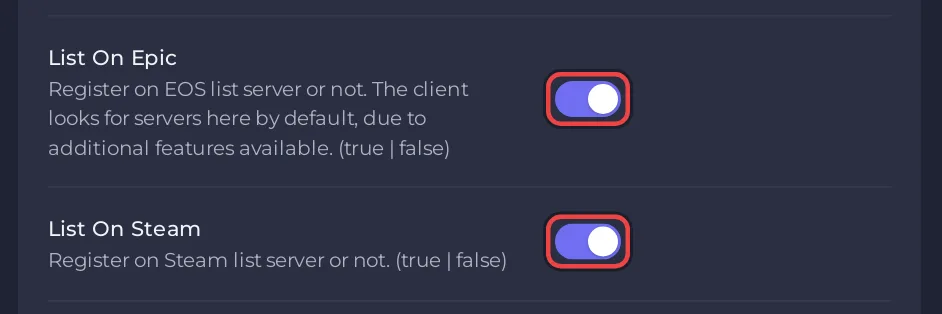
- List On Epic is off. Stunlock's server instructions say the game client looks for servers on the Epic Online Services list by default. In Settings, Game Settings, switch List On Epic on and restart.
- List On Steam is off. It adds the server to the Steam list too. Switch it on and restart.
- Players search for another name. The list shows the Server Name from Game Settings, not the name of the server in the panel. Send players the exact name.
- The name changed and the server has not restarted. A new Server Name applies at the next start. Restart after changing it.
How do I keep the server out of the list?
Switch off List On Epic and List On Steam in Game Settings, restart, and share the address only. A Server Password is a separate setting: it asks players for a password and does not change the two listing switches.
Still not listed?
Your server's ports are assigned by PlayNHost and listed on Ports & Network. If the server is Online, both switches are on, a restart did not help and Direct Connect works, open a ticket with your server's name: How to open a support ticket.
More fixes: V Rising server problems and fixes. Plans and features: V Rising server hosting.


