

To wipe a V Rising server on PlayNHost, open Quick Tasks, find World Wipe and click Run. The panel stops the server, deletes every world in save-data/Saves, and starts it again, so the next start creates a fresh world. Your settings, admin list, ban list and game rules in save-data/Settings are kept.
Wipe now
- Open your server in the panel and click Quick Tasks in the left menu.
- Under All tasks, click Default tasks and find World Wipe.
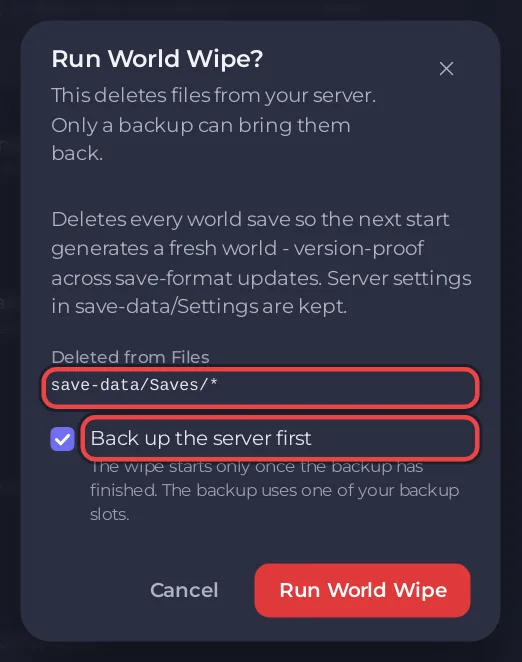
- Click Run. The window Run World Wipe? lists what is Deleted from Files:
save-data/Saves/*. - Keep Back up the server first ticked. The wipe starts only once that backup has finished.
- Click Run World Wipe. The panel answers that it runs as the schedule "World wipe" and that the console shows each step: stop, wipe 30 seconds later, start 30 seconds after that.
The fresh world uses the Save Name, Game Settings Preset and Game Difficulty Preset from Settings, Game Settings. Change them before you run the wipe if the new season should play differently: How to choose PvP or PvE on your V Rising server.
What a wipe deletes and keeps
| Deleted | Kept |
|---|---|
every world folder in save-data/Saves, with all their autosaves | Game Settings in the panel |
save-data/Settings: ServerHostSettings.json, your own ServerGameSettings.json, adminlist.txt, banlist.txt | |
| your backups |
The task's description in the panel calls it version-proof across save-format updates: it deletes the whole Saves folder, whatever the v4 folder is called after a future game update.
To keep the old world instead of deleting it, start a new one beside it: How to start a new world on your V Rising server.
Wipe every month
A ready-made World wipe schedule waits under Ready-made for V Rising on Quick Tasks. Click Add and it becomes one of your Schedules: at 04:00 Paris time on the 1st of each month it stops the server, deletes every world and starts it again. It is added switched off; switch it on when your community wants monthly wipes.
- The scheduled wipe has no backup step of its own. Your nightly Automatic backup, if your plan has backup slots, is the copy to go back to.
- Quick Tasks cannot change the time of an existing schedule. For another day or time, build a schedule of your own: How to schedule tasks and automatic backups.
The game's own reset timer
V Rising also has a built-in reset. Stunlock's server instructions describe two settings in ServerHostSettings.json: ResetDaysInterval, the days between resets (0, the default, switches it off), and DayOfReset, a weekday such as Saturday, or Any. When the server starts and is about to load its save, it checks whether it is time, and if so starts a new save and backs up the old one. Stunlock's patch notes of July 2022, when the feature arrived, put it the same way: once the date arrives, the next server restart triggers the wipe.
They are not on the panel's settings page, but you can add them to the file. The panel rewrites only its own fields at each start and keeps the keys you add.
- Click Stop and wait for the badge to say Offline.
- Open Files, then
save-data/Settings/ServerHostSettings.json. - Add the two lines shown below straight after the opening
{on the first line. Placed there, each line ends with a comma and the file stays valid. - Click Save content and start the server.
{
  "ResetDaysInterval": 14,
  "DayOfReset": "Saturday",
This example resets every 14 days, on a Saturday.
The reset happens at a server start, so pair it with a daily restart: How to restart your V Rising server on a schedule. Use either this timer or the panel's World wipe schedule, not both.
Undo a wipe
Only a backup can bring a wiped world back: How to back up and restore your V Rising world.
Plans and features: V Rising server hosting.


