

To restart a V Rising server on PlayNHost every day, open Quick Tasks, choose Schedule… in the menu of the Send Restart task, set it to repeat every day at a quiet hour and save it. Stunlock recommends a daily restart, and because your server installs updates when it starts, it also keeps the server on the latest version.
Build a daily restart
- Open your server in the panel and click Quick Tasks in the left menu.
- Under All tasks, click Default tasks and find Send Restart.
- Open its menu (More options for Send Restart) and choose Schedule….
- Give the schedule a Name, for example
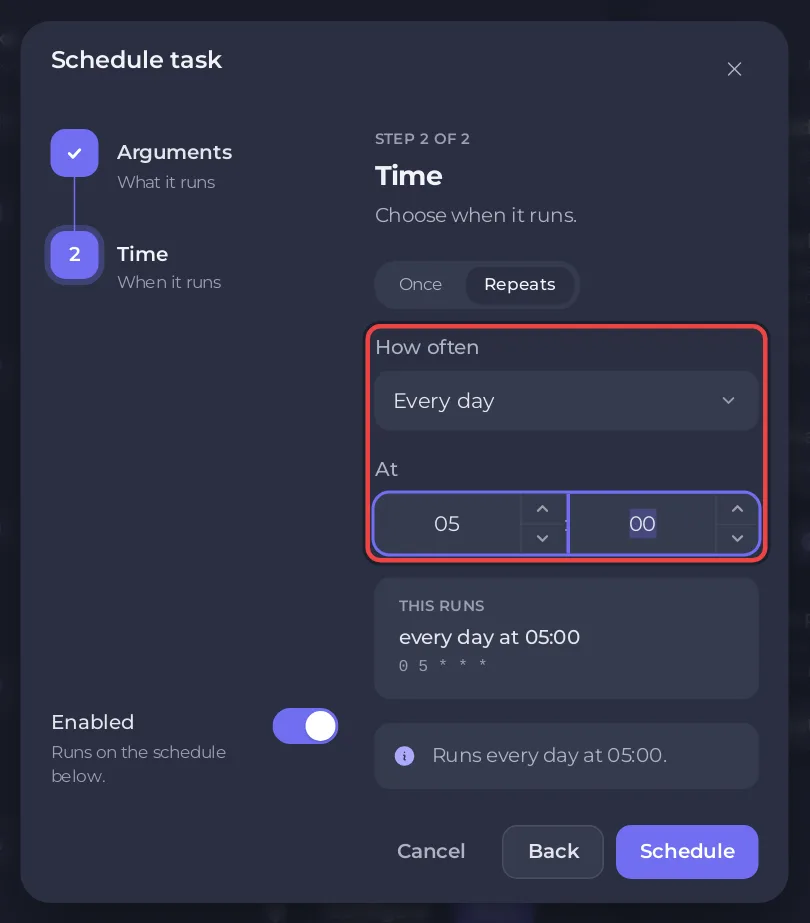
Daily restart, then click Next step. - Choose Repeats, set How often to Every day, and pick the time under At. The window shows what that time is where you are.
- Keep Enabled on and click Schedule. The new schedule appears under Schedules.
Why restart every day?
Stunlock's server instructions say the server can often run for several days without trouble, but recommend restarting it daily, at a time when it is least populated, such as the night or early morning. They add that some hosting services only update the server when it restarts. That is the case here: with Automatic Updates on, your server installs a new V Rising version at every start. See How to update your V Rising server.
Warn players first
A restart disconnects everyone. The panel cannot send a chat message to a V Rising server, because the game does not read typed console commands. To warn players, send announcerestart with the minutes left from an RCON tool before the restart: How to use RCON on your V Rising server. Picking a quiet hour does most of the work.
Change or stop the schedule
- Quick Tasks cannot change the time of a schedule that already exists. For another time, build a new schedule and delete the old one with Delete schedule.
- Switch a schedule off to pause it without deleting it, and on again later.
- Run now on the schedule runs it at once, to test it.
More about schedules: How to schedule tasks and automatic backups. Plans and features: V Rising server hosting.


