

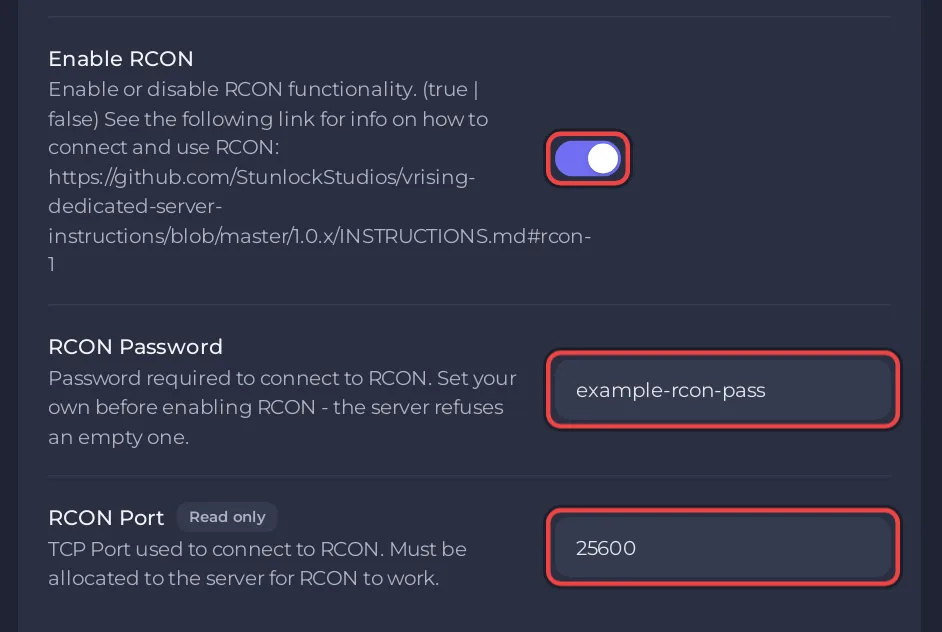
To use RCON on a V Rising server on PlayNHost, switch on Enable RCON in Settings, Game Settings, type your own RCON Password and restart. Then connect an RCON tool to your server's IP and the RCON Port shown on the same page. RCON lets you send announcements and schedule shutdowns without being in the game.
Turn RCON on
- Open your server in the panel and click the Settings tab.
- On Game Settings, type a long password of your own, with letters as well as digits, in RCON Password. The server refuses RCON with an empty password, as the field's description says.
- Switch on Enable RCON.
- Note the RCON Port. It is read only: PlayNHost assigns it to your server.
- Restart the server.
Connect an RCON tool
Use any client for the Source RCON protocol. Stunlock names mcrcon as one known to work. Connect to:
- Host: your server's IP, the part of the Server Address before the colon, on the Overview page.
- Port: the RCON Port from Game Settings.
- Password: your RCON Password.
For example, with mcrcon:
mcrcon -H 203.0.113.10 -P 25600 -p "your-rcon-password" "announce Restart in 10 minutes"Put your own IP, RCON Port and password in place of the examples.
The RCON Port must be one of your server's ports for a tool to reach it. Check the Ports & Network page in the left menu: the port should be listed there. If it is not, open a ticket with your server's name: How to open a support ticket.
Which RCON commands does V Rising accept?
Stunlock's official server instructions list these for V Rising 1.1:
| Command | Parameters | What it does |
|---|---|---|
help | optional command | Lists all commands, or explains one |
announce | message | Sends a message to every connected player |
announcerestart | number | Announces a restart in that many minutes, in each player's own language |
shutdown | message times, message | Schedules a shutdown of the server |
cancelshutdown | optional message | Cancels a scheduled shutdown |
name | name | Changes the server name while it runs |
description | description | Changes the server description while it runs |
password | password, or --clear | Sets, changes or clears the join password while it runs |
version | none | Shows the server version |
time | none | Shows the server time |
A name, description or password you set over RCON lasts until the next start. Then the values from Game Settings come back, because the panel writes them into the settings file at every start.
Good to know
- Kicking and banning are not in the RCON list. They are in-game console commands: How to kick and ban players on your V Rising server.
- Anyone with the RCON password can shut your server down. Keep it private, and switch Enable RCON off when you do not use it.
- The panel Console does not send RCON commands: How to use the Console on your V Rising server.
Plans and features: V Rising server hosting.


