

To join a Sven Co-op server on PlayNHost, click Join on your server's Overview page to copy its address, open the console in Sven Co-op with the backtick or tilde key, and type connect followed by the address. The server must show Online in the panel.
Join from the game
- Open your server in the panel. The badge next to the name must say Online. If it says Offline, click Start and wait for Online: see How to start your Sven Co-op server for the first time.
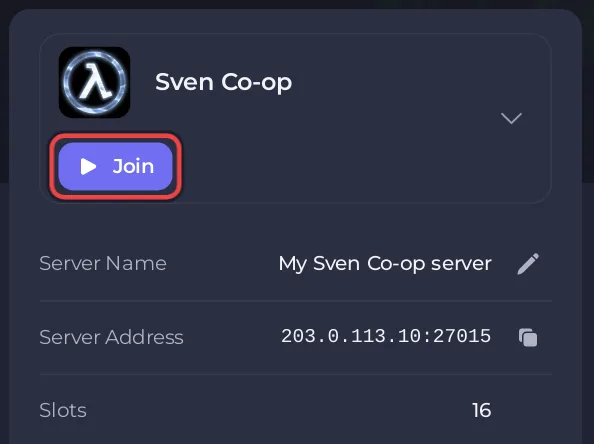
- On the Overview page, click Join on the server card. It copies the Server Address, which looks like
address:port. The copy icon next to Server Address copies the same text. - Start Sven Co-op on Steam and wait for the main menu.
- Press the backtick key or the tilde
~key, depending on your keyboard layout, to open the console. The Sven Co-op wiki names both keys. - Type
connect, a space, then paste the address, and press Enter. For exampleconnect address:portwith your own address.
Type the address whole: it already holds the port of your server. The same address is on the Ports & Network page in the left menu.
How do I join a Sven Co-op server that has a password?
A new server has no join password. If you set one in Game Settings, each player sets it in the same console before connecting:
- Press the backtick or
~key. - Type
passwordand the join password in quotes, for examplepassword "your-join-password", and press Enter. - Type
connectand the address, and press Enter.
password is the game's own player setting for this: it is listed in the official console variables. To set or remove the password, see How to change the name, password and region of your Sven Co-op server.
Can players find the server in a server list?
Yes, unless you hide it. Your server lists itself with the name in Server Name, and Region decides where it shows: the official manual says the region "is used in Steam's server browser, so players can look for servers near by". A server with Region set to -1 is not listed at all, and players must use connect. Typing the address is quicker and always works while the server is Online.
Do players need the same game version?
Yes. The Sven Co-op FAQ says a player can only play on servers running the same version of Sven Co-op. A player on another version sees Your .dll [cl_dlls/client.dll] differs from the server's. Steam keeps the game up to date on players' computers, and your server checks for a new build each time it starts: see How to update your Sven Co-op server.
Does each player need to buy anything?
No. Sven Co-op is free on Steam, and since release 5.0 in January 2016 it no longer needs Half-Life. Each player needs a Steam account and the game installed on Windows or Linux. See Which platforms can join your Sven Co-op server.
If you cannot join
- The badge is not Online: the server is still starting or is stopped. Wait for Online or click Start.
Your .dll [cl_dlls/client.dll] differs from the server's: your game and the server run different versions. Restart Steam so the game finishes updating, then restart the server.- The server has a join password: type
passwordwith the join password in the console beforeconnect.
Every cause with its fix is in Players cannot join your Sven Co-op server. To bring friends along, see How to invite friends to your Sven Co-op server.


