

On its first start, a PlayNHost Satisfactory server claims itself with the Admin Password from your settings and starts a new game, so nobody has to set it up from the game. When the Console shows [PlayNHost] Ready. The panel will save the game before every stop and restart., players can join.
Start it
- Open your server in the panel. The badge near the name says Offline.
- Click Start. The badge changes to Starting.
- Open the Console tab and watch the lines that start with
[PlayNHost]. - Wait for the line
[PlayNHost] Ready. The panel will save the game before every stop and restart.Players can join from then on.
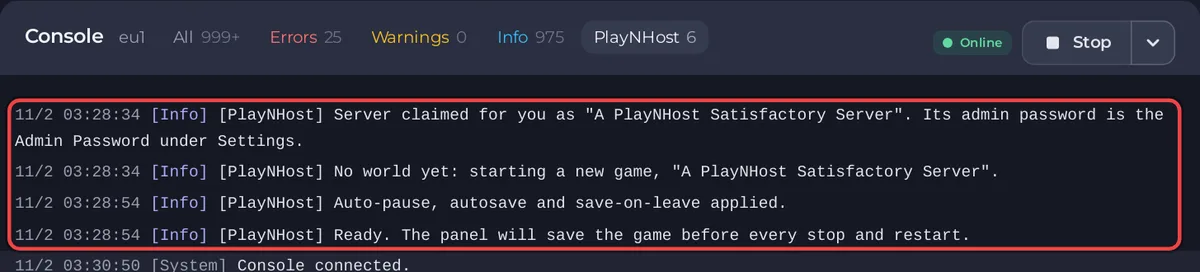
The badge turns Online as soon as the game engine is up, which can be a little before the world has loaded. If a friend gets an error right after the badge changes, wait for the Ready line and try again.
What the panel does for you on the first start
A Satisfactory dedicated server starts out unclaimed: in the game, the first person to connect could name it and set its administrator password. Your server never waits in that state. The panel claims it within seconds, and the Console says:
[PlayNHost] Server claimed for you as "A PlayNHost Satisfactory Server". Its admin password is the Admin Password under Settings.
Then, because the server has no world yet and Start A New Game Automatically is on, it starts one:
[PlayNHost] No world yet: starting a new game, "A PlayNHost Satisfactory Server".
The session takes the server's name. The starting area follows Starting Location (Random by default), and Skip The Tutorial is on, so the HUB is already built.
Last, the panel applies your settings (server name, join password, pause and autosave options) and prints the Ready line.
If Admin Password was empty, the claim line instead says the password is in the file .pnh/admin-password, which you can open in Files. Set your own under Settings at any time: How to become admin on your Satisfactory server.
What a new server already has
- Server Name:
A PlayNHost Satisfactory Server. Change it before you invite people: How to change the server name and join password of your Satisfactory server. - Join Password: none, so anyone with the address can join.
- Pause When Empty: on. The factory pauses while nobody is connected: Does your Satisfactory server keep running when nobody is online?
- Autosave Every (Minutes): 5, and Stop and Restart save the game first.
- Mods: none. Add them on the Modding tab: How to add mods to your Satisfactory server.
- Daily restart: a schedule that restarts the server every morning so it picks up game updates: How to restart your Satisfactory server on a schedule.
- The ports are assigned for you. Players only need the IP and port from the Overview page.
Already have a world?
You do not have to play the new world. Upload your own save on the Worlds page and load it: How to upload your own Satisfactory world. To start the first world from the game's Server Manager instead, switch Start A New Game Automatically off before the first start.
Next steps
If the Ready line never comes, see Satisfactory server problems and fixes and How to fix a server that will not start.


