

The official Satisfactory wiki gives 8 GB of RAM for a dedicated server, and says 16 GB may be recommended for larger saves or more than four players. Memory grows as the factory grows, so the best guide is your own server's usage, measured with players on, in the Usage card of the panel.
What the official numbers say
The Dedicated servers page of the official wiki lists:
| Official figure | |
|---|---|
| Memory | "8GB. 16GB RAM may be recommended for larger saves or to host more than 4 players." |
| Processor | "Anything with a single-thread rating of 2000 or higher should work." |
The same page explains that the game loop is single threaded, so a busy factory depends on the speed of one CPU core more than on the number of cores.
These are general recommendations for a server you run yourself, not measurements of your world. A new world uses far less than a factory hundreds of hours in.
What makes a Satisfactory server use more memory
The wiki ties the higher figure to two things:
- A larger save. A factory hundreds of hours in holds far more machines, belts and trains for the server to simulate than a new world.
- More players, above four.
Check your own usage
- Open your server in the panel. You land on Overview.
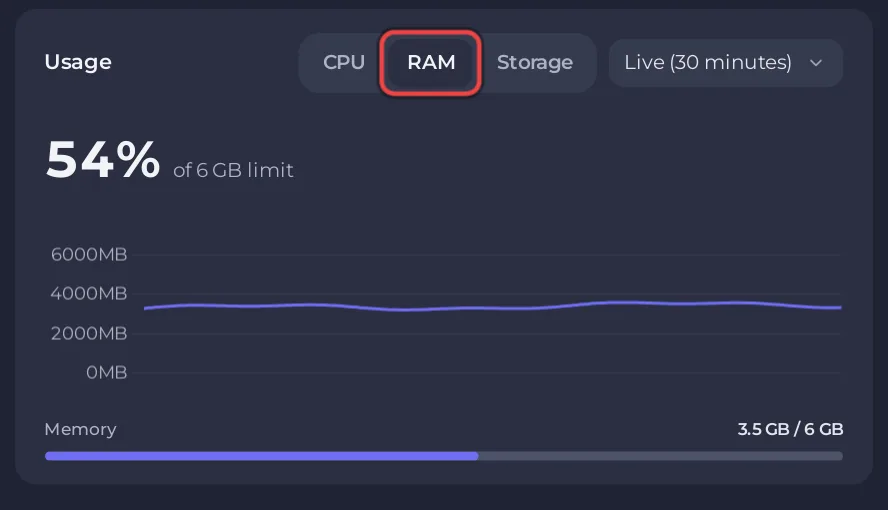
- On the Usage card, choose RAM.
- Read it while your group is playing. An empty server, or a factory that is paused because nobody is on, tells you little.
When the server really needs more
If the server reaches its memory limit, the system stops it, and the Overview page shows a card: This server ran out of memory, with the last time it happened and how many times. That card is the evidence that the plan is too small for your factory. Its Add more memory button leads to a bigger plan: How to change your plan or billing cycle.
Without that card, the plan is big enough, even if the graph runs high. Slowdowns with memory to spare have other causes: Why is my Satisfactory server lagging?
See also How to read your server's usage graphs.


