

To invite friends to your Satisfactory server, click Copy invite message on the Play with friends card of your server's Overview page and paste it to them. The message holds the IP, the port, the password if you set one, and the three Server Manager steps to join.
Send the invite
- Open your server in the panel. You land on Overview.
- On the Play with friends card, click Copy invite message.
- Paste it in Discord, Steam chat or wherever your friends are.
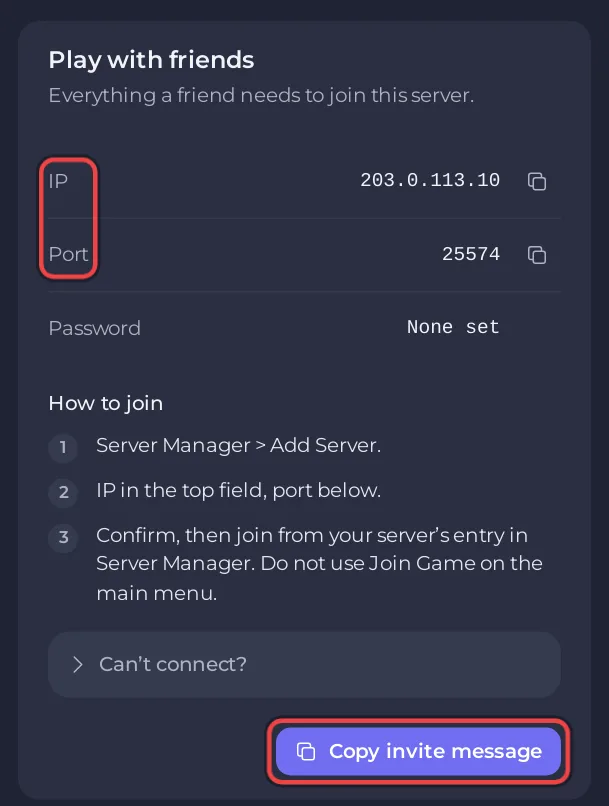
The message starts with Join my Satisfactory server: followed by IP and port, then the steps from the card: Server Manager, Add Server, IP in the top field and port below, confirm, then join from the server's entry in Server Manager. If you set a Join Password, the message includes it when your account can see it, and otherwise says It has a password: ask me for it.
If your server runs mods, send the mod list too
Every friend needs the same mods at the same versions as the server, or the game closes the connection after login.
- Click the Modding tab.
- On the card Your players need these mods, click Copy the list.
- Paste it under the invite. Each line has a mod's name, its version and its ficsit.app page.
Your friends install those mods with Satisfactory Mod Manager before they join. More in Players cannot join your modded Satisfactory server.
Before you invite
- Wait for the Console line
[PlayNHost] Ready.: What happens the first time you start your Satisfactory server. - Give the server a name your friends will recognise, and a join password if you want one: How to change the server name and join password of your Satisfactory server.
- Tell friends to use Server Manager, not Join Game on the main menu: How to join your Satisfactory server.
Let a friend help run the server
The invite lets a friend play. To let a friend restart the server, load saves or manage mods in the panel, invite them with Invite people at the top of the server page, or from Team & Roles in the left menu, and give them a role. See How to invite friends and give them access.
What each person can do on the Worlds page follows their role: Save now needs console access, Load and New game need restart access, and deleting a save needs file deletion.
To give a friend admin rights inside the game instead, share the Admin Password: How to become admin on your Satisfactory server.


