

To rename a Satisfactory server or give it a join password on PlayNHost, open Settings, Game Settings, change Server Name or Join Password, and restart the server. The panel sends the new value to the game at the next start, and the Console confirms it.
Change the name or the password
- Open your server in the panel and click the Settings tab.
- Open Game Settings.
- Type the new Server Name, or a Join Password. Click outside the field to save it.
- Restart the server.
- Open the Console tab and look for
[PlayNHost] Server name set to "..."or[PlayNHost] Join password set.
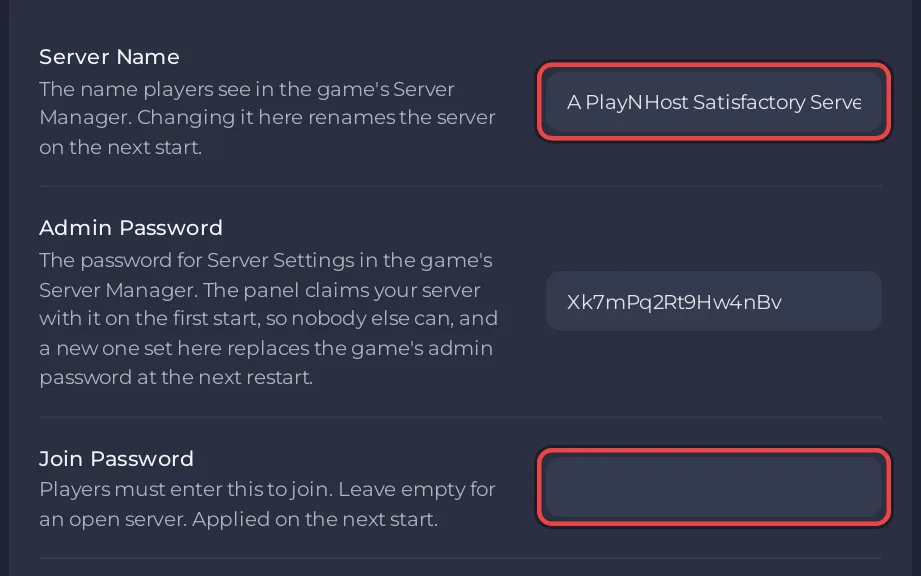
What each field accepts
| Field | Rules | Default |
|---|---|---|
| Server Name | Up to 64 characters, at least one letter, no " or \, and not only the word true or false | A PlayNHost Satisfactory Server |
| Join Password | Empty, or 4 to 64 characters with at least one letter, no " or \ | empty |
The name is what players see in the game's Server Manager list. The first world the server started also took this name as its session name. Renaming the server does not rename that session.
Remove the join password
Empty the Join Password field and restart. The Console says No join password: anyone with the address can join.
Where players see it
- The Play with friends card on the Overview page shows the password in its Password row, or None set.
- Copy invite message on the same card puts the password in the invite. See How to invite friends to your Satisfactory server.
- In the game, players type it when they join from the Server Manager: How to join your Satisfactory server.
Changed it in the game instead?
The panel only sends the name or the password again when you change that field in the panel, so a change made in the game's Server Manager stays until then. The panel's field can show the older value in the meantime. The admin password is different: always change it in the panel, see How to become admin on your Satisfactory server.
If the Console says The join password was not changed: followed by the game's reason, fix the value and restart again.


