%7B.s%7Banimation%3Ab%201.5s%20ease-out%20both%7D.d%7Banimation-delay%3A.16s%7D%7D%40keyframes%20b%7B0%25%7Bfill%3A%23F4F6FA%7D18%25%7Bfill%3A%23FFE08A%7D34%25%2C70%25%7Bfill%3A%23FF8A1F%7D80%25%7Bfill%3A%23FFE08A%7D100%25%7Bfill%3A%23FF8A1F%7D%7D%3C%2Fstyle%3E%3Cg%20transform%3D%22translate(143%20428.93)%20scale(3.885906)%22%3E%3Cg%20transform%3D%22translate(0%202)%22%20fill%3D%22%23706EF0%22%3E%3Cpath%20d%3D%22M0%200%20H48%20A40%2040%200%200%201%2048%2080%20V100%20H0%20Z%22%2F%3E%3Cpath%20transform%3D%22translate(91.75%200)%22%20d%3D%22M0%200%20L48%200%20L48%2050%20L76%2050%20L76%20100%20L0%20100%20Z%22%2F%3E%3Cpath%20transform%3D%22translate(173%200)%22%20d%3D%22M0%20100%20L58%20-4%20L116%20100%20Z%22%2F%3E%3Cpath%20transform%3D%22translate(264.25%200)%22%20d%3D%22M0%200%20L104%200%20L76%2050%20L76%20100%20L28%20100%20L28%2050%20Z%22%2F%3E%3Cg%20transform%3D%22translate(375%200)%22%3E%3Cpath%20d%3D%22M0%200%20L50%2038%20L50%200%20L100%200%20L100%20100%20L0%20100%20Z%22%20fill%3D%22%23F4F6FA%22%2F%3E%3Crect%20class%3D%22s%22%20x%3D%2247%22%20y%3D%2263%22%20width%3D%2219%22%20height%3D%2230%22%2F%3E%3Crect%20class%3D%22s%20d%22%20x%3D%2274%22%20y%3D%2263%22%20width%3D%2219%22%20height%3D%2230%22%2F%3E%3C%2Fg%3E%3Cpath%20transform%3D%22translate(484.75%200)%22%20d%3D%22M0%200%20L48%200%20L48%2037%20L52%2037%20L52%200%20L100%200%20L100%20100%20L52%20100%20L52%2063%20L48%2063%20L48%20100%20L0%20100%20Z%22%2F%3E%3Cpath%20transform%3D%22translate(588.5%200)%22%20d%3D%22M0%2050%20A53%2053%200%201%200%20106%2050%20A53%2053%200%201%200%200%2050%20Z%22%2F%3E%3Cpath%20transform%3D%22translate(698.25%200)%22%20d%3D%22M25%200%20H102%20V50%20H77%20A25%2025%200%200%201%2077%20100%20H0%20V50%20H25%20A25%2025%200%200%201%2025%200%20Z%22%2F%3E%3Cpath%20transform%3D%22translate(804%200)%22%20d%3D%22M0%200%20L90%200%20L90%2050%20L69%2050%20L69%20100%20L21%20100%20L21%2050%20L0%2050%20Z%22%2F%3E%3C%2Fg%3E%3C%2Fg%3E%3C%2Fsvg%3E)


Open Wipe in the left menu, choose what to wipe, choose the next map, keep Back up first ticked, click Wipe now, type the wipe's name and click Wipe this server. The server stops and stays stopped until you start it, and a new map is generated at the next start.
The three wipes
Each option on the page includes everything above it.
| Wipe | What it deletes | What it keeps |
|---|---|---|
| Map wipe | The world and everything built in it. | Blueprints players have learned, admins, bans, settings and plugins. |
| Map and blueprint wipe | The world, everything built in it and every learned blueprint. | Admins, bans, settings and plugins. |
| Full wipe | All of the above, and every record of a player: deaths, carried items, clans and the signs they painted. | Admins, bans, settings and plugins. |
Plugins and their data, in the oxide and carbon folders, are never removed by a wipe, and neither are server.cfg, users.cfg and bans.cfg. If a plugin keeps player balances or stats, delete its data file in Files yourself.
Facepunch's monthly forced wipe is a map wipe. A blueprint wipe is only needed in a month when Facepunch announces one. See How to get your Rust server ready for forced wipe day.
Wipe by hand
A wipe permanently deletes files. Leave Back up first ticked.
The page reads as three numbered steps. On a wide screen step 3 stays in view on the right, with a summary of what is about to happen.
- Open your server in the panel and click Wipe in the left menu. You need the Files permission to delete: see How to let a friend help run your Rust server.
- In step 1, What to wipe, click Map wipe, Map and blueprint wipe or Full wipe. Each card shows how many files it deletes, what goes and what stays.

In step 2, The next map, choose what the next start builds:
- Next map in your rotation, shown only when you have saved a map rotation, and then chosen when the page opens: the map marked Next. See How to set up a map rotation on your Rust server.
- Generate a new random seed (chosen when the page opens if you have no rotation): a different world. This is what most people mean by a wipe.
- Keep this seed: the same world is generated again, empty. Choose it if your community plays a map it knows.
- Use this seed: type a number from 1 to 2147483647. Until you type one, the summary says
Type a seed in step 2and Wipe now stays greyed out.
- In step 3, Wipe, read the summary: Deletes (the wipe and its file count), Next map, and Afterwards:
Your server stays stopped until you start it. - Keep Back up first ticked. It is ticked by default if you are allowed to make backups. If you untick it, the page warns A wipe cannot be undone.
- Click Wipe now. A window opens with the wipe's name, how many files it deletes and Show exactly which files, if you want to read the list.
- In the window, type the word shown after Type (
map,blueprintsorfull) and click Wipe this server.
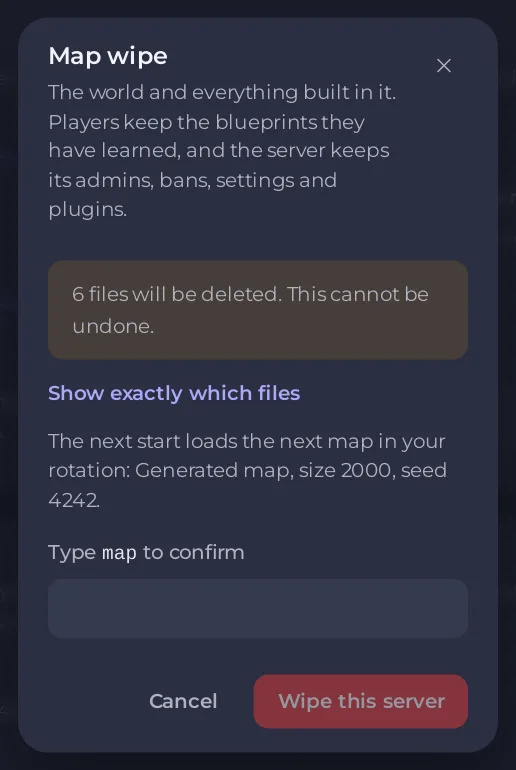
- When the wipe has finished, start the server. A new map takes a few minutes to generate.
What Back up first does
- The server stops.
- A backup named Before wipe with the date is made.
- The wipe runs only once the backup has finished, usually within a minute or two. The backup appears under Backups.
The backup uses one of your backup slots. If all your slots are used, the backup cannot be made, so nothing is wiped: delete an old backup first. If anything fails, nothing is wiped and you get a notification. To get the world back after a wipe, see How to undo a wipe on your Rust server.
Without a backup, the page says Wipe complete, how many files it deleted and the seed the next map will use, or which map of your rotation comes next.
The countdown at the top
The top of the page counts down to the Facepunch forced wipe in days, hours, minutes and seconds, with the date and time in your own time zone, and a bar such as Day 20 of 35 of this wipe. For the first day after the update it shows The update is out: wipe day. Beside it, Your next scheduled wipe shows your own next wipe schedule and how long until it runs. If no schedule is on, it says None is on with a link, Open Tasks, to Quick Tasks.
Good to know
- Another way: the Map Wipe task on Quick Tasks. Run asks you to confirm, with Back up the server first ticked, then runs the ready-made map wipe as a schedule: players are warned 10, 5 and 1 minutes ahead, then the server stops, is backed up, wiped onto the next map of your rotation (or a new random seed if you have none) and started again. The schedule stays on the page, switched off. To choose the seed, use the Wipe page.
- A Map and blueprint wipe is what players call a BP wipe: How to do a blueprint wipe on your Rust server.
- To wipe on a timer, use the ready-made schedules: How to set up automatic wipes on your Rust server.
- To change the map size or choose a seed on purpose, see How to choose your Rust world size and seed.
- A wipe that changes the map needs a new picture on the live map: How to use the live map on your Rust server.
- If a wipe did not happen, see Your Rust server did not wipe.





