%7B.s%7Banimation%3Ab%201.5s%20ease-out%20both%7D.d%7Banimation-delay%3A.16s%7D%7D%40keyframes%20b%7B0%25%7Bfill%3A%23F4F6FA%7D18%25%7Bfill%3A%23FFE08A%7D34%25%2C70%25%7Bfill%3A%23FF8A1F%7D80%25%7Bfill%3A%23FFE08A%7D100%25%7Bfill%3A%23FF8A1F%7D%7D%3C%2Fstyle%3E%3Cg%20transform%3D%22translate(143%20428.93)%20scale(3.885906)%22%3E%3Cg%20transform%3D%22translate(0%202)%22%20fill%3D%22%23706EF0%22%3E%3Cpath%20d%3D%22M0%200%20H48%20A40%2040%200%200%201%2048%2080%20V100%20H0%20Z%22%2F%3E%3Cpath%20transform%3D%22translate(91.75%200)%22%20d%3D%22M0%200%20L48%200%20L48%2050%20L76%2050%20L76%20100%20L0%20100%20Z%22%2F%3E%3Cpath%20transform%3D%22translate(173%200)%22%20d%3D%22M0%20100%20L58%20-4%20L116%20100%20Z%22%2F%3E%3Cpath%20transform%3D%22translate(264.25%200)%22%20d%3D%22M0%200%20L104%200%20L76%2050%20L76%20100%20L28%20100%20L28%2050%20Z%22%2F%3E%3Cg%20transform%3D%22translate(375%200)%22%3E%3Cpath%20d%3D%22M0%200%20L50%2038%20L50%200%20L100%200%20L100%20100%20L0%20100%20Z%22%20fill%3D%22%23F4F6FA%22%2F%3E%3Crect%20class%3D%22s%22%20x%3D%2247%22%20y%3D%2263%22%20width%3D%2219%22%20height%3D%2230%22%2F%3E%3Crect%20class%3D%22s%20d%22%20x%3D%2274%22%20y%3D%2263%22%20width%3D%2219%22%20height%3D%2230%22%2F%3E%3C%2Fg%3E%3Cpath%20transform%3D%22translate(484.75%200)%22%20d%3D%22M0%200%20L48%200%20L48%2037%20L52%2037%20L52%200%20L100%200%20L100%20100%20L52%20100%20L52%2063%20L48%2063%20L48%20100%20L0%20100%20Z%22%2F%3E%3Cpath%20transform%3D%22translate(588.5%200)%22%20d%3D%22M0%2050%20A53%2053%200%201%200%20106%2050%20A53%2053%200%201%200%200%2050%20Z%22%2F%3E%3Cpath%20transform%3D%22translate(698.25%200)%22%20d%3D%22M25%200%20H102%20V50%20H77%20A25%2025%200%200%201%2077%20100%20H0%20V50%20H25%20A25%2025%200%200%201%2025%200%20Z%22%2F%3E%3Cpath%20transform%3D%22translate(804%200)%22%20d%3D%22M0%200%20L90%200%20L90%2050%20L69%2050%20L69%20100%20L21%20100%20L21%2050%20L0%2050%20Z%22%2F%3E%3C%2Fg%3E%3C%2Fg%3E%3C%2Fsvg%3E)


Open Wipe in the left menu and scroll to the Map rotation card. Add the maps you want, put them in order, mark the one that comes next and click Save rotation. Every wipe that makes a new map, including your scheduled force wipe, then uses the map marked Next and moves the mark on to the one after it.
What a rotation does
Without a rotation, a wipe that makes a new map rolls a new random seed. With one, it takes the map marked Next:
- A generated map sets the world size and seed for the next start. Leave the seed empty and that map gets a new random seed each time it comes round.
- A custom map link sets the link your server loads the map from. See How to use a custom map on your Rust server.
After the last map, the rotation starts again at the first. A rotation holds at most 20 maps.
Add maps
- Open your server in the panel and click Wipe in the left menu.
- Scroll down to Map rotation, under step 2. A new list says
No maps yet. Each new-map wipe rolls a new random seed.
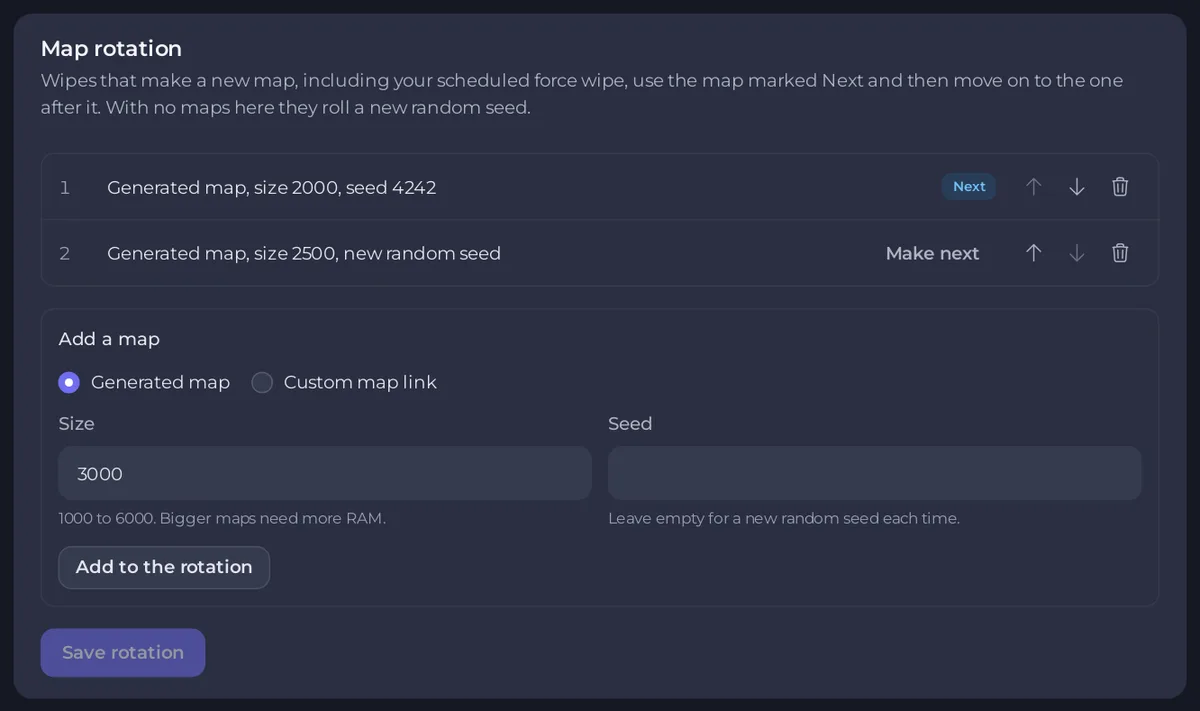
- Under Add a map, choose Generated map or Custom map link.
- For a generated map, type the Size, from 1000 to 6000 (bigger maps need more RAM), and a Seed from 1 to 2147483647, or leave Seed empty for a new random seed each time. The size starts filled in with your server's current world size.
- For a custom map, paste the Direct link to the .map file, for example a Dropbox link ending in
?dl=1. Maps with custom prefabs also need the RustEdit extension on Oxide or Carbon. - Click Add to the rotation. The map joins the end of the list.
- Repeat for every map, then click Save rotation.
Until you save, the card says Not saved yet. Wipes use the saved list. Nothing changes for your server until you click Save rotation.
Change the order
Each row has a number, a line naming the map, and buttons:
- Next marks the map the next wipe uses. Click Make next on another row to move the mark.
- Move up and Move down (the arrows) change the order.
- Remove (the bin) takes a map out of the list.
Click Save rotation after your changes. To remove the rotation, remove every map and save: wipes then roll a new random seed again.
Wipe onto the next map
- By hand: on the Wipe page, step 2, The next map, shows Next map in your rotation with the map's name, and it is chosen when the page opens. The summary in step 3, Wipe, shows it under Next map. Click Wipe now as usual: How to wipe your Rust server. You can still pick Generate a new random seed, Keep this seed or Use this seed instead; only Next map in your rotation uses and moves on the rotation.
- On a schedule: the ready-made wipe schedules on Quick Tasks, and Run on the Map Wipe task, use the rotation every time: How to set up automatic wipes on your Rust server.
After a wipe by hand without a backup first, the page says which map comes next, for example The next map is map 2 of 3 in your rotation. Start the server when you are ready: the new map is built at the start.

If something goes wrong
- Your saved rotation cannot be used: the card shows this with the reason. Wipes that make a new map stop until you save a new list. The list shows empty: add your maps again and click Save rotation.
- The rotation was not saved with a message that a wipe used the next map since the page was opened: a wipe ran in the meantime. Reload the page and make your change again.
- A message that your server's startup command cannot load that kind of map: older servers may need a one-time update. Open a ticket. A wipe that hits this stops before anything is deleted.
- The buttons are missing and the card says
Changing the rotation needs the Change startup permission.: ask the owner for that permission. See How to let a friend help run your Rust server.
Good to know
- A custom map's link must stay online while it is in the rotation, because players download the map from it when they join.
- Each new map needs a new picture on the live map. Draw it after the first start on the new map: How to use the live map on your Rust server.
- The Activity log says
Saved the map rotationwhen someone saves it. - To preview a size and seed before you add it, see How to choose your Rust world size and seed.





