%7B.s%7Banimation%3Ab%201.5s%20ease-out%20both%7D.d%7Banimation-delay%3A.16s%7D%7D%40keyframes%20b%7B0%25%7Bfill%3A%23F4F6FA%7D18%25%7Bfill%3A%23FFE08A%7D34%25%2C70%25%7Bfill%3A%23FF8A1F%7D80%25%7Bfill%3A%23FFE08A%7D100%25%7Bfill%3A%23FF8A1F%7D%7D%3C%2Fstyle%3E%3Cg%20transform%3D%22translate(143%20428.93)%20scale(3.885906)%22%3E%3Cg%20transform%3D%22translate(0%202)%22%20fill%3D%22%23706EF0%22%3E%3Cpath%20d%3D%22M0%200%20H48%20A40%2040%200%200%201%2048%2080%20V100%20H0%20Z%22%2F%3E%3Cpath%20transform%3D%22translate(91.75%200)%22%20d%3D%22M0%200%20L48%200%20L48%2050%20L76%2050%20L76%20100%20L0%20100%20Z%22%2F%3E%3Cpath%20transform%3D%22translate(173%200)%22%20d%3D%22M0%20100%20L58%20-4%20L116%20100%20Z%22%2F%3E%3Cpath%20transform%3D%22translate(264.25%200)%22%20d%3D%22M0%200%20L104%200%20L76%2050%20L76%20100%20L28%20100%20L28%2050%20Z%22%2F%3E%3Cg%20transform%3D%22translate(375%200)%22%3E%3Cpath%20d%3D%22M0%200%20L50%2038%20L50%200%20L100%200%20L100%20100%20L0%20100%20Z%22%20fill%3D%22%23F4F6FA%22%2F%3E%3Crect%20class%3D%22s%22%20x%3D%2247%22%20y%3D%2263%22%20width%3D%2219%22%20height%3D%2230%22%2F%3E%3Crect%20class%3D%22s%20d%22%20x%3D%2274%22%20y%3D%2263%22%20width%3D%2219%22%20height%3D%2230%22%2F%3E%3C%2Fg%3E%3Cpath%20transform%3D%22translate(484.75%200)%22%20d%3D%22M0%200%20L48%200%20L48%2037%20L52%2037%20L52%200%20L100%200%20L100%20100%20L52%20100%20L52%2063%20L48%2063%20L48%20100%20L0%20100%20Z%22%2F%3E%3Cpath%20transform%3D%22translate(588.5%200)%22%20d%3D%22M0%2050%20A53%2053%200%201%200%20106%2050%20A53%2053%200%201%200%200%2050%20Z%22%2F%3E%3Cpath%20transform%3D%22translate(698.25%200)%22%20d%3D%22M25%200%20H102%20V50%20H77%20A25%2025%200%200%201%2077%20100%20H0%20V50%20H25%20A25%2025%200%200%201%2025%200%20Z%22%2F%3E%3Cpath%20transform%3D%22translate(804%200)%22%20d%3D%22M0%200%20L90%200%20L90%2050%20L69%2050%20L69%20100%20L21%20100%20L21%2050%20L0%2050%20Z%22%2F%3E%3C%2Fg%3E%3C%2Fg%3E%3C%2Fsvg%3E)


When Install on the Modding tab does not work, the panel says why. Most often the server is on Vanilla, the plugin is a paid or zipped Codefling plugin, or the download failed. Each message below has its fix.
Plugins need Oxide or Carbon
Plugins need Oxide or Carbon. Your Modding Framework is Vanilla, and nothing would load the plugin.
- On the Modding tab, set Modding Framework to Oxide or Carbon.
- Click Restart to apply.
- Install the plugin again.
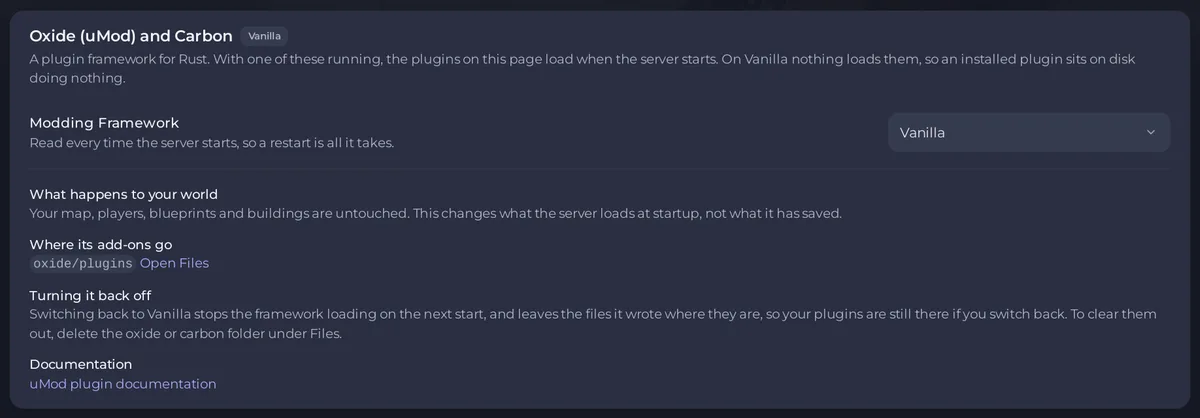
See How to add mods to your Rust server.
Won’t run here
A Codefling row shows Won’t run here with the reason:
A paid plugin:Codefling gives the file only to the account that bought it: buy it there, then upload the .cs file to your plugins folder in Files.- A plugin that comes as a .zip or another file
the panel cannot install for you: download it from Codefling and follow its instructions.
For both, see How to upload a plugin to your Rust server.
The download failed
- From uMod:
Looks like we couldn't download this plugin automatically. You should still be able to download it in your browser atand a link. Download the file from that link and upload it to your plugins folder. - From Codefling:
This plugin could not be installed from Codefling just now.The message names the folder to upload the .cs file to in Files.
Upload steps: How to upload a plugin to your Rust server.
Already installed from somewhere else
A Codefling install says the plugin is already installed from somewhere else (uMod or an upload), and it may be a different plugin with the same name. The panel leaves your file alone. If you want the Codefling one, uninstall the other first: How to remove a plugin from your Rust server.
Try again in a minute
A Codefling install can say The panel could not check your plugins folder just now, so nothing was installed. Try again in a minute. Nothing was changed. Wait a minute and click Install again.
It installed but does not show
The panel says <name> is being installed. It will appear under Installed once the server has it. Give it a moment, then click Installed. On Oxide, a plugin that installed but failed to start shows Not running: How to fix a plugin that is not running on your Rust server.
Good to know
- Installing needs the Create and upload file permission: How to let a friend help run your Rust server.
- The usual steps: How to install and update plugins on your Rust server.





