%7B.s%7Banimation%3Ab%201.5s%20ease-out%20both%7D.d%7Banimation-delay%3A.16s%7D%7D%40keyframes%20b%7B0%25%7Bfill%3A%23F4F6FA%7D18%25%7Bfill%3A%23FFE08A%7D34%25%2C70%25%7Bfill%3A%23FF8A1F%7D80%25%7Bfill%3A%23FFE08A%7D100%25%7Bfill%3A%23FF8A1F%7D%7D%3C%2Fstyle%3E%3Cg%20transform%3D%22translate(143%20428.93)%20scale(3.885906)%22%3E%3Cg%20transform%3D%22translate(0%202)%22%20fill%3D%22%23706EF0%22%3E%3Cpath%20d%3D%22M0%200%20H48%20A40%2040%200%200%201%2048%2080%20V100%20H0%20Z%22%2F%3E%3Cpath%20transform%3D%22translate(91.75%200)%22%20d%3D%22M0%200%20L48%200%20L48%2050%20L76%2050%20L76%20100%20L0%20100%20Z%22%2F%3E%3Cpath%20transform%3D%22translate(173%200)%22%20d%3D%22M0%20100%20L58%20-4%20L116%20100%20Z%22%2F%3E%3Cpath%20transform%3D%22translate(264.25%200)%22%20d%3D%22M0%200%20L104%200%20L76%2050%20L76%20100%20L28%20100%20L28%2050%20Z%22%2F%3E%3Cg%20transform%3D%22translate(375%200)%22%3E%3Cpath%20d%3D%22M0%200%20L50%2038%20L50%200%20L100%200%20L100%20100%20L0%20100%20Z%22%20fill%3D%22%23F4F6FA%22%2F%3E%3Crect%20class%3D%22s%22%20x%3D%2247%22%20y%3D%2263%22%20width%3D%2219%22%20height%3D%2230%22%2F%3E%3Crect%20class%3D%22s%20d%22%20x%3D%2274%22%20y%3D%2263%22%20width%3D%2219%22%20height%3D%2230%22%2F%3E%3C%2Fg%3E%3Cpath%20transform%3D%22translate(484.75%200)%22%20d%3D%22M0%200%20L48%200%20L48%2037%20L52%2037%20L52%200%20L100%200%20L100%20100%20L52%20100%20L52%2063%20L48%2063%20L48%20100%20L0%20100%20Z%22%2F%3E%3Cpath%20transform%3D%22translate(588.5%200)%22%20d%3D%22M0%2050%20A53%2053%200%201%200%20106%2050%20A53%2053%200%201%200%200%2050%20Z%22%2F%3E%3Cpath%20transform%3D%22translate(698.25%200)%22%20d%3D%22M25%200%20H102%20V50%20H77%20A25%2025%200%200%201%2077%20100%20H0%20V50%20H25%20A25%2025%200%200%201%2025%200%20Z%22%2F%3E%3Cpath%20transform%3D%22translate(804%200)%22%20d%3D%22M0%200%20L90%200%20L90%2050%20L69%2050%20L69%20100%20L21%20100%20L21%2050%20L0%2050%20Z%22%2F%3E%3C%2Fg%3E%3C%2Fg%3E%3C%2Fsvg%3E)


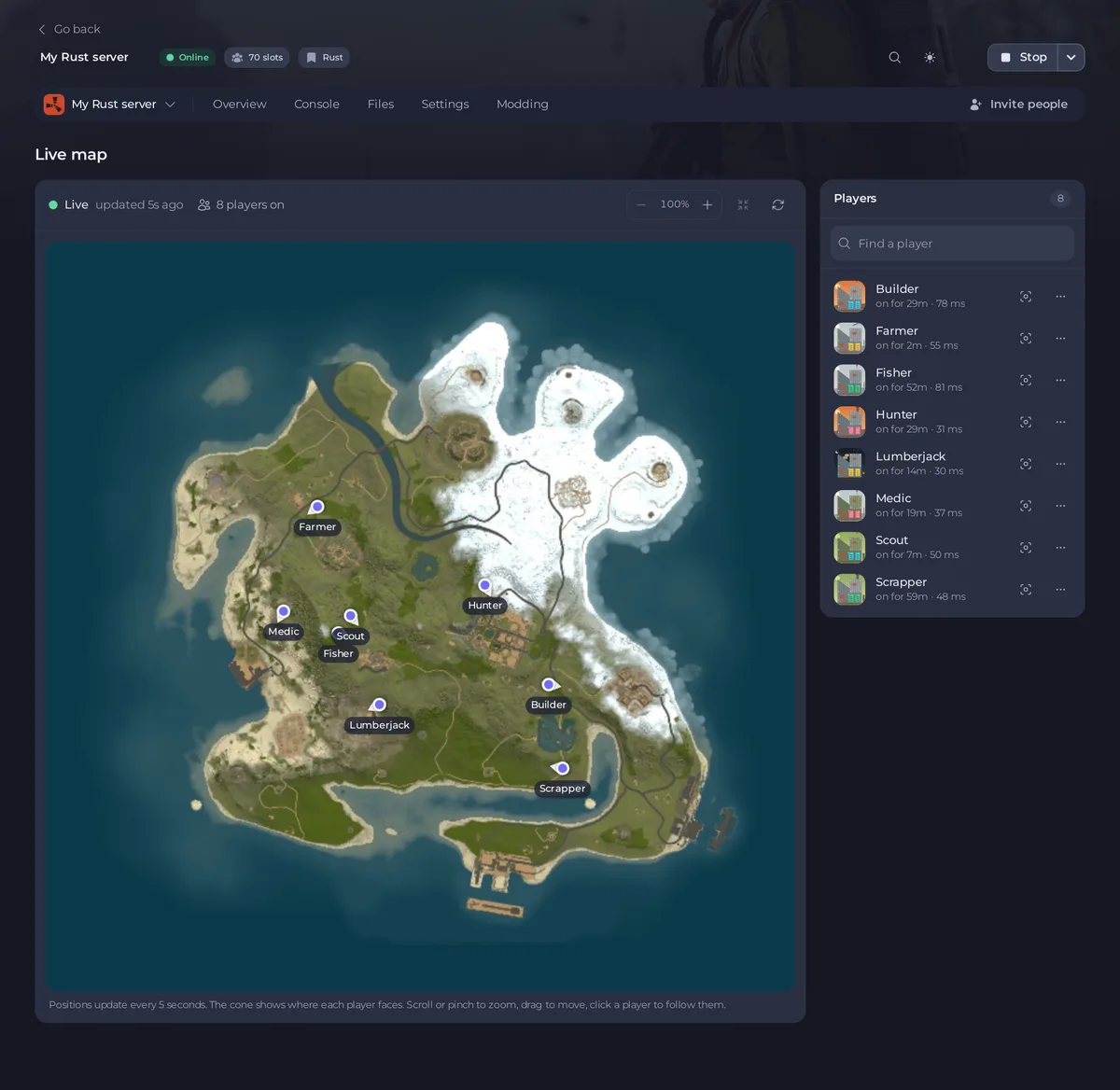
Open Live map in the left menu. The first time, click Draw the map: your server draws a picture of its own map, and every player then shows on it, updated every 5 seconds. Beside the map, the Players list shows how long each player has been on, and the ... menu on a row kicks or bans them.
Before you start
- The server must be running. The draw button stays greyed out with
Your server has to be running to draw its map.while it is stopped. - The live map talks to the game over RCON, so the server needs an RCON Password in Settings, Game Settings. Without one the page says RCON is off. See Your Rust server will not start without an RCON password.
- A generated map needs a fixed World Seed. Without one the panel refuses to draw and says the server
has no fixed seed. Any wipe on the Wipe page with Generate a new random seed or Use this seed sets one: How to choose your Rust world size and seed. A custom map needs no seed. - You need the Use the console permission. Kick and ban use the same permission.
Draw the map
- Open your server in the panel and click Live map in the left menu. It sits below Wipe.
- The card Draw this map first explains that your server draws its own map once, and again after each wipe that changes the map.
- Click Draw the map. The button says Drawing the map... for a few seconds.
- If anyone is playing, a window opens first. It says how many seconds the server pauses while it draws and how many players are on and will notice. Click Draw the map to go ahead, or close the window and draw later, when nobody is on.
The game really stops for those seconds, longer on a bigger map, so players feel a short freeze. You only draw once per map.
Read the map
- The bar above the map says Live and
updated 5s agowhile the server answers, or Not answering when it does not. Next to it is the number of players on. - Each player is a dot with their name. With more than 10 players on, a name shows when you point at its dot or zoom in close. The cone on the dot shows which way they face. Positions move every 5 seconds while the page is open.
- Zoom with the minus and plus buttons in the bar (the number between them is the zoom), with the mouse wheel or touchpad, or with two fingers on a phone. When zoomed in, drag the map to move it.
- The Whole map button, to the right of the zoom, goes back to the full view.
Follow or find a player
- Click a player's dot, or Show on the map on their row in the Players list. The map zooms in on them and keeps them in view as they move. A label says
Followingand their name. - Click the same player again to stop. Dragging the map or clicking Whole map also stops following.
With more than six players on, a Find a player box appears at the top of the list. Type part of a name to narrow the list.
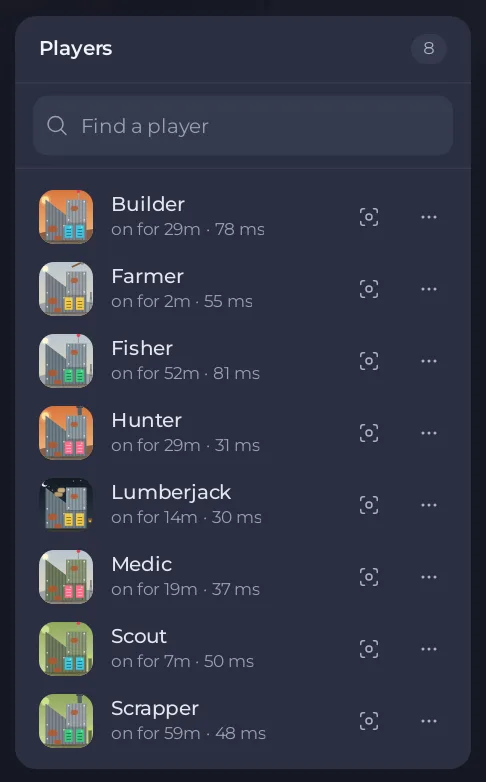
Each row shows the name, how long the player has been on, for example on for 29m or just joined, and their ping in milliseconds.
Kick or ban from the list
- Click ... at the end of the player's row. The menu has Copy name, Kick and Ban.

- Choose Kick or Ban. A window shows the server's name and asks you to confirm.
- Click Kick or Ban in the window. A message says
KickedorBannedand the name, and the player leaves the map.
A kicked player can rejoin straight away. A banned player cannot rejoin until you lift the ban with Bans on the Overview page. The full steps are in How to kick, ban and add admins on your Rust server and How to unban a player on your Rust server.
After a wipe or a map change
A wipe that changes the map, a new seed or size, or a new custom map link makes the old picture wrong, so the page asks you to draw again: Draw this map first comes back. Start the server, wait until it has fully started, then click Draw the map. You can also redraw at any time with the Draw again button, the last one in the bar above the map.
If you changed the seed or size but did not restart, the panel says Your server is still running its previous map and does not draw. Restart the server, then draw.
If it does not work
- RCON is off: set an RCON Password in Settings, Game Settings, then restart the server.
- The map was not drawn with
Your server did not answer: the server is stopped or still starting. Wait for Server startup complete in the Console and try again. - The Players list says
It may still be starting. The map fills in once it has finished.Wait a minute. If it saysStart your server to see who is where., the server is stopped. - No ... menu on a row: the menu appears once the panel has matched the row to the server's player list, which it reads about every 20 seconds, so wait a moment. If it never appears, use the Console instead: How to use the Console and commands on your Rust server.
- The server refused the RCON password: you changed the password and did not restart. Restart the server.
Good to know
- The picture is saved as a file in your server's main folder, named after the map's size and seed. The panel keeps only the latest one and deletes the one before.
- The live map and the Active players card on Overview read the same players: How to see who is online on your Rust server.
- To let a friend use the live map, give their role Use the console: How to let a friend help run your Rust server.





