

To invite friends to a RimWorld Open World server on PlayNHost, copy the Server Address from your server's Overview page and send it with the list of what they need: RimWorld 1.4 and the Open World, Harmony and HugsLib mods. Playing needs only that; helping you run the server in the panel needs an invite in Team & Roles.
Before you invite anyone
- Player Version is
1.3under Settings, Game Settings, as on every new server. Any other value refuses everyone. - The world exists: you connected first and generated it. See How to generate the world on your RimWorld Open World server.
- If Enforce Mods is on, the mod lists are set up, so your friends know which mods to run.
Send your friends the address
- Open your server in the panel. On Overview, find the Server details card.
- Click Join, or the copy icon on the Server Address row. The address is now copied.
- Paste it into a message with the rest of what they need.
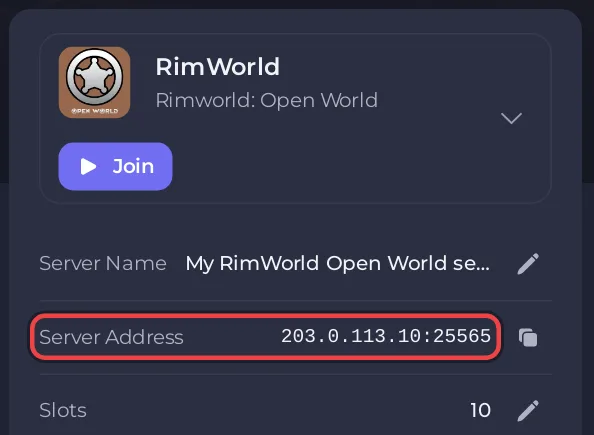
A message your friends can follow:
Join my RimWorld Open World server.
1. Steam: right click RimWorld, Properties, Betas, pick version-1.4.3901.
2. Subscribe to Open World, Harmony and HugsLib on the Steam Workshop and turn them on in Mods.
3. Main menu: Multiplayer, Direct Connect.
   Server IP: <the part before the colon>
   Server Port: <the number after the colon>
4. Click Connect, then Register a username and password. Keep the password: it cannot be recovered.
Each friend needs their own copy of RimWorld on PC. The full steps for them: How to join your RimWorld Open World server.
How do I keep strangers out?
A new server lets in anyone who has the address and the right mod version. To allow only your group, turn on Use Whitelist and list their usernames: How to use a whitelist on your RimWorld Open World server. Ask each friend for the exact username they will register, because the list matches it letter for letter.
Let a friend help run the server
A friend who should start and restart the server, use the Console, edit files or take backups needs panel access, not your password.
- Click Team & Roles in the left menu.
- Click Invite someone, enter their Email address and pick a Role.
- Click Send invitation. They get an email with a link to accept.
The roles, and how to change what someone can do, are in the general guide How to invite friends and give them access.
Can a friend be admin in the game without panel access?
Yes. Type op and their username in the Console, for example op Alice, then ask them to log out of the server and back in. Open World then gives them admin in the game, which lets them use RimWorld's developer mode and run server commands from Open World's chat. See How to become admin and ban players on your RimWorld Open World server.


