

On a new RimWorld Open World server, the first player who logs in generates the world that everyone else will share. Do it yourself, before you invite anyone, with only Open World, Harmony and HugsLib active and the Royalty, Ideology and Biotech expansions switched off. When it worked, the Console prints Saved Base Generated World File!.
Why the expansions must be off
The Open World mod refuses to generate a world while Royalty, Biotech or Ideology is active: it disconnects you with "You must generate the world without DLC first!". The server's v1.0.4 release notes say the same: "The server owner must generate the world without DLC, preferably running just openworld". The Open World wiki adds: "MAKE SURE YOU DO THIS COMPLETELY VANILLA", and "only have Open World, HugsLib, and Harmony enabled". Your normal mod list can come back after the world exists.
Generate it
- In RimWorld, open Mods on the main menu. Leave only Core, Harmony, HugsLib and Open World active, and switch off Royalty, Ideology and Biotech if you own them. Restart RimWorld when it asks.
- Make sure the server is Online in the panel and that Player Version under Settings, Game Settings is
1.3. - Click Multiplayer, then Direct Connect, type the Server IP and Server Port and click Connect.
- Click Register and create an account. The Open World wiki suggests registering a separate user named
worldfor this step. - A message says you are the first player joining this server and that you configure the settings everyone else will have. Pick a scenario and storyteller.
- On the world page, set the planet coverage, seed and other world options, then click Generate.
- Watch the panel Console. The line
Saved Base Generated World File!means the server has stored the world. - You do not need to place a settlement with this account. Click Back on the world map to leave the server.
How to check that it worked
- In the panel, click the Files tab and open
Data. The fileWorld.jsonis there: it holds the world settings, and the server treats the world as made once this file exists. - Open
WorldGenData. The fileBaseGame.zipxis there: it is the world itself, which the server sends to every new player.
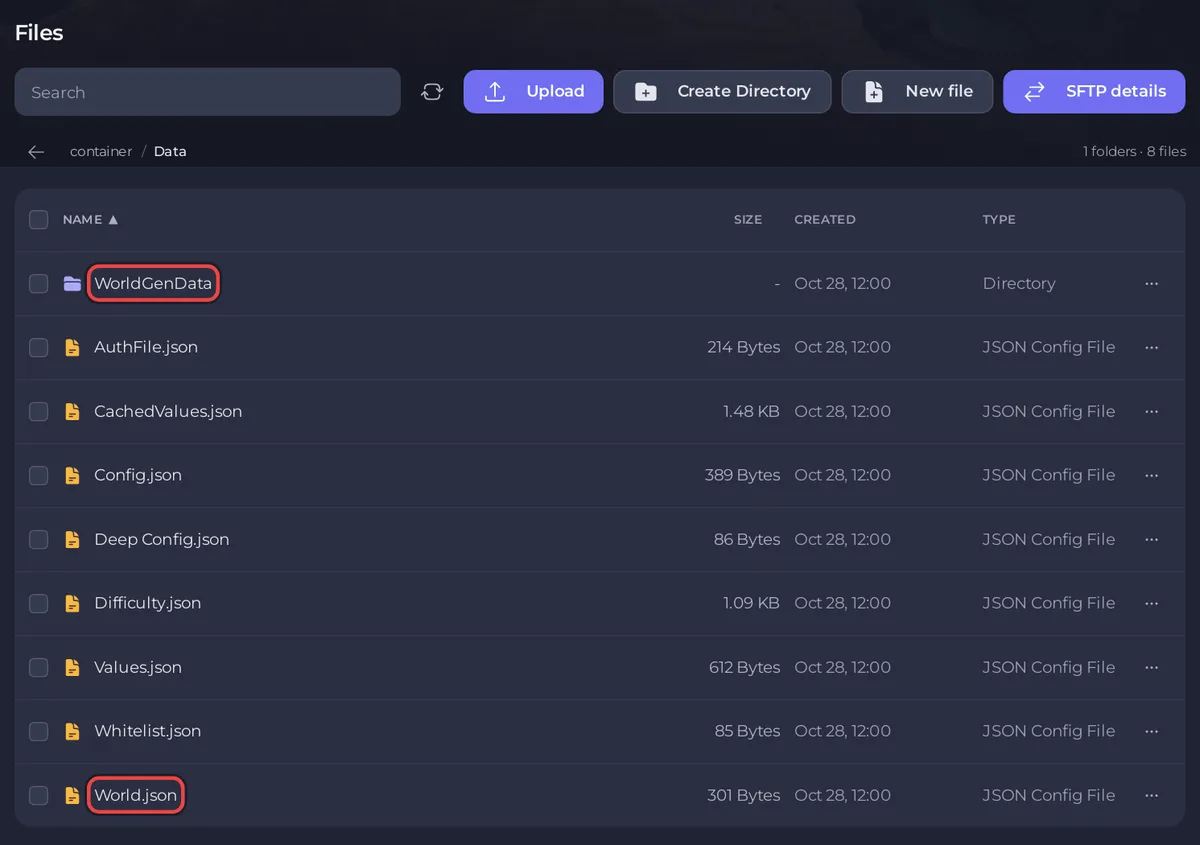
If World.json is there but BaseGame.zipx is missing, new players cannot load the world. On a new server with nothing to lose, type wipe twice in the Console, start the server again and repeat the steps.
After the world exists
- Turn your usual mods and expansions back on and restart RimWorld. If the server uses Enforce Mods, set up the mod lists first: How to add mods to your RimWorld Open World server.
- Every other player now clicks Multiplayer, connects, registers, picks a scenario and a storyteller and clicks Join to load the shared world: How to join your RimWorld Open World server.
- Take a backup now, so you can always return to a clean world: How to back up and restore your RimWorld Open World server.
How do I make a new world?
A new world means a full wipe: every account, colony, settlement and faction goes with it. Type wipe twice in the Console, start the server again and generate the world as above. See How to wipe or reset a colony on your RimWorld Open World server.


