

To join a RimWorld Open World server on PlayNHost, start RimWorld 1.4 with the Open World, Harmony and HugsLib mods active, click Multiplayer on the main menu, open Direct Connect and type your server's IP and port. Then click Register the first time, or Login after that. The IP and port come from the Server Address on your server's Overview page.
What does each player need?
- RimWorld on PC (Steam), switched to version 1.4. Open World was made for RimWorld 1.4 and was never updated for 1.5 or 1.6. See Which RimWorld version does a RimWorld Open World server need?
- Three Steam Workshop mods, subscribed and active: Open World, and the two items its Workshop page lists as required, Harmony and HugsLib.
- The mod version the server expects. The last Open World mod is version 1.3, and the server's Player Version setting must say
1.3. Each player can check theirs in RimWorld under Options, Mod settings, Open World: it showsRunning version: 1.3. - The server's IP and port.
Find the IP and port
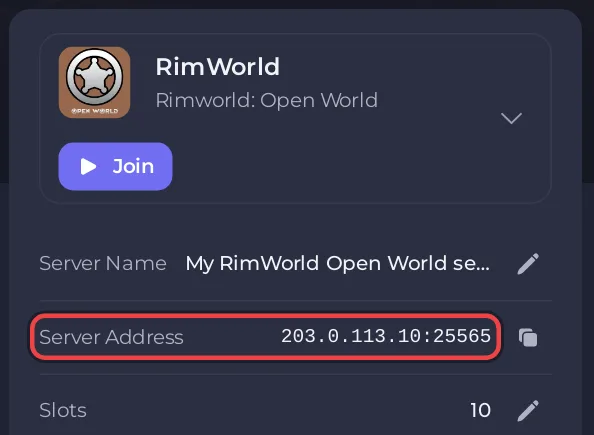
- Open your server in the panel. The Overview page shows the Server details card.
- Click the copy icon on the Server Address row, or click Join. The address is now copied.
- The address looks like
IP:port. The part before the colon is the Server IP, the number after it is the Server Port.
Connect from RimWorld
The window and button names below are the ones in the Open World mod, version 1.3.
- Start RimWorld with Open World, Harmony and HugsLib active, and the server Online.
- On the main menu, click Multiplayer. The Multiplayer Menu opens.
- Click Direct Connect.
- Type the IP in Server IP and the port in Server Port, then click Connect.
- The window asks you to choose your login mode. The first time, click Register, choose a Username and Password, type the password again in Confirm Password and click Register. After that, click Login with the same details.
Open World warns at registration that accounts are linked to the game saves and that passwords cannot be recovered. Keep your password safe. If a player forgets it, the server owner can set a new one with the changepass command: How to use the Console and commands on your RimWorld Open World server.
What happens after you log in?
- On a new server with no world yet, the first player is asked to generate the world for everyone. Do this with only Open World, Harmony and HugsLib active and the Royalty, Ideology and Biotech expansions switched off: How to generate the world on your RimWorld Open World server.
- On a server that has a world, a new player picks a scenario and a storyteller, then clicks Join to load the shared world and pick a place to settle.
- A player with a colony on the server logs in and continues where they saved.
If you cannot join
- "You have a different version of the mod from the server!": the server's Player Version is not
1.3, or the player runs an old mod. Set it under Settings, Game Settings and restart. - "Mods are not permitted in the server" or "Mods are missing from the game": Enforce Mods is on and the player's mods do not match. See How to add mods to your RimWorld Open World server.
- "You are not whitelisted in the server": Use Whitelist is on and the username is not on the list.
- Nothing happens or the connection times out: the server is not Online, or the IP or port is wrong.
Every message and its fix: RimWorld Open World server problems and fixes.


