

To make a RimWorld Open World server private on PlayNHost, list the allowed usernames in Data/Whitelist.json, turn on Use Whitelist under Settings, Game Settings, and restart. Anyone else who logs in sees "You are not whitelisted in the server". Replace the three test names the file starts with, so nobody can register one of them and get in.
Turn on the whitelist
- Ask each player for the exact username they use, or will register, on your server. The match is exact, capital letters included.
- In the panel, click the Files tab, open
Dataand clickWhitelist.json. - Replace the names between the brackets with your players' usernames, each in double quotes, separated by commas. Keep your own name in the list.
- Click Save content.
- Click the Settings tab and, in Game Settings, turn on Use Whitelist.
- Click Restart now. The server reads the list when it starts.
A new Whitelist.json looks like this:
{
  "WhitelistedUsernames": [
    "Test 1",
    "Test 2",
    "Test 3"
  ]
}
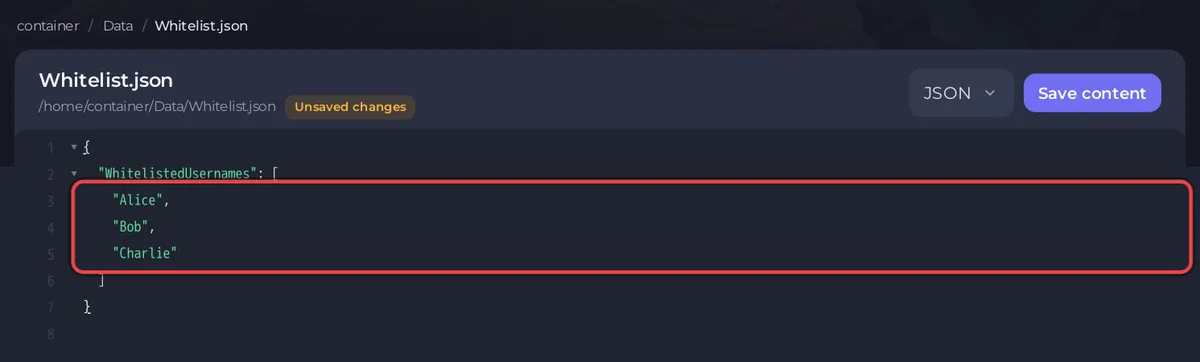
With your players it looks like this:
{
  "WhitelistedUsernames": [
    "Alice",
    "Bob",
    "Charlie"
  ]
}
Keep the quotes, the commas between names and the brackets. A missing quote or comma breaks the file and can stop the server from starting.
Add or remove a player later
- Edit
Data/Whitelist.jsonin Files as above and click Save content. - Restart the server from the Console or Overview with Restart.
Removing a name stops that account from logging in again. It does not delete the player's colony or account; a player who is online stays connected until they leave. To remove someone straight away, also type kick and their username in the Console, or ban them: How to become admin and ban players on your RimWorld Open World server.
When is the whitelist checked?
At every login, after the username and password are accepted. A player who is not on the list sees "You are not whitelisted in the server". Registration itself is not blocked, so an outsider can still create an account, but cannot log in with it while the whitelist is on.
Questions people ask
Does Open World have a join password instead? The panel has no join password setting for Open World. The whitelist is the way to keep a server to your group.
Do I need the whitelist if I set Enforce Mods? They do different things. Enforce Mods checks which mods a player runs; the whitelist checks who they are. See How to add mods to your RimWorld Open World server.
Every Game Settings switch: RimWorld Open World server settings reference.


